
Introduction
The Robertshaw RS332PE Premier Programmable Thermostat is an advanced control unit for heating, ventilation, and air conditioning (HVAC) systems. It features a slimline design, a backlit display, and programmable scheduling capabilities to optimize comfort and energy usage. This thermostat is suitable for both conventional HVAC equipment and heat pump systems, including those with dual fuel configurations. It serves as a direct replacement for previous Robertshaw 300 series programmable products.
Setup and Installation
Proper installation is crucial for the thermostat's functionality and safety. It is recommended that installation be performed by a qualified HVAC technician.
Mounting the Thermostat
The thermostat consists of two main parts: the backplate, which mounts to the wall and connects to the wiring, and the thermostat body, which attaches to the backplate.
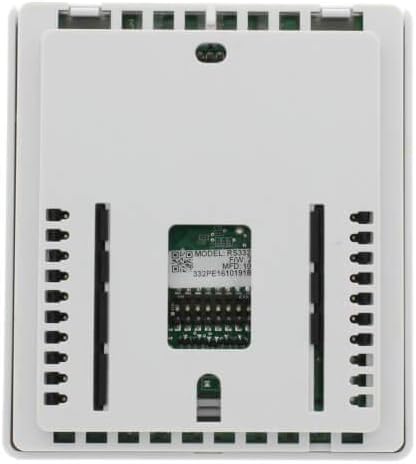
Figure 1: Rear view of the RS332PE thermostat, illustrating the wiring terminal block and mounting points. Ensure all wiring connections are secure and correctly matched to your HVAC system's requirements.
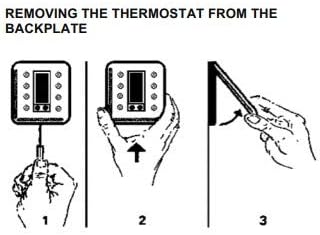
Figure 2: Diagram detailing the process of removing the thermostat from its backplate. This typically involves inserting a tool into a slot to release a latch, then pulling the thermostat body away from the wall-mounted backplate.
Initial Power-Up and Configuration
After installation and power connection, the thermostat will power on. Follow the on-screen prompts to set the initial date, time, and system type (e.g., conventional, heat pump). Refer to the detailed wiring diagrams provided with your product packaging for specific connections.
Operating Instructions
The RS332PE thermostat features an intuitive interface with a clear digital display and dedicated buttons for various functions.
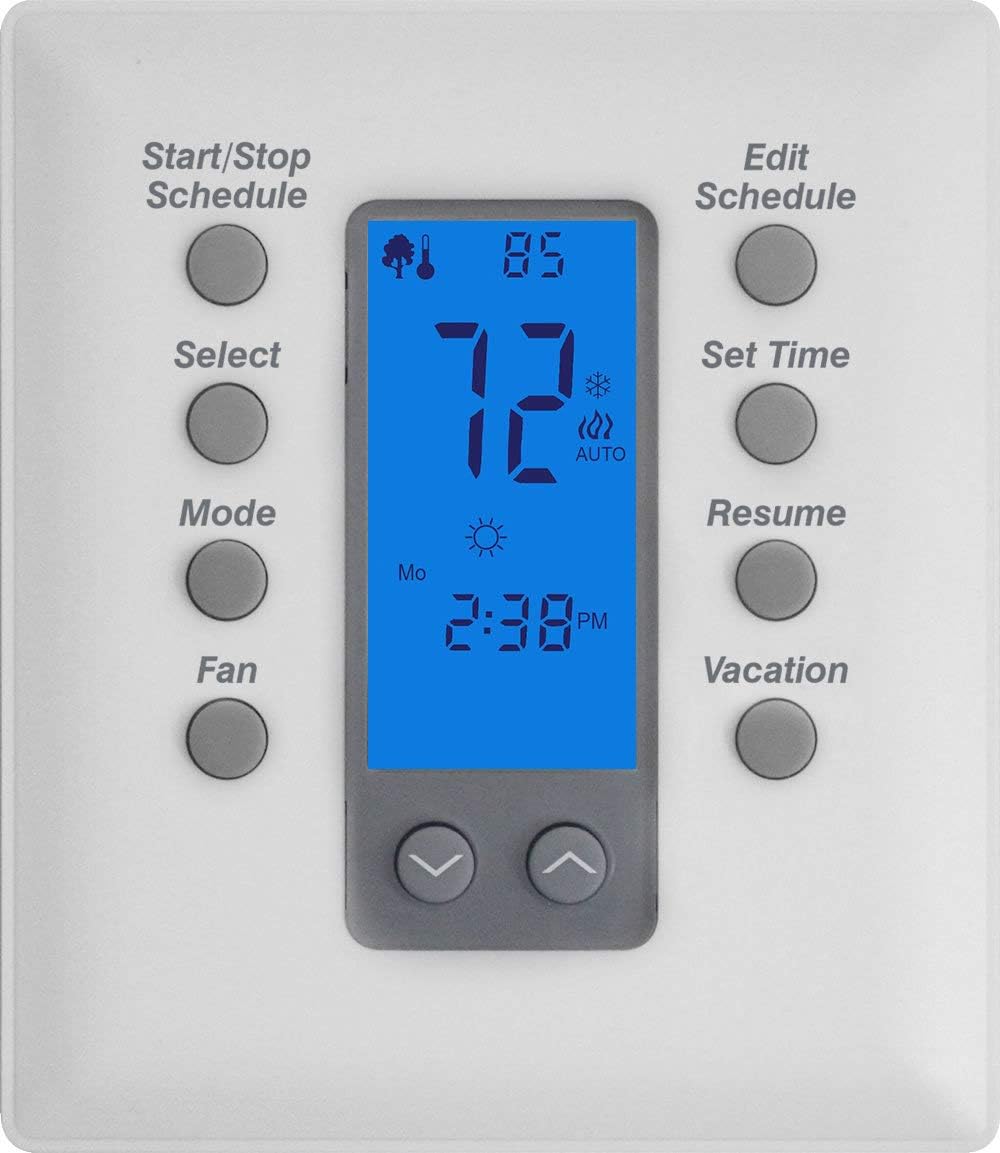
Figure 3: Front view of the RS332PE thermostat, highlighting the backlit digital display and the arrangement of control buttons for easy access to functions.
Button Functions Overview
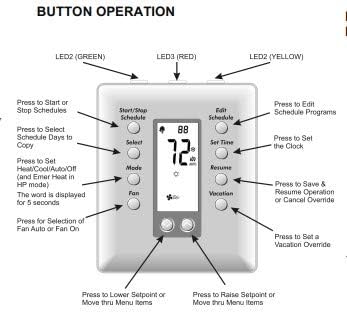
Figure 4: Detailed diagram showing the purpose of each button on the thermostat's front panel. This includes buttons for scheduling, mode selection, fan control, and time adjustments.
- Start/Stop Schedule: Press to activate or deactivate programmed schedules.
- Select: Used to select schedule days to copy or confirm selections in menu modes.
- Mode: Toggles between system modes such as Heat, Cool, Auto, Off, and Emergency Heat (for heat pump systems).
- Fan: Selects fan operation mode (Auto or On).
- Edit Schedule: Enters the programming mode to create or modify daily schedules.
- Set Time: Allows adjustment of the current time and date.
- Resume: Saves changes or cancels an override during programming or temporary adjustments.
- Vacation: Activates or deactivates the vacation hold setting.
- Up/Down Arrows: Adjusts temperature setpoints, navigates menu items, and changes values during programming.
Programming Schedules
The RS332PE allows for 7-day programmable scheduling, enabling different temperature settings for various times of the day and days of the week. Press the 'Edit Schedule' button and follow the on-screen prompts to set your desired comfort levels and times.
Setting the Time and Date
To set the current time and date, press the 'Set Time' button. Use the Up/Down arrows to adjust the values and 'Select' or 'Resume' to confirm and move to the next setting.
Using Vacation Mode
The Vacation mode allows you to set a constant, energy-saving temperature for an extended period, overriding the regular schedule. Press the 'Vacation' button to activate this feature and set the desired temperature.
Maintenance
The Robertshaw RS332PE thermostat requires minimal maintenance to ensure continued optimal performance.
Cleaning the Thermostat
Wipe the exterior of the thermostat with a soft, damp cloth. Do not use abrasive cleaners or solvents, as these can damage the plastic casing and display. Ensure no liquid enters the internal components.
Battery Replacement
If your thermostat uses batteries (check your specific model's power requirements), replace them annually or when a low battery indicator appears on the display. Use high-quality alkaline batteries of the specified type.
Troubleshooting
This section addresses common issues you might encounter with your RS332PE thermostat.
| Problem | Possible Cause | Solution |
|---|---|---|
| Display is blank | No power, tripped circuit breaker, loose wiring, dead batteries (if applicable). | Check circuit breaker. Verify wiring connections at the thermostat and HVAC unit. Replace batteries if necessary. |
| HVAC system not responding | Incorrect mode selected, fan set to 'Off', wiring issue, system lockout. | Ensure thermostat is in Heat or Cool mode. Check fan setting. Verify wiring. Consult HVAC technician if system remains unresponsive. |
| Temperature readings inaccurate | Thermostat exposed to direct sunlight or drafts, internal sensor issue. | Relocate thermostat if possible. Ensure no heat sources or drafts directly affect the thermostat. |
| Schedule not running | Schedule is paused or overridden, incorrect time/date setting. | Press 'Start Schedule' or 'Resume'. Verify current time and date settings. |
Specifications
- Model: RS332PE
- Brand: Robertshaw
- Special Feature: Programmable
- Display Type: Digital
- Backlight: Yes
- Control Method: Remote (Wi-Fi connectivity mentioned in specifications, implying remote control capability)
- Connectivity Protocol: Wi-Fi
- Shape: Rectangular
- Item Weight: Approximately 0.75 Pounds (12 ounces)
- UPC: 732003267035
Warranty and Support
Robertshaw products are manufactured to high-quality standards and are backed by a manufacturer's warranty. For specific warranty terms, technical support, or service inquiries, please refer to the warranty card included with your product or visit the official Robertshaw website. Keep your purchase receipt as proof of purchase for warranty claims.
For additional assistance, you may contact Robertshaw customer service or consult their online resources for FAQs and further documentation.