
1. Introduction
This manual provides detailed instructions for the installation, operation, and maintenance of your Antec NeoECO Gold Zen NE600G Zen 600W Power Supply. This power supply unit (PSU) is designed to deliver stable and efficient power to your personal computer system, featuring 80 PLUS Gold certification for high energy efficiency and a 120mm silent fan for quiet operation.

Figure 1.1: Top-down view of the Antec NeoECO Gold Zen NE600G Zen 600W Power Supply, showing the fan grill and Antec logo.
2. Safety Information
Please read and follow all safety instructions carefully before installing or operating the power supply unit. Failure to do so may result in personal injury or damage to the product or other components.
- High Voltage: The power supply contains high voltage components. Do not open the power supply casing. There are no user-serviceable parts inside.
- Professional Installation: Installation should be performed by qualified personnel.
- Power Disconnection: Always disconnect the AC power cord from the wall outlet before installing, removing, or cleaning the power supply.
- Proper Grounding: Ensure the power supply is properly grounded to prevent electrical shock.
- Ventilation: Do not block any ventilation openings of the power supply. Ensure adequate airflow around the unit.
- Moisture: Do not operate the power supply in high humidity environments or near water.
- Temperature: Avoid operating the power supply in excessively high temperatures.
3. Package Contents
Verify that all items are present in your package:
- Antec NeoECO Gold Zen NE600G Zen 600W Power Supply Unit
- AC Power Cord
- Mounting Screws
- User Manual
4. Product Features
The Antec NeoECO Gold Zen NE600G Zen 600W Power Supply offers the following key features:
- 600W Continuous Power: Provides stable and reliable power output.
- 80 PLUS Gold Certified: Achieves up to 92% efficiency, reducing electricity consumption and heat generation.
- 120mm Silent Fan: High-quality fan designed for quiet operation and long lifespan.
- CircuitShield Industrial Grade Protection: Includes multiple protection circuits for system safety.
- Non-Modular Design: All cables are permanently attached to the power supply.
- 99% +12V Output: Strong +12V rail for maximum CPU and GPU support.

Figure 4.1: Side view of the Antec NeoECO Gold Zen NE600G Zen 600W Power Supply, displaying the product branding and model name.

Figure 4.2: Close-up view of the 120mm fan, highlighting its design for efficient and quiet cooling.
5. Specifications
| Feature | Specification |
|---|---|
| Model Name | NE600G Zen |
| Brand | Antec |
| Output Wattage | 600 Watts |
| Form Factor | ATX12V |
| Efficiency Certification | 80 PLUS Gold |
| Power Supply Design | Non-Modular |
| Cooling Method | Air (120mm Fan) |
| Item Dimensions (L x W x H) | 9.49 x 8.78 x 4.53 inches |
| Maximum Input Voltage | 240 Volts (AC) |
| Main Connector | 1 x 24-pin (20+4) ATX |
| CPU Connector | 1 x 8-pin (4+4) CPU/EPS |
| PCI-E Connectors | 2 x 8-pin (6+2) PCI-E |
| SATA Connectors | 6 |
| Molex Connectors | 2 |
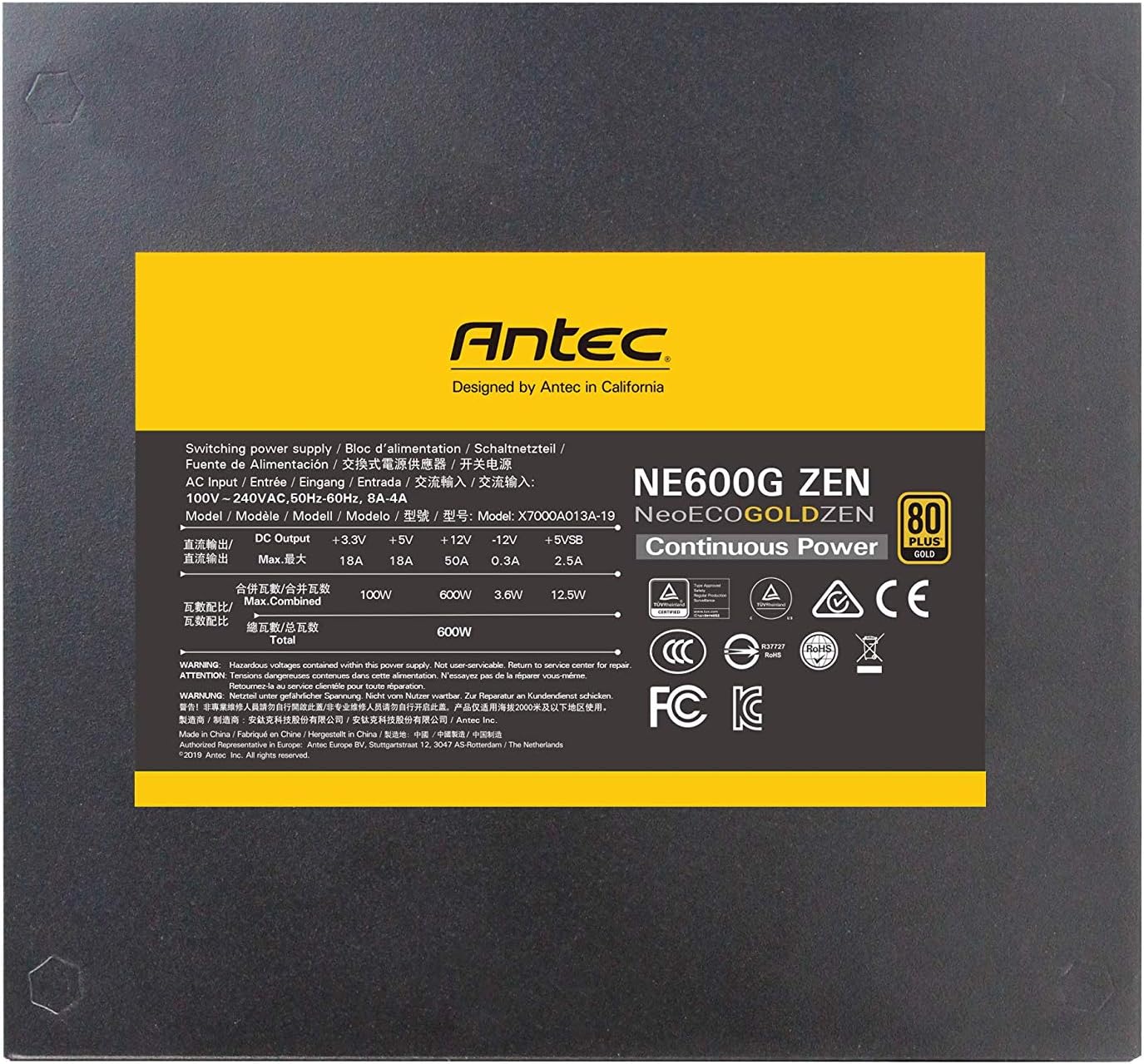
Figure 5.1: Electrical specifications label on the Antec NeoECO Gold Zen NE600G Zen 600W Power Supply, detailing voltage and current outputs.
6. Installation Guide
Follow these steps to install your Antec NeoECO Gold Zen NE600G Zen 600W Power Supply into your computer system:
- Preparation: Ensure your computer is completely powered off and unplugged from the wall outlet. Open your computer case.
- Remove Old PSU (if applicable): Disconnect all cables from your old power supply and remove it from the case.
- Mount the New PSU: Carefully place the Antec NE600G Zen into the power supply bay of your computer case. Align the screw holes and secure the PSU with the provided mounting screws.
- Connect Main Power: Connect the 24-pin ATX connector to the corresponding port on your motherboard. Ensure it clicks into place.
- Connect CPU Power: Connect the 8-pin (4+4) CPU/EPS connector to the CPU power port on your motherboard.
- Connect Graphics Card Power: Connect the 8-pin (6+2) PCI-E connectors to your graphics card(s) if required. Use both 6-pin and 2-pin sections as needed.
- Connect Peripherals: Connect the SATA power connectors to your storage drives (HDDs, SSDs) and optical drives. Use Molex connectors for other compatible peripherals if necessary.
- Cable Management: Route the cables neatly to improve airflow and aesthetics within your case.
- Close Case and Connect AC: Close your computer case, then connect the AC power cord to the power supply and plug it into a wall outlet.

Figure 6.1: The Antec NeoECO Gold Zen NE600G Zen 600W Power Supply with its non-modular cables, ready for installation.

Figure 6.2: Rear view of the power supply, indicating the AC power inlet and the main power switch.
7. Operation
After successful installation, operating your Antec NeoECO Gold Zen NE600G Zen 600W Power Supply is straightforward:
- Power On: Ensure the power switch on the back of the PSU (Figure 6.2) is in the 'I' (On) position. Then, press the power button on your computer case.
- Quiet Operation: The 120mm fan is designed for quiet operation. Under normal loads, the fan noise should be minimal.
- Power Off: To turn off your computer, use the operating system's shutdown function. For complete power disconnection, switch the PSU's power switch to 'O' (Off) and unplug the AC power cord.
8. Maintenance
Proper maintenance ensures the longevity and optimal performance of your power supply:
- Dust Cleaning: Periodically clean dust from the power supply's fan grill and interior of your computer case. Use compressed air to gently blow out dust, ensuring the fan does not spin rapidly during cleaning. Always disconnect power before cleaning.
- Airflow: Ensure that the computer case has adequate airflow and that the power supply's ventilation is not obstructed.
- Cable Management: Maintain tidy cable management to prevent obstruction of airflow within the case.
9. Troubleshooting
If you encounter issues with your Antec NeoECO Gold Zen NE600G Zen 600W Power Supply, refer to the following common troubleshooting steps:
- No Power:
- Check if the AC power cord is securely plugged into both the wall outlet and the power supply.
- Ensure the power switch on the back of the PSU is in the 'I' (On) position.
- Verify that the 24-pin ATX and 8-pin CPU power connectors are firmly seated on the motherboard.
- Test the wall outlet with another device to confirm it has power.
- System Instability/Random Shutdowns:
- Ensure all power connectors (motherboard, CPU, GPU, drives) are securely connected.
- Check for proper ventilation and ensure the PSU fan is spinning. Overheating can cause instability.
- If you have recently added new components, ensure your total system wattage does not exceed the PSU's capacity.
- Unusual Noises:
- If you hear grinding or rattling, it might indicate a fan issue. Disconnect power and inspect the fan for obstructions. Do not attempt to repair the fan yourself.
If these steps do not resolve your issue, please contact Antec customer support for further assistance.
10. Warranty and Support
Your Antec NeoECO Gold Zen NE600G Zen 600W Power Supply is backed by a 5-year Antec Quality Warranty from the date of purchase. This warranty covers defects in materials and workmanship under normal use.
For warranty claims or technical support, please visit the official Antec website or contact their customer service department. You may be required to provide proof of purchase.
- Online Support: Refer to the official Antec website for FAQs, troubleshooting guides, and support contact information.
- Contact Information: Specific contact details for Antec support can typically be found on their website or in your product packaging.


