
1. Introduction
Thank you for choosing the Hygger 9W Aquarium LED Light. This product is designed to provide optimal illumination for your freshwater or marine aquarium, supporting plant growth and enhancing the visual appeal of your aquatic environment. Featuring adjustable brightness, multiple color modes, and a convenient timer function, this light offers versatility and ease of use. Please read this manual thoroughly before installation and operation to ensure safe and efficient use.
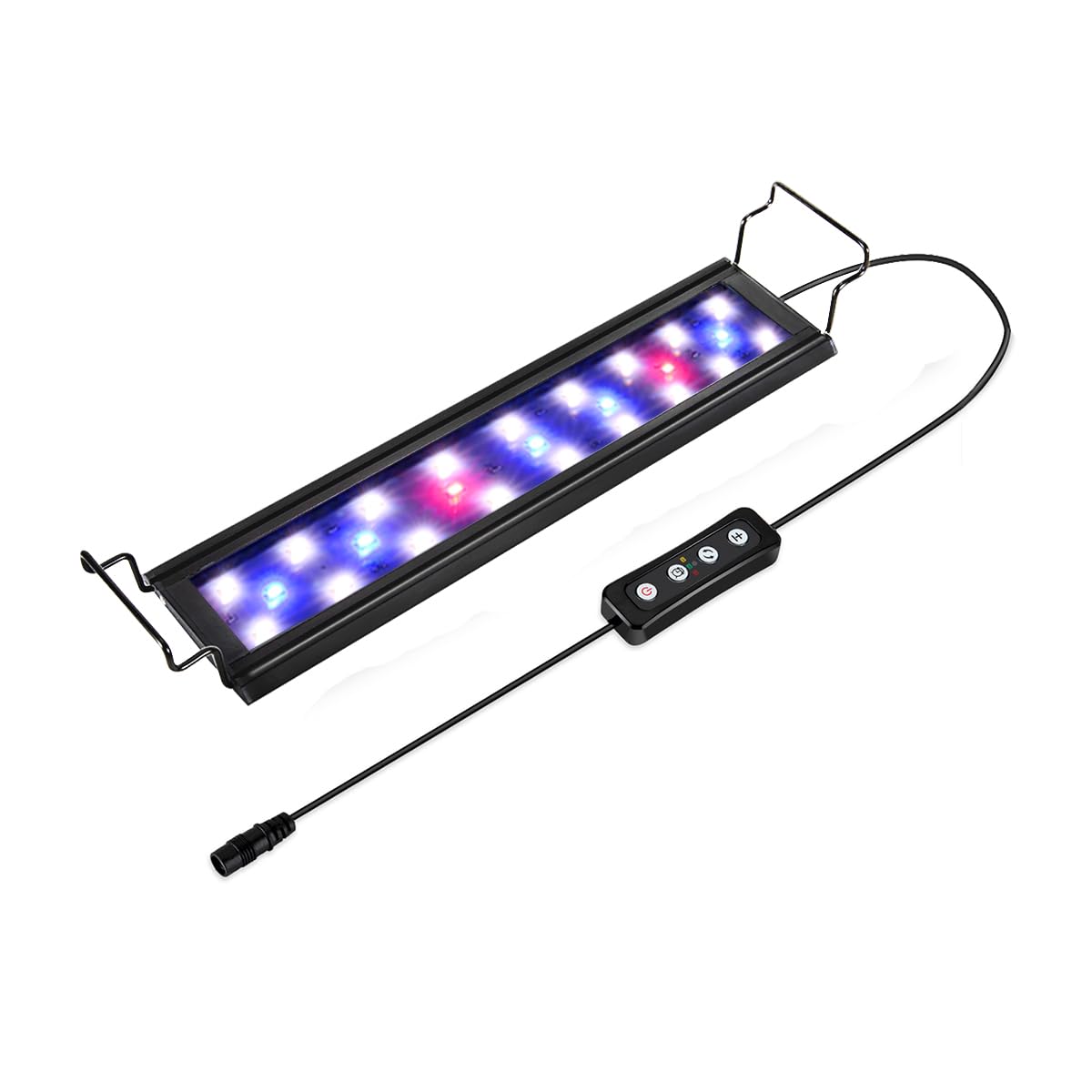
Figure 1: The Hygger 9W Aquarium LED Light, designed for optimal illumination of freshwater and saltwater aquariums.
2. Safety Instructions
To prevent electric shock or injury, please observe the following safety precautions:
- Read all instructions carefully before use.
- Do not immerse the light fixture in water. It is designed to be placed above the water surface.
- Ensure your hands are dry before handling the power adapter or controller.
- Always unplug the light from the power outlet before performing any maintenance, cleaning, or when not in use.
- Do not operate the light if any part is damaged, especially the power cord or adapter.
- Keep out of reach of children.
- Use only with the provided power adapter.
3. Package Contents
Verify that all items are present in the package:
- Hygger 9W Aquarium LED Light
- Power Adapter with inline controller
- Adjustable Metal Brackets (2 pcs)
- Plastic Brackets (2 pcs)
- Instruction Manual (this document)
4. Product Overview & Features
The Hygger 9W Aquarium LED Light is equipped with advanced features for a customizable and healthy aquatic environment:
- Ultra-Bright LEDs: DC12V / 9 watt, suitable for 28-48cm wide aquariums and low to medium light plants in both freshwater and marine setups.
- Adjustable Brackets: Comes with removable metal and plastic brackets, allowing compatibility with most aquariums, with or without covers and spacers.
- Three Color Modes: Easily switch between White LEDs, Blue + White + Red LEDs, and Red + Blue LEDs to create different lighting effects.
- Five Brightness Levels: Adjust light intensity from 100% down to 10% to meet the specific needs of your aquatic plants and inhabitants.
- Integrated Timer: Set the lighting duration for 3, 6, or 12 hours.
- Durable Construction: Features a flat aluminum profile for efficient heat dissipation and high-quality, energy-efficient LEDs with a lifespan of up to 20,000 hours.

Figure 2: An overview of the inline controller for the Hygger Aquarium Light, detailing buttons for brightness adjustment, color mode selection, and timer settings (3H, 6H, 12H).

Figure 3: Visual representation of the five adjustable brightness levels and three distinct color modes (White, Blue+White+Red, Blue+Red) available with the Hygger Aquarium Light.

Figure 4: Spectrum graph illustrating the light output of the Hygger Aquarium Light, optimized for plant growth and color rendering.
5. Specifications
| Feature | Specification |
|---|---|
| Brand | hygger |
| Model | HG918-9W |
| Power | 9 Watts |
| Voltage | 12 Volts |
| Product Dimensions | 30 x 8 x 0.8 cm |
| Weight | 490 g |
| Material | Aluminum (shell), Plastic (shade) |
| Light Type | LED (White, Blue, Red) |
| Number of Lights | 24 |
| Special Features | Dimmable, Timer |
| Cable Length | 12 cm (controller cable) |
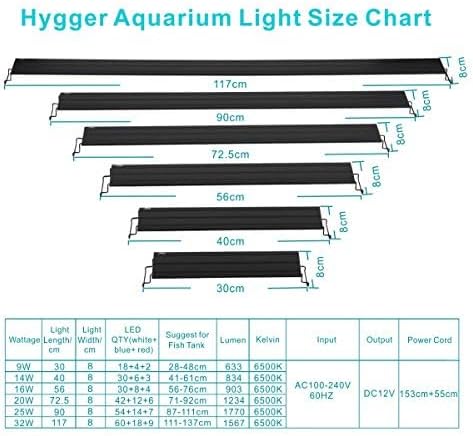
Figure 5: A detailed size chart providing specifications for various Hygger Aquarium Light models, including wattage, dimensions, LED configuration, and recommended aquarium sizes.

Figure 6: Official product data sheet for the Hygger Aquarium Light, listing technical parameters and compliance information.

Figure 7: The energy efficiency label for the Hygger HG918-9W Aquarium Light, indicating its energy class and consumption. For more details, visit https://eprel.ec.europa.eu/qr/1752440.
6. Setup Instructions
6.1 Attaching the Brackets
The Hygger Aquarium LED Light comes with both metal and plastic adjustable brackets. Choose the type that best suits your aquarium setup.
- Identify the bracket type you wish to use (metal or plastic).
- Slide the brackets into the slots on each end of the light fixture. Ensure they are securely fitted.
- Adjust the length of the brackets to match the width of your aquarium. The brackets are extendable to fit various tank sizes.

Figure 8: Hygger Aquarium Light with aluminum alloy shell and extendable metal brackets, ready for installation.
6.2 Mounting on the Aquarium
Once the brackets are attached and adjusted:
- Carefully place the light fixture on the edges of your aquarium, ensuring the brackets rest firmly on the tank walls.
- Make sure the light is centered and stable to prevent accidental falls.
6.3 Power Connection
Connect the light to the power source:
- Connect the light's cable to the inline controller.
- Connect the inline controller to the power adapter.
- Plug the power adapter into a suitable electrical outlet.
7. Operating Instructions
7.1 Inline Controller Overview
The light is controlled via an inline controller with four buttons:
- Brightness Adjustment Button (+/-): Adjusts the light intensity.
- Color Mode Button (Cycle Icon): Cycles through different color modes.
- Timer Button (Clock Icon): Sets the lighting duration.
- Power Button (On/Off Icon): Turns the light on or off.
7.2 Power On/Off
Press the Power Button once to turn the light on or off.
7.3 Color Mode Selection
The light offers three distinct color modes:
- White LEDs: Provides bright, clear illumination.
- Blue + White + Red LEDs: A balanced spectrum for general viewing and plant growth.
- Red + Blue LEDs: Ideal for enhancing red plant coloration and creating a moonlight effect.
To cycle through these modes, press the Color Mode Button (second button from top) repeatedly until your desired mode is active.
7.4 Brightness Adjustment
The light has five adjustable brightness levels (100%, 77%, 55%, 32%, 10%).
- Press the + button to increase brightness.
- Press the - button to decrease brightness.
7.5 Timer Function
The light features a timer for 3, 6, or 12 hours:
- Press the Timer Button (third button from top) once for 3 hours.
- Press it twice for 6 hours.
- Press it three times for 12 hours.
The light will automatically turn off after the set duration. Note that the timer function does not include a gradual sunrise/sunset simulation; it is a simple on/off timer.
Video 1: This video provides a visual guide to the installation and operation of the Hygger 9W-32W Aquarium Light, showcasing its adjustable brightness, multiple color options, and integrated timer functionality.
8. Maintenance
Regular maintenance ensures the longevity and optimal performance of your aquarium light.
8.1 Cleaning
- Always unplug the light before cleaning.
- Wipe the light fixture with a soft, damp cloth. Do not use abrasive cleaners or solvents.
- Ensure the light is completely dry before plugging it back in.
8.2 Storage
If storing the light for an extended period, ensure it is clean and dry. Store it in a cool, dry place away from direct sunlight.
9. Troubleshooting
| Problem | Possible Cause | Solution |
|---|---|---|
| Light does not turn on. | No power, loose connection, damaged adapter. | Check power outlet, ensure all connections are secure, try a different outlet. If adapter is damaged, replace it. |
| Light flickers or dims unexpectedly. | Unstable power supply, loose connection, internal fault. | Check power connections. Ensure the power supply is stable. If the problem persists, contact customer support. |
| Timer function not working. | Incorrect setting, power interruption. | Re-set the timer according to the operating instructions. If power is interrupted, the timer may reset. |
| Cannot change color modes or brightness. | Controller malfunction. | Ensure the light is on. Try pressing the buttons firmly. If unresponsive, contact customer support. |
10. Warranty and Support
The Hygger 9W Aquarium LED Light comes with a one-year warranty from the date of purchase. This warranty covers manufacturing defects and malfunctions under normal use.
If you encounter any issues or have questions regarding your product, please do not hesitate to contact us through Amazon's messaging system. Our customer support team aims to respond within 16 hours to assist you.


