
Introduction
The Logitech MX Keys is an advanced wireless illuminated keyboard designed for optimal efficiency, stability, and precision. Its Perfect Stroke keys are uniquely shaped to match your fingertips, providing satisfying feedback with every press. The increased key stability contributes to reduced noise and optimized responsiveness, enhancing your typing experience. With tactile references for hand positioning, users can easily maintain orientation and workflow. The keyboard features smart backlighting that illuminates upon hand proximity and automatically adjusts to ambient lighting conditions. Furthermore, the MX Keys supports Flow cross-computer control, allowing seamless typing across multiple devices when paired with a Flow-enabled mouse. This versatile keyboard is compatible with a wide range of operating systems, including Windows, macOS, Linux, iOS, and Android, and can be paired with up to three devices simultaneously.
Setup
Setting up your Logitech MX Keys keyboard is straightforward. The keyboard can connect to your devices via the included Logitech Unifying Receiver or Bluetooth. Ensure the keyboard is charged before initial use. The USB-C charging port is located on the top edge of the keyboard.
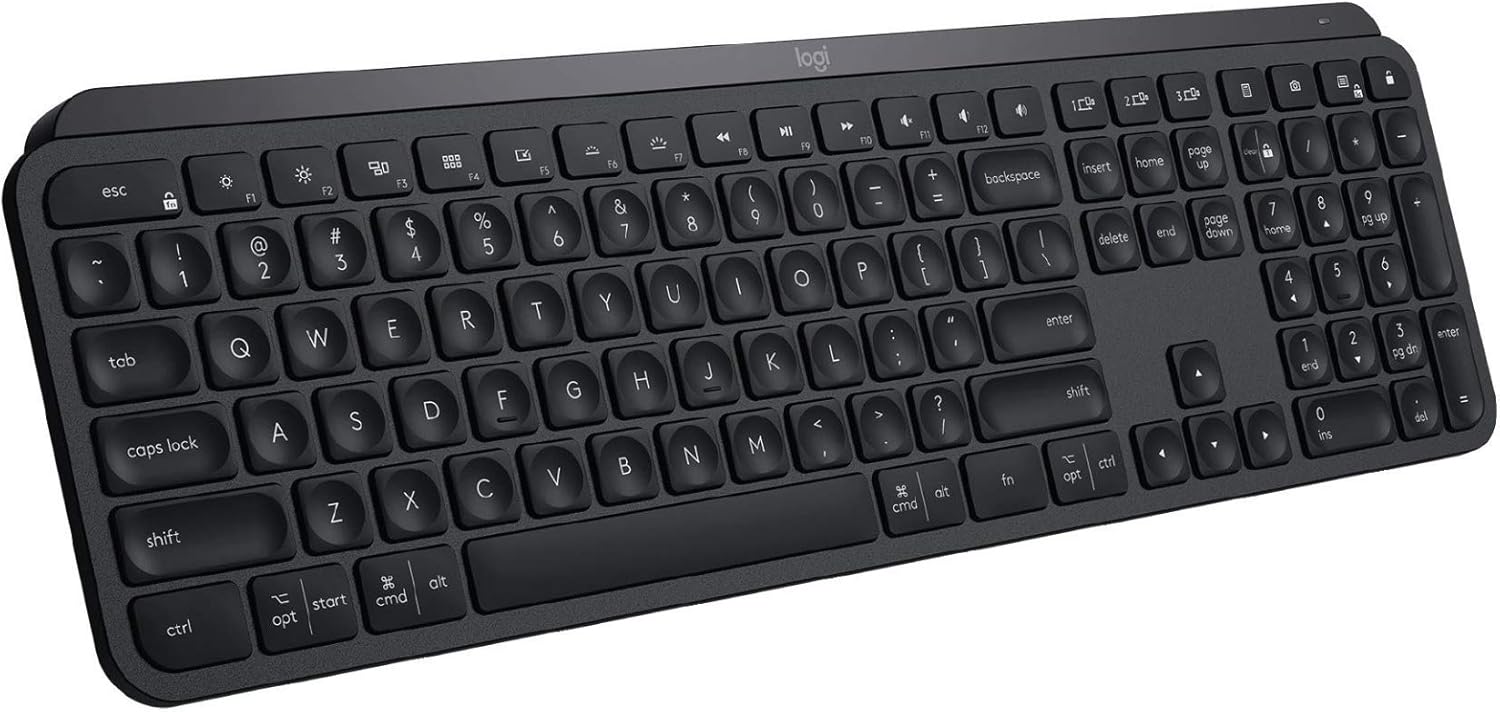
Figure 1: Top-down view of the Logitech MX Keys keyboard.
For initial pairing, turn on the keyboard using the power switch located next to the USB-C port. If using the Unifying Receiver, plug it into an available USB port on your computer. The keyboard should automatically connect. For Bluetooth pairing, activate Bluetooth on your device and select the MX Keys from the list of available devices. The keyboard supports pairing with up to three different devices, which can be easily switched between using dedicated keys (1, 2, 3) on the keyboard.

Figure 2: The Logitech MX Keys keyboard seamlessly connected to multiple devices.
Operating
The MX Keys keyboard is designed for a superior typing experience. Its Perfect Stroke keys feature a spherical dishing that matches the natural shape of your fingertips, providing a comfortable and precise feel. The keys offer a satisfying tactile response while maintaining a low noise profile, ideal for quiet work environments.

Figure 3: Detailed view of the Logitech MX Keys key layout.
A standout feature is the Smart Illumination. The backlit keys automatically light up as your hands approach the keyboard and adjust their brightness based on ambient lighting conditions, conserving battery life. The keyboard also supports Logitech Flow, allowing you to control multiple computers with a single MX Keys keyboard and a Flow-enabled mouse, seamlessly transitioning between screens. The keyboard is compatible with Windows, macOS, Linux, iOS, and Android systems, offering broad versatility.

Figure 4: The slim and sturdy profile of the MX Keys keyboard.
Maintenance
To maintain your Logitech MX Keys keyboard, regularly wipe it down with a soft, dry cloth to remove dust and debris. For deeper cleaning, a slightly damp cloth can be used, ensuring no moisture enters the key switches or ports. Avoid using harsh chemicals or abrasive materials.

Figure 5: USB-C charging port on the Logitech MX Keys keyboard.
The keyboard is equipped with a USB-C rechargeable battery. A full charge can last up to 10 days with backlighting enabled, or up to 5 months with backlighting off. Charge the keyboard using the provided USB-C cable. It can be used while charging.
Troubleshooting
If you encounter issues with your Logitech MX Keys keyboard, consider the following:
- Connectivity Issues: Ensure the keyboard is turned on and fully charged. If using the Unifying Receiver, try plugging it into a different USB port. For Bluetooth connections, ensure Bluetooth is enabled on your device and try re-pairing the keyboard.
- Backlight Behavior: The smart illumination feature adjusts automatically. If the backlight turns off too quickly, this is a battery-saving feature. There is no option to change the backlight timeout in the provided software. Keeping the keyboard plugged in will keep the lights on.
- Typing Feel: The keyboard has a fixed angle due to its integrated battery strip and lacks adjustable stands. This design choice contributes to its solid feel but means the typing angle cannot be customized.
- Key Layout: Some users may find the left Shift key to be smaller than standard, potentially leading to accidental presses of the adjacent backslash key. Familiarity with the layout will improve typing accuracy over time.
Specifications
| Brand | Logitech G |
| Series | MX Keys |
| Model Number | 920-009295 |
| Connectivity Technology | Bluetooth, USB |
| Operating System | Linux, Chrome OS, Mac OS, Windows 11, Android, iPadOS, Windows 10 |
| Item Weight | 1.8 pounds |
| Product Dimensions | 17.7 x 6.1 x 1.6 inches |
| Power Source | Battery Powered |
| Batteries | 1 Lithium Polymer batteries required (included) |
What's in the Box
- MX Keys Keyboard
- Unifying Receiver
- USB-C Charging Cable (USB-A to USB-C)
- User Documentation
- Deco Essentials Keyboard and Mouse Gel Memory Foam Wrist Pads, Universal Design, Added Comfort
- Gear Medium Sized Pro Gaming Pad Water Resistant Non-Slip (11 x 14)
Warranty and Support
This product may be eligible for extended protection plans. For detailed warranty information, technical support, and additional resources, please visit the official Logitech G website or refer to the user documentation included in the product packaging.


