
1. Introduction
Thank you for choosing the BORNMIO CS-LI1SL replacement battery. This manual provides essential information for the safe and effective use of your new battery, designed as a compatible replacement for RAYOVAC RV-DC8100 devices. Please read this manual thoroughly before installation and use to ensure optimal performance and safety.

Figure 1: BORNMIO CS-LI1SL Replacement Battery Pack
2. Safety Information
To prevent injury, property damage, or damage to the battery, always follow these safety precautions:
- DO NOT attempt to disassemble, open, or service the battery pack.
- DO NOT crush, puncture, short external contacts, or dispose of in fire or water.
- Replace only with the battery pack designated for your product.
- Keep contact points clean to ensure proper connection.
- DO NOT store above 60°C (140°F).
- Keep the battery out of reach of children.
- This battery features built-in protection against overcharge, over-discharge, over-voltage, and short circuits to enhance safety and battery life.
- Dispose of used batteries according to local regulations.
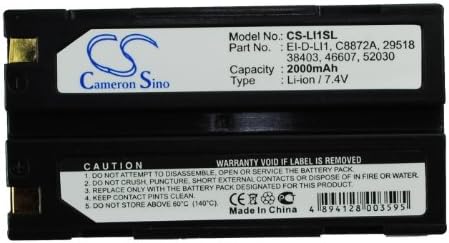
Figure 2: Battery label showing model number, specifications, and caution warnings.
3. Setup and Installation
Follow these steps to install your new BORNMIO replacement battery:
- Ensure your RAYOVAC RV-DC8100 device is completely powered off and unplugged from any power source.
- Locate the battery compartment on your device. Refer to your device's original instruction manual for specific instructions on how to open the compartment and remove the old battery.
- Carefully insert the BORNMIO CS-LI1SL battery into the compartment, ensuring that the contacts align correctly and the battery is securely seated.
- Close the battery compartment cover.
- It is recommended to fully charge the new battery before its first use.
4. Operating Instructions
4.1 Initial Charging
For optimal performance and battery longevity, fully charge the battery before its first use. Connect your RAYOVAC RV-DC8100 device to its original charger and allow it to charge until the charging indicator shows a full charge.
4.2 Regular Use and Charging
Use your device as normal. When the battery level is low, recharge it using the device's original charger. Avoid completely draining the battery frequently, as this can reduce its overall lifespan. The battery's advanced chip ensures compatibility and functions like the original.
5. Maintenance
5.1 Cleaning
Periodically inspect the battery contacts and the device's battery compartment contacts. If dirty, gently clean them with a dry, soft cloth to ensure good electrical connection.
5.2 Storage
If you plan to store the battery for an extended period (more than one month), charge it to approximately 50-70% capacity. Store the battery in a cool, dry place, away from direct sunlight and extreme temperatures. Do not store above 60°C (140°F).
6. Troubleshooting
| Problem | Possible Cause | Solution |
|---|---|---|
| Battery not charging | Incorrect installation, faulty charger, dirty contacts. | Ensure battery is correctly seated. Check charger functionality. Clean battery and device contacts. |
| Short operating time | Battery not fully charged, battery degradation over time. | Ensure battery is fully charged before use. If battery is old, consider replacement. |
| Device not powering on | Battery not installed correctly, battery discharged. | Verify battery installation. Charge the battery. |
If you encounter issues not listed here or if the suggested solutions do not resolve the problem, please contact BORNMIO customer support for further assistance.
7. Specifications
- Model Number: CS-LI1SL
- Battery Type: Li-ion
- Voltage: 7.4V
- Capacity: 2000mAh
- Watt-Hours (WH): 14.80Wh
- Dimensions: 70.66 x 38.62 x 20.47 mm (2.78 x 0.81 x 1.52 inches)
- Weight: 130g / 4.59 oz
- Certifications: ISO9001, RoHS, CE
- Manufacturer: CS
- Compatible with: RAYOVAC RV-DC8100
8. Warranty and Support
8.1 Warranty Information
This BORNMIO battery comes with a 12-month warranty and a 14-day money-back guarantee from the date of purchase. This warranty covers manufacturing defects and ensures the battery meets its stated specifications under normal use. Please retain your proof of purchase for warranty claims.
8.2 Customer Support
For any questions, technical assistance, or warranty claims, please contact BORNMIO customer support. Our team is available to provide professional suggestions and help resolve any issues you may encounter.
Please note: Warranty void if the label is removed from the battery.