
ThreeH H-AC11Brown_Blue
ThreeH Desk Wooden Alarm Clock Digital User Manual
Model: H-AC11Brown_Blue
Introduction
Thank you for purchasing the ThreeH Desk Wooden Alarm Clock Digital. This manual provides detailed instructions for setting up, operating, and maintaining your new alarm clock. Please read this manual thoroughly before use to ensure proper function and longevity of the product.
This digital alarm clock features a wooden design, digital time and temperature display, multiple alarm settings, and voice control functionality. It is suitable for use in homes, kitchens, and offices.
Product Overview
The ThreeH Desk Wooden Alarm Clock is designed with a minimalist aesthetic and practical features. It displays time and temperature clearly with adjustable brightness. The clock supports both USB power and battery backup.

Image: Front view of the ThreeH Wooden Digital Alarm Clock, displaying time (12:02) and temperature (23°C) in blue LED digits on a brown wooden surface.
Key Features:
- Digital Time and Temperature Display
- 3 Alarm Settings
- Voice Control Functionality
- Adjustable Brightness (3 levels)
- Power Off Memory (CR2032 battery backup)
- Dual Power Supply Options (USB or AAA batteries)
- Modern Wooden Design
Setup
Powering the Clock:
The clock can be powered by either a USB power cord or AAA batteries. For continuous display and optimal performance, USB power is recommended.
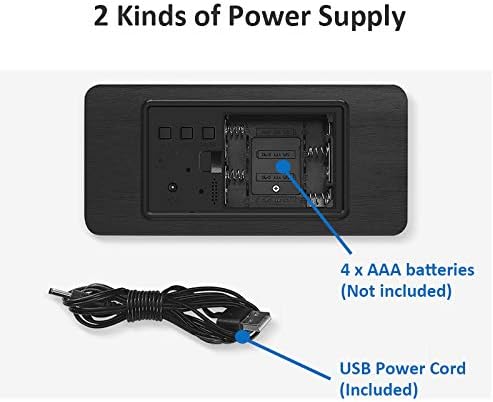
Image: Rear view of the alarm clock, illustrating the battery compartment for 4x AAA batteries (not included) and the USB power cord input (included).
- USB Power: Connect the provided USB power cord to the DC5V port on the back of the clock and plug the other end into a USB power adapter (not included) or a powered USB port.
- Battery Power (Backup): Open the battery compartment on the back of the clock. Insert 4 x AAA batteries (not included), ensuring correct polarity (+/-). Note: Batteries are primarily for backup and may not provide continuous display.
- Memory Battery: The clock also uses a CR2032 button cell battery (usually pre-installed) for "power off memory," which retains time settings even when the main power is disconnected.

Image: Detailed view of the clock's rear panel, highlighting the 'SET', 'UP', 'DOWN', and 'RESET' buttons, the USB port, and the CR2032 battery compartment for memory retention.
Operating Instructions
Setting Time and Date:
- Press the SET button to enter time setting mode. The hour digits will flash.
- Use the UP and DOWN buttons to adjust the hour.
- Press SET again to move to minute setting. Adjust minutes with UP and DOWN.
- Continue pressing SET to cycle through year, month, and day settings, adjusting each with UP and DOWN.
- Press SET one last time to exit setting mode.
Setting Alarms:
The clock supports up to 3 alarm settings (AL1, AL2, AL3).
- Press the SET button repeatedly until "AL1" appears on the display.
- Press SET to enter AL1 setting. The hour digits will flash.
- Use UP and DOWN to set the alarm hour.
- Press SET to move to minute setting. Adjust minutes with UP and DOWN.
- Press SET again to enable/disable the alarm (ON/--).
- Repeat for AL2 and AL3 if desired.
Voice Control Function:
In power-saving mode, the display will turn off. To activate the display, make a sound (e.g., clap hands, tap the clock) or touch the clock. The display will light up for approximately 15 seconds before turning off again.
To toggle voice control mode (ON/OFF), refer to the specific instructions in your clock's packaging, as this feature can sometimes be enabled or disabled via a long press of a specific button (e.g., DOWN button) or a combination of buttons.
Adjusting Brightness:
The clock features 3 levels of brightness. While in normal time display mode, press the UP button to cycle through the brightness levels.

Image: A ThreeH Wooden Digital Alarm Clock with a dark wood finish, showing the time and temperature in bright blue LED digits. This image demonstrates the clear display.
Maintenance
- Cleaning: Wipe the clock surface with a soft, dry cloth. Do not use abrasive cleaners or solvents, as they may damage the wooden finish or electronic components.
- Battery Replacement: If using AAA batteries for backup, replace them when the display becomes dim or inconsistent, or if the clock fails to retain time during power outages. Ensure correct polarity.
- CR2032 Battery: The CR2032 battery for memory retention typically lasts for several years. If the clock loses time settings after a power disconnection, the CR2032 battery may need replacement.
- Environment: Keep the clock away from direct sunlight, extreme temperatures, high humidity, and strong magnetic fields to prevent damage.
Troubleshooting
| Problem | Possible Cause | Solution |
|---|---|---|
| Display is off or dim. |
|
|
| Clock loses time settings after power disconnection. | CR2032 memory battery is dead or missing. | Replace the CR2032 button cell battery on the back of the clock. |
| Alarm does not sound. |
|
|
| Voice control not working. | Voice control feature is disabled. | Refer to your clock's specific instructions to enable voice control mode. |
Specifications
| Feature | Detail |
|---|---|
| Brand | ThreeH |
| Model Number | H-AC11Brown_Blue |
| Product Dimensions | 4 x 3.81 x 7 cm |
| Item Weight | 245 g |
| Material | Wood |
| Display Type | Digital |
| Special Features | Alarm, Voice Control, Temperature Display, Adjustable Brightness |
| Power Source | Corded Electric (USB), 4x AAA Batteries (backup), 1x CR2032 (memory) |
Warranty and Support
For warranty information and customer support, please refer to the documentation included with your purchase or contact ThreeH customer service directly through their official website or the retailer where the product was purchased.
Please retain your proof of purchase for any warranty claims.
Related documentsH-AC11Brown_Blue

Ask a question about this manual
Ask about setup, troubleshooting, compatibility, parts, safety, or missing instructions. Manuals+ will review the question and use this page’s manual context to help answer it.