
1. Introduction
This manual provides essential information for the safe and effective use of your BORNMIO CS-THS710SL replacement battery. This battery is designed to provide reliable power for compatible TEKTRONIX THS710 series oscilloscopes. Please read this manual thoroughly before installation and operation to ensure optimal performance and safety.
2. Compatibility
The BORNMIO CS-THS710SL battery is a direct replacement for the following TEKTRONIX models and battery part numbers:
- Compatible TEKTRONIX Models: THS710, THS710A, THS720, THS720A, THS720P, THS730A
- Compatible Battery Part Number: THS7BAT
3. Product Specifications
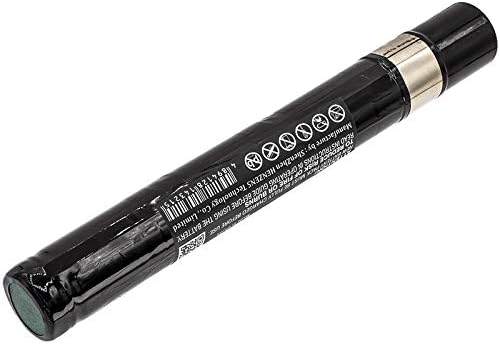
Image 1: BORNMIO CS-THS710SL Ni-MH Replacement Battery. This image shows the full cylindrical battery with its black casing and silver contacts, displaying the product label with specifications and safety warnings.
| Feature | Detail |
|---|---|
| Battery Type | Nickel-Metal Hydride (Ni-MH) |
| Capacity | 4000mAh |
| Watt-Hours (Wh) | 19.20Wh |
| Voltage | 4.8V |
| Dimensions (L x W x H) | 198.70 x 27.35 x 27.00mm (approx. 7.82 x 1.08 x 1.06 inches) |
| Weight | 350g / 12.35oz |
| Certifications | RoHS, CE, ISO9001 |

Image 2: Close-up view of the BORNMIO CS-THS710SL battery label. This image highlights the model number, part number, voltage, capacity, and battery type (Nickel Metal Hydride) printed on the battery's casing.
4. Setup and Installation
- Power Off Device: Ensure your TEKTRONIX oscilloscope is completely powered off and disconnected from any power source before proceeding.
- Locate Battery Compartment: Refer to your oscilloscope's original user manual to locate and open the battery compartment. This typically involves removing a cover secured by screws or latches.
- Remove Old Battery: Carefully disconnect the old battery from its connector. If the battery is secured, gently remove it from the compartment.
- Insert New Battery: Connect the BORNMIO CS-THS710SL replacement battery to the device's battery connector, ensuring proper alignment. Place the new battery into the compartment. Do not force the battery into place.
- Secure Compartment: Close and secure the battery compartment cover.
- Initial Charge: It is recommended to fully charge the new battery before its first use. Connect your oscilloscope to its power adapter and allow it to charge until the charging indicator shows a full charge.
5. Operating Instructions
5.1 Charging the Battery
- Always use the original or a certified compatible charger for your TEKTRONIX oscilloscope.
- Connect the oscilloscope to the charger and a power outlet. The charging indicator on your device will typically illuminate.
- Allow the battery to charge completely. Overcharging Ni-MH batteries is generally not harmful with modern chargers, but prolonged excessive charging can reduce battery life over time.
- Avoid frequent partial charges if possible; occasional full discharge and recharge cycles can help maintain battery health.
5.2 Battery Usage
- The battery provides portable power for your oscilloscope. Monitor the device's battery level indicator during use.
- When the battery level is low, recharge it promptly to avoid unexpected power loss during critical operations.
- Operating the device in extremely hot or cold environments can affect battery performance and lifespan.
6. Maintenance and Storage
- Cleaning: Keep the battery contacts clean and free from dust or debris. Use a dry, soft cloth to wipe the contacts if necessary.
- Storage: If storing the battery for an extended period, ensure it is charged to approximately 50-80% capacity. Store it in a cool, dry place away from direct sunlight and extreme temperatures.
- Avoid Full Discharge: While Ni-MH batteries benefit from occasional full discharge cycles, avoid leaving the battery completely discharged for long periods, as this can lead to irreversible capacity loss.
- Regular Use: For optimal battery life, use and recharge the battery regularly rather than letting it sit unused for months.
7. Troubleshooting
- Battery Not Charging:
- Ensure the charger is properly connected to both the oscilloscope and a working power outlet.
- Verify that the battery is correctly installed in the compartment and its contacts are clean.
- Test with a different compatible charger if available.
- Short Operating Time:
- The battery may not be fully charged. Ensure a complete charge cycle.
- Battery capacity naturally degrades over time and with usage cycles. If the battery is old, replacement may be necessary.
- Operating the device in extreme temperatures can reduce effective battery life.
- Device Not Powering On:
- Confirm the battery is fully charged and correctly installed.
- Ensure the device itself is functioning correctly by testing with an external power source if possible.
8. Safety Information and Warnings
Failure to follow these safety instructions may result in fire, electric shock, injury, or damage to the battery or device. Keep this manual for future reference.
- RISK OF FIRE OR BURNS: Do not disassemble, open, or service the battery pack.
- Do not crush, puncture, short external contacts, or dispose of in fire or water.
- Do not expose the battery to temperatures above 60°C (140°F).
- Use only with the specified device and charger.
- Keep the battery out of reach of children.
- If the battery leaks, avoid contact with skin and eyes. If contact occurs, rinse immediately with plenty of water and seek medical attention.
- Dispose of used batteries according to local regulations. Do not dispose of with household waste.
- WARRANTY VOID IF LABEL IS REMOVED.
9. Customer Support
If you encounter any issues or have questions regarding your BORNMIO CS-THS710SL replacement battery, please contact our customer support team. To assist you efficiently, please provide your battery details or pictures when reaching out.
We are committed to providing professional suggestions and support.
