
1. Introduction
This manual provides instructions for the proper installation and care of your TOURATECH ZEGA Pro 2 Aluminum Pannier Case Reflective Strips. These high-quality, self-adhesive strips are designed to significantly enhance the visibility of your motorcycle, especially when equipped with panniers, thereby improving safety for both the rider and other road users.
It is crucial to follow these instructions to ensure optimal performance and longevity of the reflective strips.
2. Product Overview
The TOURATECH Reflective Strips are a safety accessory for motorcycle panniers. They are self-adhesive, weather-resistant, and feature fine reflective particles to powerfully reflect light. This increases the motorcycle's conspicuity, particularly in low-light conditions or at night.
- Material: High-quality, self-adhesive, weather-resistant reflective film.
- Color: Black (specifically designed for ZEGA Pro/ZEGA Pro2 "And-Black" aluminum panniers). Red strips are also available for other aluminum panniers to add a color accent.
- Function: Enhances visibility by reflecting light, making the motorcycle and its panniers more noticeable to other road users.
- Quantity: Each pack contains two self-adhesive strips.
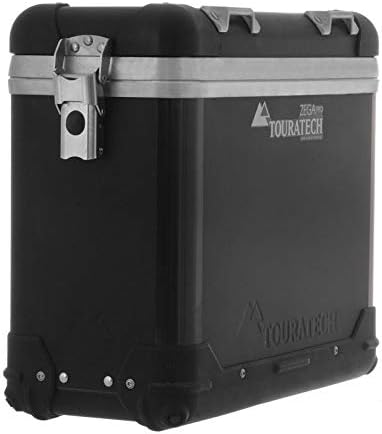
The image above shows a TOURATECH ZEGA Pro 2 Aluminum Pannier Case, which is the intended application for these reflective strips. The strips themselves are thin, flexible, and designed to adhere securely to the pannier's surface.
3. Setup and Installation
Proper installation is essential for the durability and effectiveness of the reflective strips. Follow these steps carefully:
- Clean the Surface: Thoroughly clean the area on the pannier where the reflective strip will be applied. Use a mild detergent and water, then dry completely. Ensure the surface is free from dirt, dust, grease, wax, or any other contaminants. A clean, dry surface is critical for proper adhesion.
- Positioning: Carefully determine the exact placement of the reflective strip on the edge of your ZEGA Pro or ZEGA Pro2 aluminum pannier. The strips are designed to fit unobtrusively along the edges.
- Peel Backing: Peel off a small section of the protective backing from one end of the reflective strip. Avoid touching the adhesive surface with your fingers.
- Apply Gradually: Align the exposed adhesive edge with the desired starting point on the pannier. Slowly and firmly press the strip onto the surface, gradually peeling off the remaining backing as you go. Use a soft cloth or squeegee to smooth out any air bubbles and ensure full contact with the pannier surface.
- Firm Pressure: Once fully applied, apply firm, even pressure across the entire strip to ensure maximum adhesion.
- Curing Time: Allow the adhesive to cure for at least 24 hours before exposing the panniers to extreme weather conditions, washing, or high speeds.
Repeat the process for the second reflective strip on the other pannier.
4. Operating
The TOURATECH Reflective Strips are passive safety devices. Once correctly installed, they operate continuously without user intervention. Their function is to reflect ambient light, such as headlights from other vehicles, back to the source, thereby increasing the visibility of your motorcycle and its panniers.
No specific operational steps are required after installation. Ensure the strips remain clean for optimal reflective performance.
5. Maintenance
To ensure the longevity and effectiveness of your reflective strips, follow these maintenance guidelines:
- Cleaning: Clean the reflective strips regularly with a soft cloth, mild soap, and water. Avoid abrasive cleaners, harsh chemicals, or high-pressure washers directly on the strips, as these can damage the reflective surface or compromise the adhesive.
- Inspection: Periodically inspect the strips for any signs of damage, peeling, or loss of reflectivity. If a strip shows significant wear or damage, consider replacing it to maintain optimal safety.
- Adhesion Check: Gently press along the edges of the strips to ensure they remain firmly adhered to the pannier surface. If any edges are lifting, re-apply pressure or consider re-installation if the issue persists.
6. Troubleshooting
Most issues related to reflective strips are minor and can be resolved with simple steps.
- Issue: Reflective strip is peeling or not adhering properly.
- Possible Cause: Insufficient surface cleaning before application.
- Solution: Ensure the pannier surface is thoroughly cleaned and dried before application. If peeling occurs, carefully re-clean the area and re-apply a new strip if necessary, ensuring firm pressure during installation.
- Possible Cause: Application in cold temperatures.
- Solution: Apply the strips in a warm environment (above 10°C / 50°F) to ensure optimal adhesive performance.
- Issue: Reduced reflectivity.
- Possible Cause: Dirt or grime accumulation on the strip.
- Solution: Clean the strip as described in the Maintenance section.
- Possible Cause: Damage to the reflective surface.
- Solution: If the reflective surface is scratched or damaged, the strip may need to be replaced.
7. Specifications
| Attribute | Detail |
|---|---|
| Model Number | 01-050-0888-0 |
| Product Type | Reflective Strips for Aluminum Panniers |
| Dimensions (L x W) | Approx. 9.1 x 2.2 inches (230 x 55 mm) |
| Color | Black (for "And-Black" panniers) |
| Adhesion | Self-adhesive |
| Weather Resistance | Yes |
| Pack Contents | Two (2) self-adhesive strips |
8. Warranty and Support
For warranty information and customer support regarding your TOURATECH Reflective Strips, please refer to the documentation provided at the time of purchase or contact TOURATECH directly through their official website or authorized dealers.
Keep your proof of purchase for any warranty claims.


