
1. Introduction
This manual provides essential instructions for the safe and effective use of your BORNMIO replacement Ni-MH battery, model CS-PHS920SL. This battery is designed as a replacement for various Panasonic ER and E series shavers, including models ER153, E150, E151, E152, E153, E154, E155, ER150, ER151, ER152, and ER154. Please read this manual thoroughly before installation and use.

Figure 1: BORNMIO CS-PHS920SL Replacement Ni-MH Battery. This image shows the two-cell battery pack with visible specifications and branding.
2. Safety Information
Adherence to the following safety guidelines is crucial for preventing injury and damage to the battery and device.
- Initial Charge: A new battery pack must be fully charged before its first use to ensure optimal performance and longevity.
- Temperature: Do not store or operate the battery above 60°C (140°F). High temperatures can reduce battery life and pose safety risks.
- Physical Damage: Do not crush, puncture, or short-circuit the external contacts of the battery. Such actions can lead to fire or burns.
- Water Exposure: Do not dispose of the battery in fire or water.
- Disassembly: Do not attempt to disassemble the battery pack. This can void the warranty and is dangerous.
- Certifications: This battery is certified with ISO9001, RoHS, and CE, indicating compliance with quality, environmental, and safety standards.
- Protection Features: The battery incorporates protection against overcharge, over-discharge, over-voltage, and short circuits to enhance safety and battery life.

Figure 2: Battery safety markings. This image displays various international safety symbols printed on the battery, indicating proper disposal and handling precautions.
3. Setup and Installation
Replacing the battery in your Panasonic shaver requires careful handling. If you are unsure about the process, it is recommended to seek professional assistance or consult your shaver's original instruction manual for specific battery replacement procedures.
- Power Off: Ensure your shaver is completely powered off and disconnected from any charging source.
- Access Battery Compartment: Locate and open the battery compartment of your Panasonic shaver. This may involve removing screws or prying open a cover, depending on the model.
- Remove Old Battery: Carefully disconnect and remove the old battery. Note the orientation of the battery and its terminals.
- Insert New Battery: Insert the BORNMIO CS-PHS920SL battery, ensuring the polarity (+/-) matches the original battery's orientation. The battery is designed to fit the specified Panasonic models.
- Secure Compartment: Close and secure the battery compartment.
- Initial Charge: Fully charge the shaver with the new battery before its first use.
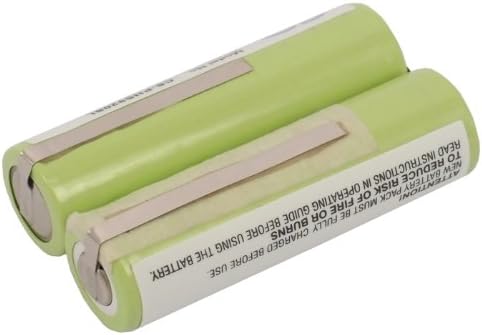
Figure 3: Side view of the battery. This image shows the battery from a side angle, highlighting the metal connection tabs for installation.
4. Operating Instructions
Once installed, the battery operates within your shaver's existing power management system.
- Charging: Use the original charger provided with your Panasonic shaver to charge the new battery. Allow for a full charge cycle before initial use.
- Usage: Operate your shaver as per its original instructions. The battery provides consistent power for the device.
- Discharge: For optimal battery health, avoid completely draining the battery frequently. Recharge when the shaver indicates low power.
5. Maintenance and Storage
Proper maintenance ensures the longevity and performance of your battery.
- Storage: If storing the battery for an extended period, ensure it is partially charged (around 50%) and stored in a cool, dry place, away from direct sunlight and extreme temperatures.
- Cleaning: Keep the battery contacts clean and free from dust or debris. Use a dry cloth if necessary.
- Avoid Extreme Temperatures: Do not expose the battery to temperatures below 0°C (32°F) or above 45°C (113°F) for prolonged periods during use or storage.

Figure 4: Battery with detailed specifications. This image shows the battery with visible text detailing its model number, part number, voltage, capacity, and type (Nickel Metal Hydride).
6. Troubleshooting
If you encounter issues with your BORNMIO replacement battery, consider the following:
- Battery Not Holding Charge:
- Ensure the battery was fully charged before its first use. Ni-MH batteries often require a full initial charge to calibrate.
- Verify that the shaver's charging unit is functioning correctly.
- Check for proper installation and secure connections within the shaver's battery compartment.
- If the issue persists after several charge cycles, contact customer support.
- Shaver Not Powering On:
- Confirm the battery is correctly installed and fully charged.
- Ensure the shaver itself is not faulty. Test with another known-good battery if possible.
7. Specifications
| Attribute | Detail |
|---|---|
| Model Number | CS-PHS920SL |
| Battery Type | Ni-MH (Nickel-Metal Hydride) |
| Capacity | 2000mAh |
| Watt-Hours (Wh) | 4.80Wh |
| Voltage | 2.4V |
| Dimensions | 48.73 x 28.68 x 14.31mm (1.92 x 0.56 x 1.13 inches) |
| Weight | 120g / 4.23oz |
| Certifications | ISO9001, RoHS, CE |
| Compatible Models | PANASONIC ER153, E150, E151, E152, E153, E154, E155, ER150, ER151, ER152, ER154 |
8. Warranty and Support
Your BORNMIO replacement battery comes with the following assurances:
- Warranty: A 12-month warranty covers manufacturing defects and performance issues under normal use.
- Money Back Guarantee: A 14-day money-back guarantee is provided from the date of purchase.
- Customer Support: For any questions, concerns, or warranty claims, please contact BORNMIO customer support through your purchase platform.
