
Introduction
This manual provides essential information for the safe and effective use of your BORNMIO CS-CPB8011 Ni-MH replacement battery. This battery is designed to be compatible with various VTech cordless phone models and replaces original battery part numbers such as 89-1323-00-00, 80-0099-00-00, and 80-1323-00-00. Please read these instructions carefully before installation and use.

Image 1: The BORNMIO CS-CPB8011 Ni-MH replacement battery, displaying its specifications label. This battery features a 700mAh capacity, 2.52Wh, 3.6V, and Ni-MH type.
Setup and Installation
Follow these steps to safely install your new replacement battery into your VTech cordless phone:
- Power Off Device: Ensure your cordless phone is completely powered off and disconnected from its charging base before beginning installation.
- Locate Battery Compartment: Identify the battery compartment on your phone handset. This is typically on the back, secured by a cover.
- Remove Old Battery: Carefully open the battery compartment cover. Disconnect the old battery's connector from the phone's port. Remove the old battery.
- Insert New Battery: Connect the new BORNMIO CS-CPB8011 battery's connector firmly into the phone's battery port. Ensure the connector is oriented correctly to avoid damage.
- Position Battery: Place the new battery into the compartment, ensuring it fits securely without forcing.
- Close Compartment: Replace the battery compartment cover and secure it.
- Initial Charge: Place the phone handset on its charging base for at least 12-16 hours for the initial charge, even if the phone indicates a full charge sooner. This conditions the battery for optimal performance.
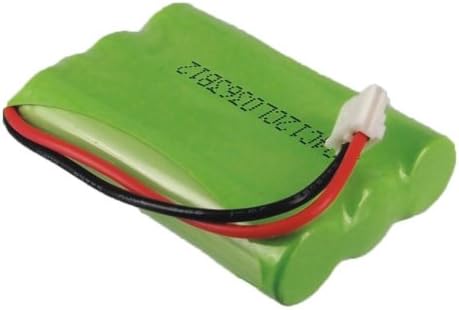
Image 2: Side view of the BORNMIO CS-CPB8011 battery, showing its compact design and connector wires.
Operating Instructions
Once installed and initially charged, your BORNMIO replacement battery operates like the original. Observe the following for best performance:
- Regular Charging: For daily use, return the handset to its charging base when not in use to maintain a full charge.
- Full Discharge (Periodically): To prolong the battery's overall lifespan and maintain its capacity, allow the battery to fully discharge (until the phone indicates low battery or powers off) once every few months, then fully recharge it.
- Temperature: Operate the phone and battery within normal room temperatures. Extreme heat or cold can affect battery performance and lifespan.
Maintenance and Care
Proper care ensures the longevity and optimal performance of your battery:
- Storage: If storing the battery for an extended period, charge it to about 50% capacity and store it in a cool, dry place. Recharge it every 3-6 months to prevent deep discharge.
- Cleaning: Keep the battery contacts clean. If necessary, gently wipe them with a dry, clean cloth.
- Disposal: Do not dispose of batteries in household waste. Follow local regulations for proper recycling of Ni-MH batteries. Many electronics stores or recycling centers accept old batteries.
- Avoid Damage: Do not puncture, disassemble, or expose the battery to fire or water.

Image 3: Top view of the BORNMIO CS-CPB8011 battery, highlighting its green casing and connector.
Troubleshooting
If you encounter issues with your battery, consider the following common solutions:
| Problem | Possible Cause / Solution |
|---|---|
| Phone not powering on after battery installation. |
|
| Battery not holding a charge or short talk time. |
|
| Phone displays "Low Battery" despite recent charging. |
|
Product Specifications
| Feature | Detail |
|---|---|
| Model Number | CS-CPB8011 |
| Battery Type | Ni-MH (Nickel-Metal Hydride) |
| Capacity | 700 mAh (Milliampere Hour) |
| Watt-Hours (Wh) | 2.52 Wh |
| Voltage | 3.6 V |
| Dimensions | 45.07 x 31.27 x 10.58 mm (1.77 x 0.42 x 1.23 inches) |
| Weight | 70 g (2.47 ounces) |
| Compatible VTech Models | MI6896, 27910, 5822, 5829, 5839, 5851, 5859, 5939, 6725, 6763, 6765, 6772, 6773, 6775, 6783, 6785, 6803, 6807, 6820, 6821, 6822BAT |
| Compatible Part Numbers | 80-0099-00-00, 80-1323-00-00, 89-1323-00-00 |
Warranty Information
For specific warranty details regarding your BORNMIO replacement battery, please refer to the documentation provided at the time of purchase or contact the seller directly. Warranty terms typically cover manufacturing defects for a specified period from the date of purchase.
Customer Support
If you have any questions, require technical assistance, or need further support regarding your BORNMIO CS-CPB8011 replacement battery, please contact the seller or manufacturer through the platform where the product was purchased. Provide your order number and a detailed description of the issue for prompt assistance.