
1. Introduction
The Walfront SVP-63A is a single-phase adjustable voltage and current protective device designed to safeguard electrical equipment from overvoltage, undervoltage, and overcurrent conditions. Featuring a double LED display, it provides real-time monitoring of voltage and current. This device is suitable for various applications requiring precise power monitoring and protection.
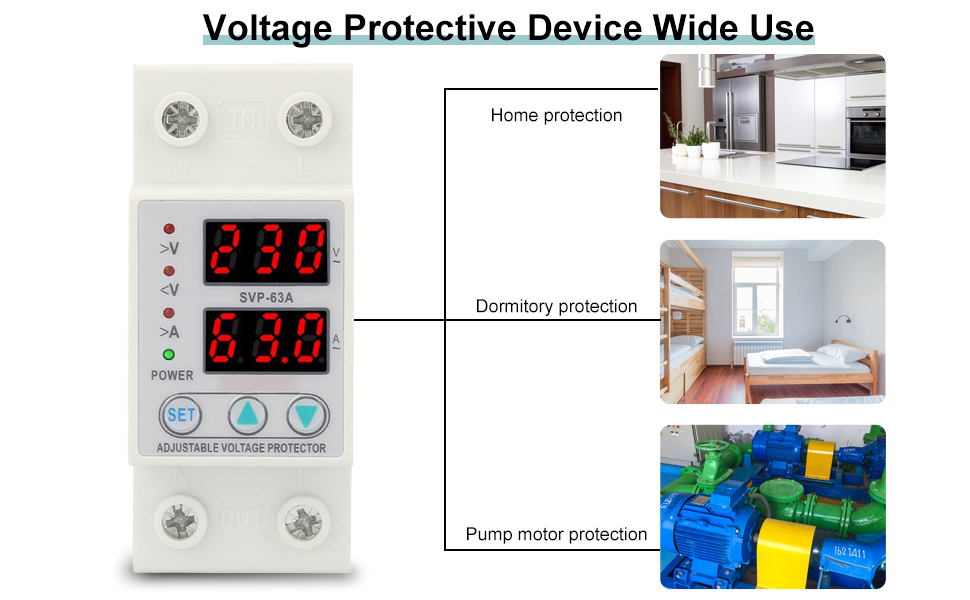
Figure 1: Walfront SVP-63A Voltage Protective Device illustrating its wide range of applications, including home, dormitory, and pump motor protection.
2. Safety Information
Please read all safety instructions carefully before installation and operation. Failure to follow these instructions may result in electric shock, fire, or serious injury.
- Installation should only be performed by qualified personnel.
- Ensure the power supply is disconnected before any installation, wiring, or maintenance.
- Verify that the device's rated voltage and current match your electrical system requirements.
- Do not operate the device in wet or damp conditions.
- Avoid touching live terminals.
3. Product Features
The Walfront SVP-63A offers a range of protective and monitoring features:
- Double LED Display: Simultaneously displays real-time voltage and current values.
- Overvoltage Protection: Automatically disconnects power when voltage exceeds a set limit.
- Undervoltage Protection: Automatically disconnects power when voltage drops below a set limit.
- Overcurrent Protection: Disconnects power if current exceeds the adjustable threshold.
- Adjustable Parameters: Overvoltage value (230V-300V, default 270V), undervoltage value (210V-145V, default 170V), overcurrent, and fault recovery delay time are all adjustable.
- Reset Mode Selection: Offers different reset modes for convenience.
- DIN Rail Installation: Designed for easy mounting on a standard DIN rail.
- Low Power Consumption: Efficient operation with minimal power usage (≤2W).
- Long Mechanical Life: Durable design for extended operational lifespan.
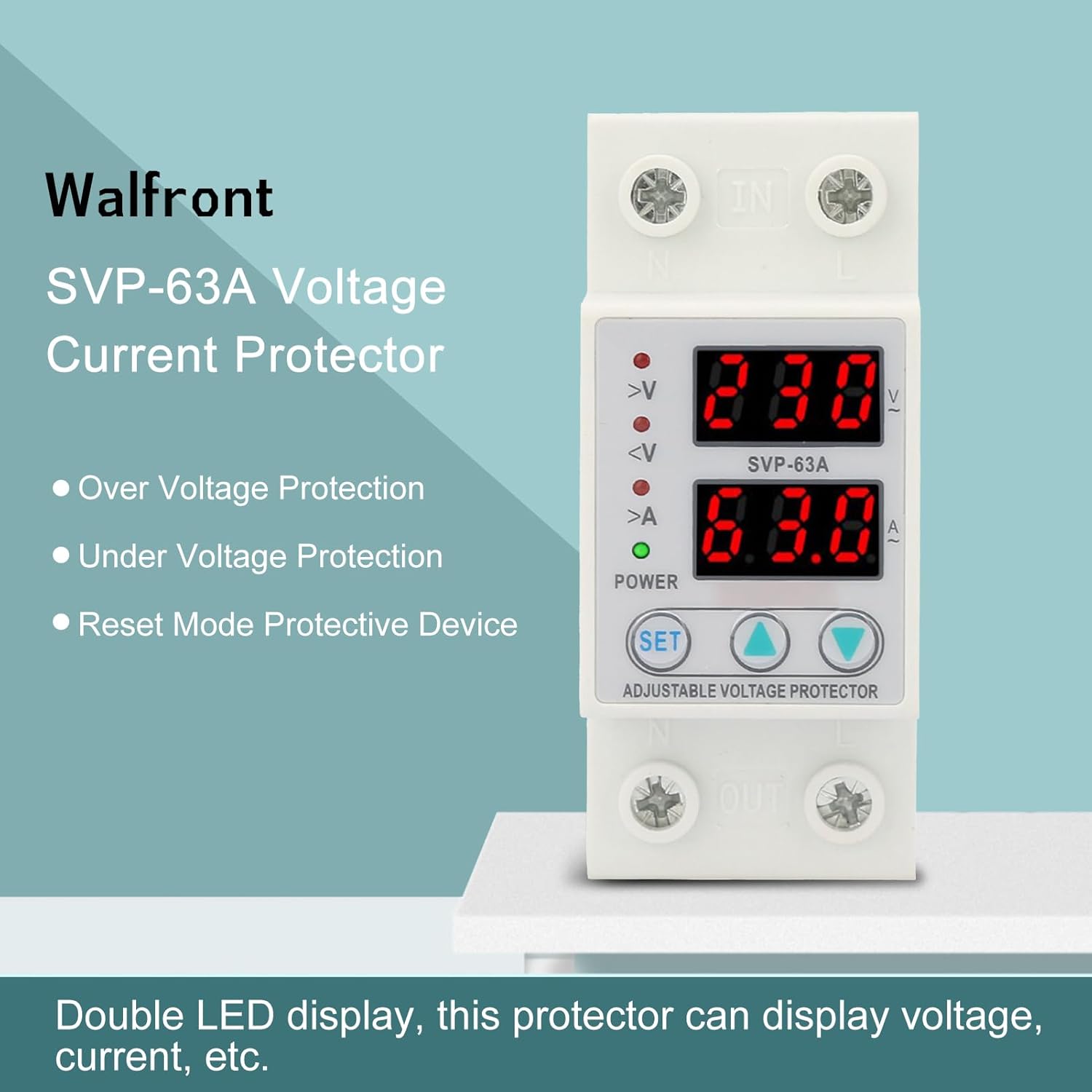
Figure 2: Front view of the Walfront SVP-63A highlighting its double LED display and core protective features.
4. Product Overview
The SVP-63A is a compact device designed for easy integration into electrical panels.

Figure 3: Product dimensions (approx. 60mm x 81mm x 36mm).

Figure 4: Side view illustrating the DIN rail clip.

Figure 5: Top view showing input terminals.
Watch this video for a visual overview of the Walfront SVP-63A Adjustable Voltage Current Protector.
Video 1: Overview of the Walfront SVP-63A Adjustable Voltage Current Protector, demonstrating its physical appearance and basic functions.
5. Installation
The SVP-63A is designed for DIN rail mounting. Follow the wiring diagram below for proper installation.
- Mount the device onto a standard 35mm DIN rail in your electrical distribution box.
- Ensure the main power supply is OFF before proceeding with wiring.
- Connect the incoming Live (L) and Neutral (N) wires to the 'IN' terminals at the top of the protector.
- Connect the outgoing Live (L) and Neutral (N) wires to the 'OUT' terminals at the bottom of the protector, leading to your protected load.
- Double-check all connections for tightness and correct polarity.
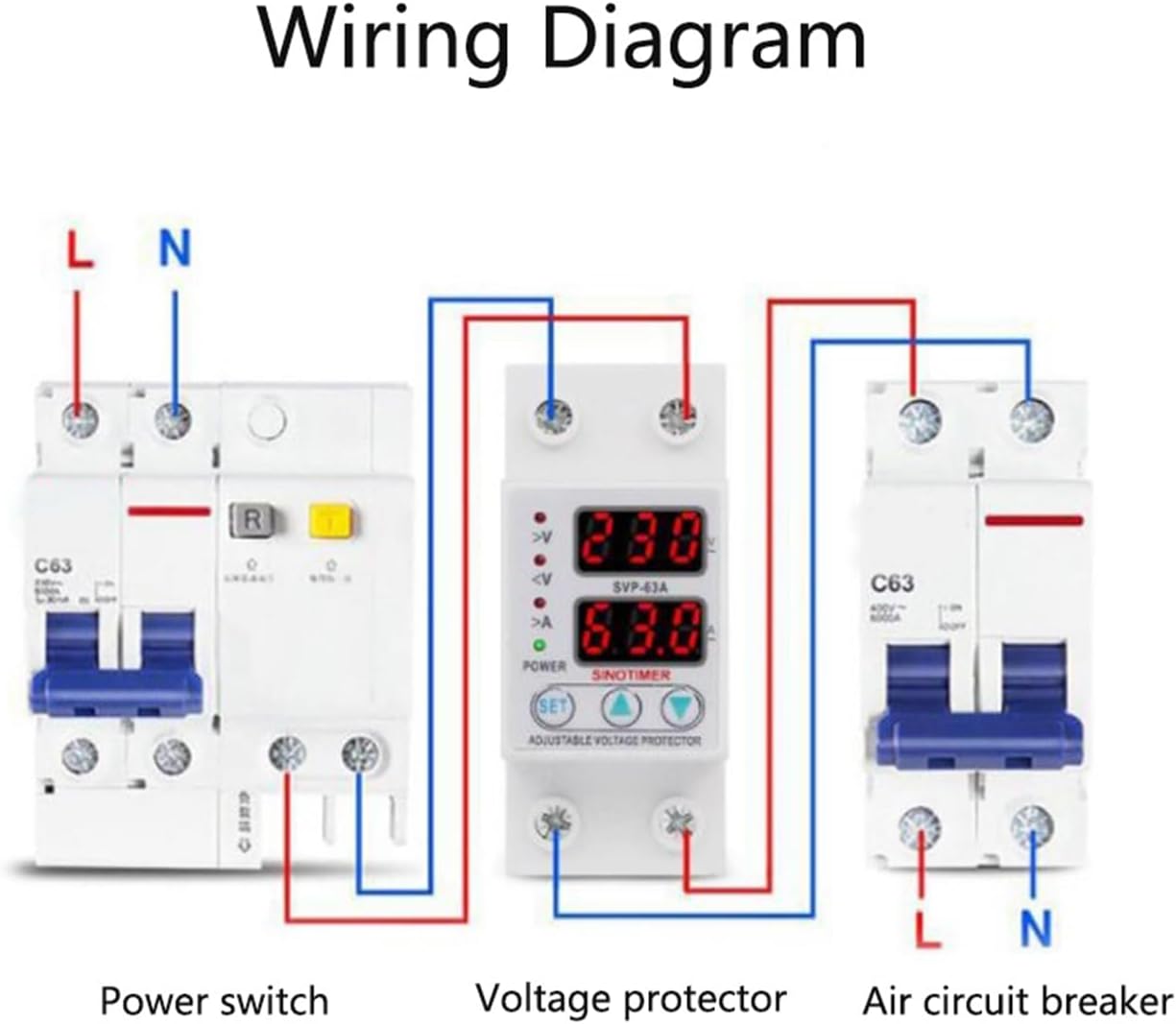
Figure 6: Wiring Diagram for SVP-63A. Connect Live (L) and Neutral (N) from the power source to the 'IN' terminals, and from the 'OUT' terminals to the load.
6. Setup and Configuration
The SVP-63A allows for adjustment of various protection parameters. Use the 'SET' button and the up/down arrow buttons to navigate and modify settings.
- Accessing Settings: Press and hold the 'SET' button for a few seconds until the display starts flashing, indicating entry into the setting mode.
- Adjusting Overvoltage Value (>V): Use the up/down arrows to set the desired overvoltage threshold. Default is 270V, adjustable from 230V to 300V.
- Adjusting Undervoltage Value (<V): Use the up/down arrows to set the desired undervoltage threshold. Default is 170V, adjustable from 145V to 210V.
- Adjusting Overcurrent Value (>A): Use the up/down arrows to set the desired overcurrent threshold. Default is 63A, adjustable from 1A to 63A.
- Adjusting Fault Recovery Delay Time: Set the delay time before the device automatically restores power after a fault condition has cleared.
- Saving Settings: After making adjustments, press the 'SET' button again to cycle through the settings and save them. The display will stop flashing.

Figure 7: Device display and control buttons for setting parameters.

Figure 8: Adjustable delay time feature.
7. Operating Instructions
Once installed and configured, the SVP-63A operates automatically to protect your electrical system.
- Power On: After successful installation and wiring, switch on the main power supply. The device's LED display will illuminate, showing the current voltage and current readings.
- Monitoring: The top LED display shows the voltage (V), and the bottom LED display shows the current (A).
- Protection Indication: Indicator lights on the front panel will illuminate to show active protection states: '>V' for overvoltage, '<V' for undervoltage, and '>A' for overcurrent.
- Automatic Disconnection: If any set parameter (overvoltage, undervoltage, overcurrent) is exceeded, the device will automatically cut off the power supply to protect connected equipment.
- Fault Recovery: After a fault condition clears, the device will wait for the set recovery delay time before automatically restoring power.
8. Maintenance
The Walfront SVP-63A requires minimal maintenance to ensure optimal performance.
- Regular Inspection: Periodically check the device for any visible damage, loose connections, or signs of overheating.
- Cleaning: Keep the device clean and free from dust. Use a dry, soft cloth for cleaning. Do not use liquid cleaners or solvents.
- Environmental Conditions: Ensure the operating environment is within the specified temperature and humidity ranges to prevent malfunction.
- No User-Serviceable Parts: Do not attempt to open or repair the device yourself. Refer to qualified service personnel for any issues.
9. Troubleshooting
If you encounter issues with your SVP-63A, refer to the following common troubleshooting steps:
| Problem | Possible Cause | Solution |
|---|---|---|
| Device does not power on | No input power; incorrect wiring | Check main power supply; verify wiring connections as per diagram. |
| Power cuts off frequently | Protection parameters set too low; unstable power supply | Adjust overvoltage/undervoltage/overcurrent thresholds; check power grid stability. |
| Display shows error or abnormal readings | Internal fault; sensor issue | Disconnect power, wait 1 minute, then reconnect. If issue persists, contact support. |
| Device does not reset after fault | Fault condition still present; incorrect reset mode setting | Ensure fault condition has cleared; check reset mode settings. |
10. Specifications
Detailed technical specifications for the Walfront SVP-63A:
| Parameter | Value |
|---|---|
| Rated Voltage | AC230V 50/60Hz |
| Rated Current | 1-63A Adjustable (Default 63A) |
| Overvoltage Protection Range | 230V-300V Adjustable (Default 270V) |
| Undervoltage Protection Range | 145V-210V Adjustable (Default 170V) |
| Overcurrent Protection Range | 1-63A Adjustable (Default 63A) |
| Power Consumption | ≤2W |
| Installation Method | DIN Rail |
| Material | Plastic |
| Product Dimensions | Approx. 3.35 x 2.56 x 1.42 inches (85 x 65 x 36 mm) |
| Item Weight | Approx. 0.704 ounces (20g) |
11. Warranty and Support
Walfront products are manufactured to high-quality standards. For warranty information, technical support, or service inquiries, please refer to the contact details provided with your purchase or visit the official Walfront website. Keep your purchase receipt as proof of purchase.