
VTech 80-526000
VTech Peppa Pig Learning Watch User Manual
Model: 80-526000
Introduction
This manual provides essential information for the safe and effective use of your VTech Peppa Pig Learning Watch. Designed for children aged 3-6 years, this interactive watch combines time-telling with engaging educational games featuring Peppa Pig.
Package Contents
- VTech Peppa Pig Learning Watch
- Parent's Guide (this document)
Product Overview
The VTech Peppa Pig Learning Watch features a durable design with a protective flip-top cover. It includes various buttons for navigation and interaction with its functions.

Image: The VTech Peppa Pig Learning Watch in purple, with Peppa Pig's face on the closed protective cover.

Image: The VTech Peppa Pig Learning Watch open on a child's wrist, displaying the digital time and an animated Peppa Pig character. The watch face is decorated with stars and a kite.
Setup
1. Battery Installation
The watch requires one CR2450 lithium battery. A battery is included for demonstration purposes. For regular use, it is recommended to replace it with a new battery.
- Locate the battery compartment on the back of the watch.
- Using a small screwdriver, open the battery compartment cover.
- Insert a new CR2450 lithium battery, ensuring correct polarity (+/-).
- Replace the cover and tighten the screw securely.
2. Initial Setup (Time and Date)
Upon first use or after battery replacement, you may need to set the time and date.
- Press the OK button to activate the watch.
- Navigate to the Settings menu using the left/right arrow buttons (if available, otherwise consult on-screen prompts).
- Select Time or Date and follow the on-screen instructions to adjust the values using the arrow buttons and confirm with OK.
Operating Instructions
1. Time Display and Clock Faces
Open the protective lid to view the current time. The watch offers eight different Peppa Pig-themed clock faces for personalization.
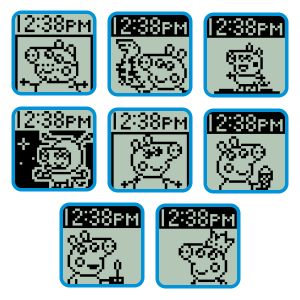
Image: A collage showing eight distinct digital clock faces, each featuring a different Peppa Pig character or scene, as they appear on the watch screen.
2. Learning Games
The watch includes four leveled-learning games designed to teach counting, number comparison, sorting, and matching skills.
- Counting Game: Practice counting objects.
- Comparison Game: Identify the smaller or greater number.
- Sorting Game: Sort items into categories.
- Matching Game: Match objects or shadows.
Video: An official VTech video demonstrating the features and learning games of the Peppa Pig Learning Watch, including interactions with the characters and various educational activities.
3. Alarm, Timer, and Stopwatch
The watch features practical time management tools:
- Alarm Clock: Set a cuckoo alarm to help establish routines.
- Timer: Use the countdown timer for various activities.
- Stopwatch: Measure elapsed time for games or tasks.
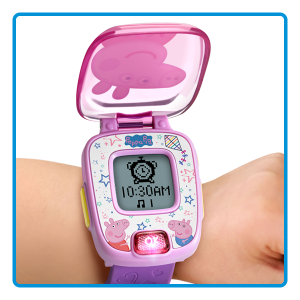
Image: The VTech Peppa Pig Learning Watch screen showing an alarm clock icon set for 10:30 AM, illustrating its alarm function.
Maintenance
- Cleaning: Wipe the watch with a slightly damp cloth. Do not immerse in water.
- Battery Care: Replace the battery when the display dims or functions become erratic. Remove batteries if the watch will not be used for an extended period.
- Storage: Store in a cool, dry place away from direct sunlight.
Troubleshooting
| Problem | Solution |
|---|---|
| Watch does not turn on or display is dim. | Replace the CR2450 lithium battery with a new one. Ensure correct polarity. |
| Buttons are unresponsive. | Remove and reinsert the battery to reset the device. If the issue persists, replace the battery. |
| Time/Date is incorrect. | Follow the "Initial Setup" instructions to reset the time and date. |
Specifications
- Model Number: 80-526000
- Product Dimensions: 8.24 x 1.13 x 1.95 inches
- Item Weight: 2.4 ounces
- Battery: 1 x CR2450 Lithium Metal battery (included for demo)
- Recommended Age: 36 months - 6 years
- Manufacturer: VTech
Warranty and Support
For warranty information or technical support, please visit the official VTech website or contact their customer service department. Keep your purchase receipt as proof of purchase.
VTech Website: www.vtechkids.com
Related documents80-526000


Ask a question about this manual
Ask about setup, troubleshooting, compatibility, parts, safety, or missing instructions. Manuals+ will review the question and use this page’s manual context to help answer it.