
1. Product Overview
The Fujitsu Premium S Alkaline AAA batteries (model LR03PS) are high-performance alkaline batteries designed for a wide range of electronic devices. These batteries offer improved long-lasting performance and strong current characteristics, making them suitable for both high-drain and low-drain applications.
Key features include a recommended service life of 10 years and a 1-year warranty against leakage.
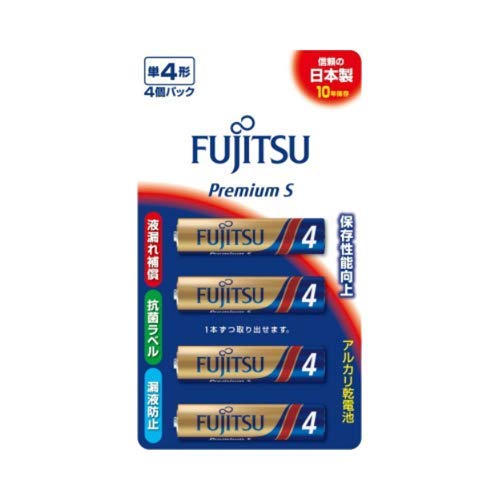
Figure 1: Fujitsu Premium S Alkaline AAA batteries, 4-pack packaging.
These batteries are ideal for devices such as digital still cameras, battery-operated shavers, LED lanterns, game consoles, electronic dictionaries, LED lights, smartphone chargers, IC recorders, electric toothbrushes, remote controls, computer mice, and clocks.
2. Safety Information
Please read and follow these safety guidelines to ensure proper use and prevent damage or injury:
- Do not recharge, disassemble, heat, or dispose of batteries in fire. This may cause leakage, explosion, or fire.
- Do not mix new and used batteries, or batteries of different types or brands.
- Insert batteries with correct polarity (+ and -) as indicated in the device. Incorrect insertion can cause damage.
- Keep batteries out of reach of small children. If swallowed, seek immediate medical attention.
- Remove exhausted batteries promptly from devices to prevent leakage.
- If battery fluid comes into contact with skin or eyes, rinse immediately with plenty of water and seek medical attention.
3. Installation (Setup)
To install the Fujitsu Premium S Alkaline AAA batteries into your device:
- Locate the battery compartment on your electronic device.
- Open the battery compartment cover.
- Observe the polarity markings (+ and -) inside the compartment.
- Insert the Fujitsu Premium S Alkaline AAA batteries, ensuring that the positive (+) end of the battery aligns with the positive (+) terminal in the compartment, and the negative (-) end aligns with the negative (-) terminal.
- Close the battery compartment cover securely.
Your device is now ready for operation.
4. Operating Instructions
Once installed, Fujitsu Premium S Alkaline AAA batteries operate automatically within your compatible electronic device. No special operating procedures are required for the batteries themselves.
- Refer to your device's instruction manual for specific operating procedures.
- Replace all batteries in a device at the same time to ensure consistent performance and prevent premature drainage or leakage.
- When a device indicates low battery power or ceases to function, replace the batteries with new ones.
5. Maintenance
Proper maintenance ensures optimal performance and longevity of your batteries:
- Storage: Store unused batteries in their original packaging in a cool, dry place at room temperature. Avoid extreme temperatures and direct sunlight.
- Cleaning: If battery terminals become dirty, gently wipe them with a clean, dry cloth.
- Disposal: Dispose of used batteries according to local regulations. Many communities offer battery recycling programs. Do not dispose of batteries in household waste or fire.
- Long-term Storage of Devices: If a device will not be used for an extended period, remove the batteries to prevent potential leakage and damage to the device.
6. Troubleshooting
If your device is not functioning correctly after installing new batteries, consider the following:
- Device Not Turning On:
- Check battery polarity: Ensure batteries are inserted with the correct positive (+) and negative (-) orientation.
- Verify battery contact: Make sure batteries are seated firmly and making good contact with the device's terminals.
- Test with another set of new batteries: This helps determine if the issue is with the batteries or the device.
- Short Battery Life:
- Ensure all batteries are new and from the same pack. Mixing old and new batteries can reduce overall performance.
- Check device power consumption: High-drain devices naturally consume batteries faster.
- Avoid extreme temperatures during use and storage, as this can affect battery life.
- Battery Leakage:
- Remove leaking batteries immediately.
- Clean the battery compartment with a cotton swab dipped in vinegar (for alkaline leakage) or lemon juice, then wipe dry.
- Dispose of leaking batteries safely.
If problems persist, consult your device's manual or contact the device manufacturer for further assistance.
7. Specifications
| Model Number | LR03PS (4976680273354) |
| Battery Type | Alkaline |
| Size | AAA |
| Nominal Voltage | 1.5V |
| Standard Capacity | 1,340 mAh (20 ohms during continuous discharge) |
| Battery Dimensions (H x Ext. Dia.) | 1.74 inches (44.2 mm) x 0.41 inches (10.3 mm) |
| Item Weight (per battery) | Approximately 0.44 ounces (12.5 grams) |
| Recommended Service Life | 10 years |
| Manufacturer | FDK (Fujitsu) |
8. Warranty and Support
Fujitsu Premium S Alkaline AAA batteries come with a 1-year warranty against leakage. This warranty covers damage to your device caused by battery leakage, provided the batteries were used according to the instructions.
For warranty claims or technical support, please contact your retailer or the Fujitsu customer service department. Keep your proof of purchase for warranty validation.
For general inquiries or further information, please visit the official Fujitsu website.


