
1. Product Overview
The Sona 35L Electric Oven SEO 2235A is a versatile countertop appliance designed for baking, roasting, and grilling. It features a 35-liter capacity, 1500W power, adjustable temperature control up to 250°C, a 60-minute auto-off timer, and a motorized rotisserie function.

Figure 1: Front view of the Sona 35L Electric Oven SEO 2235A, showcasing its compact design and main features like 35L capacity, 1500W power, and rotisserie function.
2. Safety Instructions
Please read all instructions carefully before using the appliance. Retain this manual for future reference.
- Ensure the voltage rating on the appliance matches your local power supply before connecting.
- Do not immerse the appliance, cord, or plug in water or any other liquid.
- Always supervise children when the appliance is in use.
- Do not operate the oven with a damaged cord or plug. Contact authorized service personnel for repairs.
- Place the oven on a stable, heat-resistant surface, away from walls and other appliances to allow for proper ventilation.
- The oven's exterior surfaces become hot during operation. Use oven mitts when handling hot items or surfaces.
- Never place flammable materials inside the oven.
- Unplug the oven from the power outlet when not in use and before cleaning.
- Do not use abrasive cleaners or metal scouring pads on the oven's interior or exterior.
3. Setup and First Use
3.1 Unpacking
- Carefully remove the oven and all accessories from the packaging.
- Remove any protective films, stickers, or packaging materials from the oven and its accessories.
- Inspect the oven for any damage. Do not operate if damaged.
3.2 Initial Cleaning
Before first use, wipe the interior and exterior of the oven with a damp cloth. Wash all accessories (baking tray, wire rack, crumb tray, rotisserie stick, removal tools) in warm, soapy water, rinse thoroughly, and dry completely.
3.3 Placement
Place the oven on a flat, stable, heat-resistant surface. Ensure there is at least 10-15 cm of clear space on all sides and above the oven for adequate ventilation.
3.4 Initial Burn-Off
It is recommended to run the oven empty for approximately 15 minutes on the highest temperature setting (250°C) with the function selector set to 'Bake' to burn off any manufacturing residues. A slight odor or smoke may be present during this process; ensure the area is well-ventilated.
4. Operating Instructions
4.1 Controls Overview
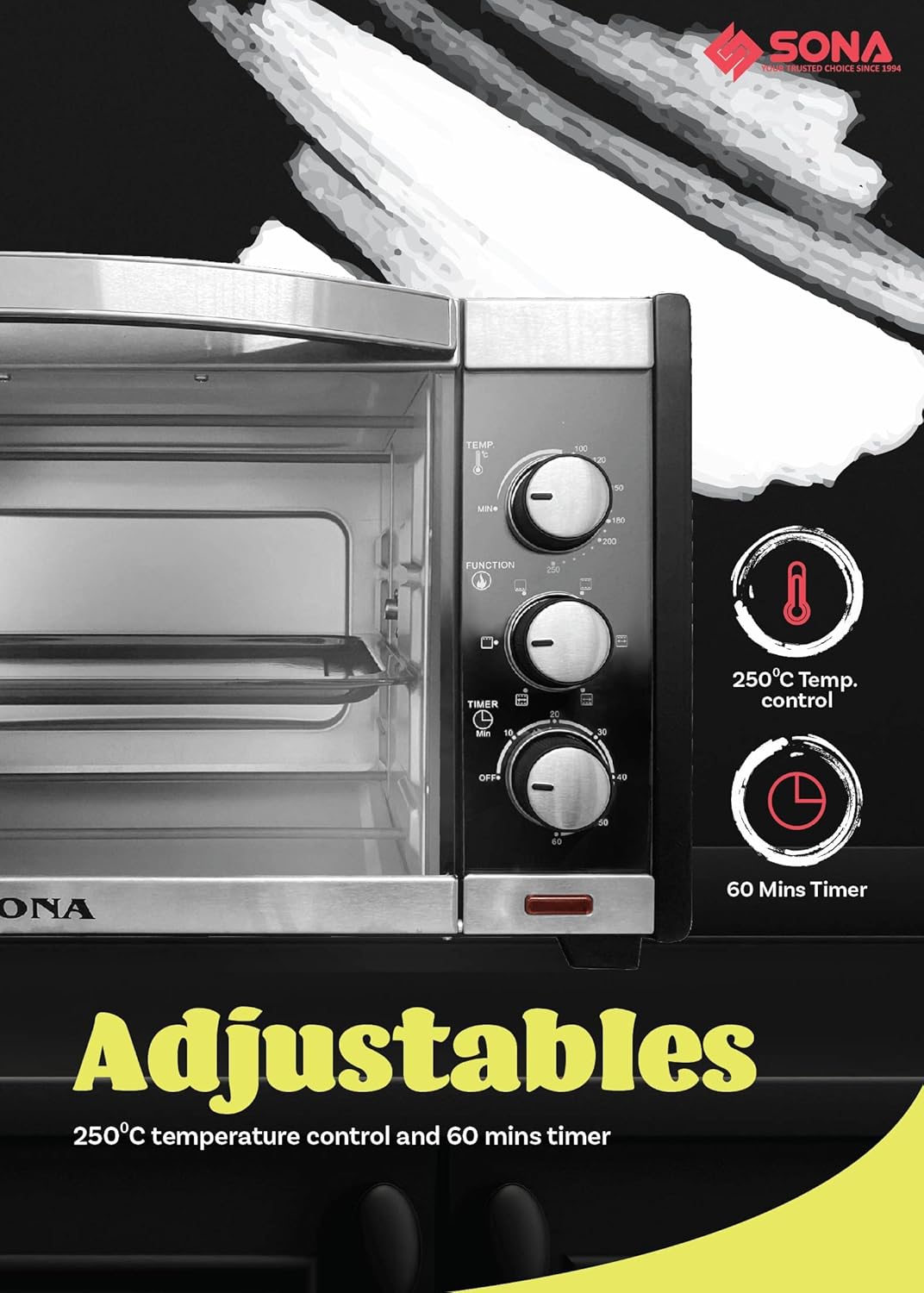
Figure 2: Close-up view of the oven's control panel, showing the temperature, function, and timer knobs for precise cooking adjustments.
- Temperature Control Knob: Adjusts the cooking temperature from 100°C to 250°C.
- Function Selector Knob: Selects the heating elements to be used (e.g., upper heat, lower heat, both, rotisserie).
- Timer Knob: Sets the cooking time up to 60 minutes. The oven will automatically turn off when the timer reaches zero.
4.2 General Operation
- Place the food on the appropriate accessory (baking tray, wire rack) and insert it into the desired rack position inside the oven.
- Close the oven door securely.
- Turn the Temperature Control Knob to the desired temperature.
- Turn the Function Selector Knob to the desired cooking mode.
- Turn the Timer Knob to the desired cooking time. The power indicator light will illuminate.
- When the set time elapses, the oven will automatically turn off, and a bell will sound.
- Carefully remove the cooked food using oven mitts and the provided removal tools.
4.3 Using the Rotisserie Function
- Secure the food (e.g., whole chicken) onto the rotisserie stick using the forks. Ensure the food is centered and balanced.
- Insert the pointed end of the rotisserie stick into the drive socket on the right side of the oven interior.
- Rest the square end of the rotisserie stick onto the support on the left side.
- Set the Temperature Control Knob to the desired temperature.
- Set the Function Selector Knob to the rotisserie icon.
- Set the Timer Knob to the desired cooking time.
- Once cooking is complete, use the rotisserie stick removal tool to carefully lift and remove the hot rotisserie stick and food from the oven.
5. Maintenance and Cleaning
Regular cleaning ensures optimal performance and extends the life of your oven. Always unplug the oven and allow it to cool completely before cleaning.
5.1 Exterior Cleaning
Wipe the exterior surfaces with a soft, damp cloth. Do not use abrasive cleaners or harsh chemicals.
5.2 Interior Cleaning
Wipe the interior walls with a damp cloth and mild detergent. For stubborn stains, a non-abrasive oven cleaner designed for conventional ovens can be used, following the product's instructions. Ensure all cleaner residue is removed before next use.
5.3 Crumb Tray
The removable crumb tray should be cleaned regularly to prevent grease buildup and potential fire hazards. Slide out the crumb tray from the bottom of the oven, discard crumbs, and wash with warm, soapy water. Rinse and dry thoroughly before reinserting.
5.4 Accessories
Wash the baking tray, wire rack, rotisserie stick, and removal tools in warm, soapy water. Rinse and dry completely. These accessories are not dishwasher safe.
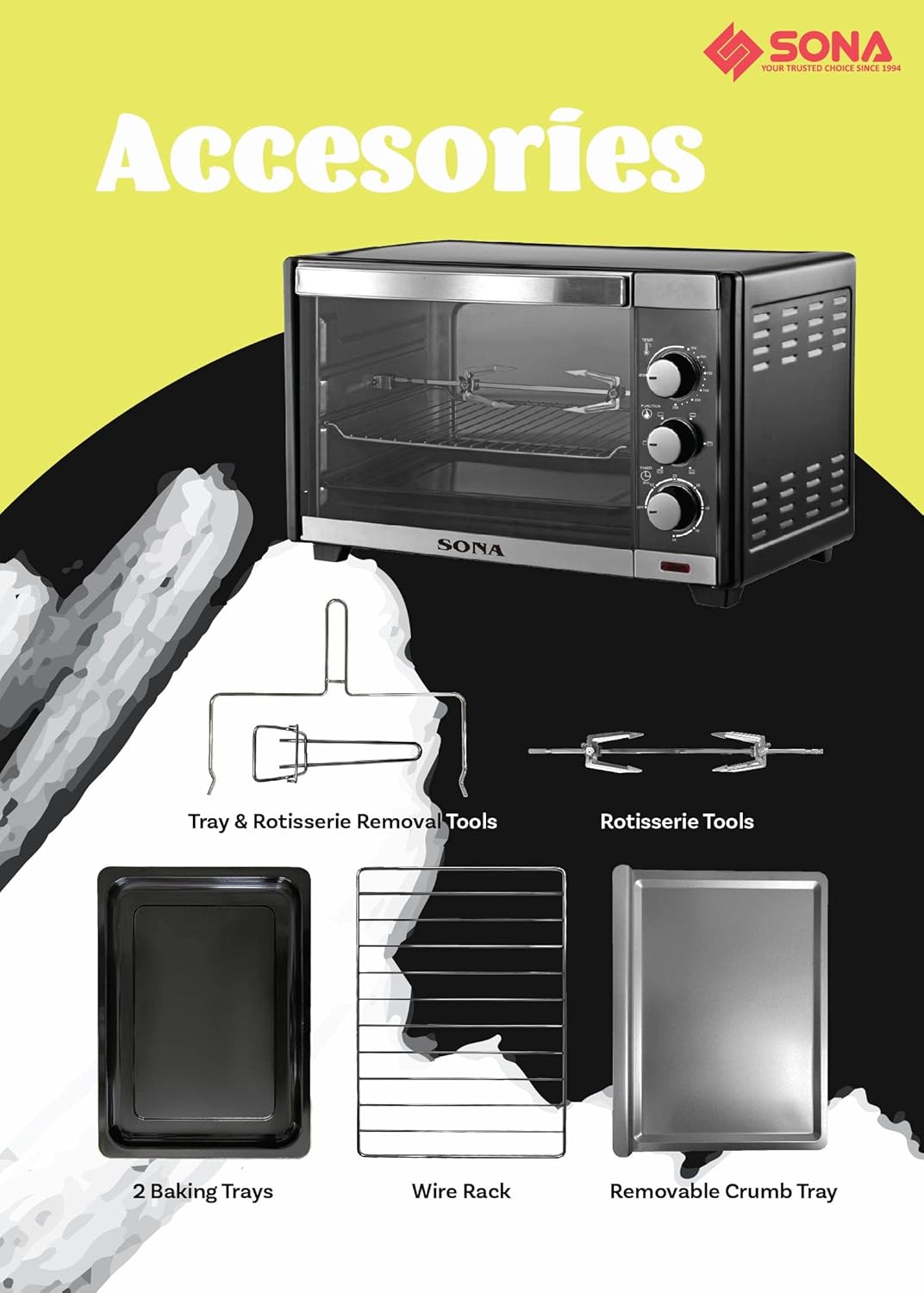
Figure 3: Included accessories for the Sona 35L Electric Oven, including baking trays, wire rack, crumb tray, rotisserie stick, and removal tools.
6. Troubleshooting
If you encounter issues with your oven, refer to the following common problems and solutions:
- Oven does not turn on:
Solution: Check if the power cord is securely plugged into a working outlet. Ensure the timer knob is set to a cooking duration and not 'OFF'. Check your household's circuit breaker. - Oven not heating properly:
Solution: Verify that the temperature and function knobs are set correctly for the desired cooking method. Allow sufficient preheating time. - Timer knob not counting down:
Solution: While the timer mechanism should function, some units may have a minor defect where the knob does not visibly move but the internal timer still operates and shuts off the oven. If the oven still turns off at the set time, this does not affect cooking performance. If the oven does not turn off, contact customer support. - Trays do not fit into slots:
Solution: Ensure you are using the correct trays for the oven model. Some trays may require a specific orientation or gentle maneuvering to fit into the rack guides. If trays consistently do not fit, contact customer support. - Excessive smoke during operation:
Solution: This may occur during initial burn-off. If it persists, ensure the oven interior and crumb tray are clean and free of food debris or grease buildup. Reduce cooking temperature if food is burning.
For issues not listed here, please contact Sona customer support.
7. Specifications
| Feature | Specification |
|---|---|
| Model Number | SEO 2235A |
| Capacity | 35 Liters |
| Power Supply | 220-240V ~50/60Hz |
| Wattage | 1500W |
| Temperature Control | Up to 250°C |
| Timer | 60 Minutes Auto-off |
| Control Type | Knob |
| Door Style | Dropdown Door |
| Included Components | Oven, Baking Tray, Wire Rack, Crumb Tray, Rotisserie Stick, Tray and Rack Removal Tool, Rotisserie Stick Removal Tool |
8. Warranty and Support
This product comes with a standard manufacturer's warranty. For warranty claims, technical support, or service inquiries, please refer to the warranty card included with your purchase or visit the official Sona website for contact information.
Please retain your proof of purchase for warranty validation.