
1. Introduction
This manual provides essential information for the safe and effective use of your BORNMIO CS-FNB17TW replacement battery. This Ni-MH battery is designed to provide reliable power for compatible YAESU two-way radios. Please read this manual thoroughly before first use.
2. Safety Information
- Do not disassemble, crush, puncture, or short-circuit the battery.
- Do not expose the battery to high temperatures (above 60°C / 140°F) or direct sunlight.
- Keep the battery away from water and moisture.
- Use only chargers specified for Ni-MH batteries.
- Dispose of used batteries according to local regulations.
- Keep out of reach of children.
- If the battery emits an unusual odor, heat, or changes shape, discontinue use immediately.
3. Compatibility
The BORNMIO CS-FNB17TW battery is compatible with the following YAESU radio models and original battery part numbers:
Compatible Radio Models:
- YAESU FT-470
- YAESU FT-23R
- YAESU FT-33R
- YAESU FT-411
- YAESU FT-411 Mark II
- YAESU FT-73R
- YAESU FT-811
- YAESU FT-911
- YAESU FTH-2005
Compatible Battery Part Numbers:
- FNB-10
- FNB-10H
- FNB-12
- FNB-12H
- FNB-14
- FNB-14H
- FNB-17
- FNB-17H
4. Setup (Installation)
- Ensure your radio is powered off before installing or removing the battery.
- Align the battery with the battery compartment on the back of your YAESU radio.
- Slide the battery into place until it clicks securely. Ensure the battery is fully seated to establish proper electrical contact.
- Note: Some users have reported that the fit may be snug or require careful alignment. If the battery does not slide on easily, gently adjust its position.
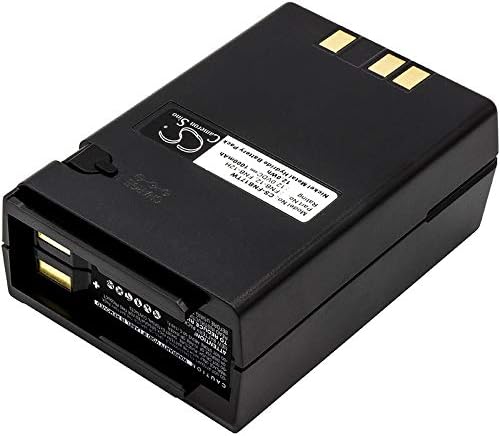
Image 1: Side view of the BORNMIO CS-FNB17TW battery, highlighting the connection terminals for installation into the radio.
5. Operating (Charging and Usage)
5.1 Initial Charge
For optimal performance, fully charge the battery before its first use. Ni-MH batteries benefit from a full charge and discharge cycle initially.
5.2 Charging Procedure
- Connect your YAESU radio (with the BORNMIO battery installed) to a compatible Ni-MH charger.
- Ensure the charger's indicator light confirms charging is in progress.
- Allow the battery to charge completely. Charging times may vary depending on the charger and the battery's discharge level. Refer to your radio's or charger's manual for specific charging durations.
- Avoid overcharging for extended periods once the battery is full, though modern chargers typically have overcharge protection.
5.3 Usage
Once charged, the battery will power your radio. Monitor your radio's battery indicator to determine when recharging is necessary. For best battery life, avoid completely draining the battery frequently.

Image 2: Top view of the BORNMIO CS-FNB17TW battery, showing the product label with model number, part numbers, voltage, and capacity.
6. Maintenance
6.1 Storage
- Store the battery in a cool, dry place, away from direct sunlight and extreme temperatures.
- For long-term storage, charge the battery to approximately 50-70% capacity. Avoid storing a fully charged or completely discharged battery for extended periods.
- Periodically check the battery during long-term storage and recharge if its voltage drops significantly.
6.2 Cleaning
Wipe the battery's exterior and terminals with a clean, dry cloth if necessary. Do not use harsh chemicals or abrasive cleaners.

Image 3: Bottom view of the BORNMIO CS-FNB17TW battery, illustrating the battery release mechanism and additional labeling.
7. Troubleshooting
| Problem | Possible Cause | Solution |
|---|---|---|
| Battery not charging | Incorrectly seated battery; faulty charger; dirty terminals. | Ensure battery is properly installed. Try a different compatible charger. Clean battery and radio terminals. |
| Short operating time | Battery not fully charged; battery nearing end of life; high power consumption settings on radio. | Ensure full charge cycle. Consider replacing battery if old. Adjust radio power settings. |
| Battery does not fit radio | Misalignment; manufacturing variation. | Carefully align and gently slide the battery. Verify radio model compatibility. |
| Battery gets hot during charging/use | Normal for Ni-MH to warm up; faulty battery or charger. | Slight warmth is normal. If excessively hot, discontinue use and contact support. |
8. Specifications
- Model Number: CS-FNB17TW
- Battery Type: Ni-MH (Nickel-Metal Hydride)
- Capacity: 1000mAh
- Voltage: 12.0V
- Watt-Hours (WH): 12.00Wh
- Dimensions: 81.00 x 54.00 x 33.00mm (3.19 x 2.13 x 1.3 inches)
- Weight: 300g (10.58oz)
- Certifications: RoHS approved, CE and ISO9001 Certificate
9. Warranty and Support
For any questions, concerns, or support regarding your BORNMIO CS-FNB17TW battery, please contact the seller or manufacturer directly. Please refer to your purchase documentation for specific warranty terms and conditions.
You can often find contact information on the product packaging or the retailer's website where the purchase was made.
