1. Introduction
Thank you for choosing the ELECTROPRIME Newrixing Nr-3019 Portable Bluetooth Speaker. This manual provides essential information for setting up, operating, and maintaining your speaker. Please read these instructions carefully before use to ensure optimal performance and longevity of your device.
2. Package Contents
Please check the package for the following items:
- ELECTROPRIME Newrixing Nr-3019 Portable Bluetooth Speaker
- USB Charging Cable
- User Manual
3. Product Overview
Familiarize yourself with the speaker's components and controls.
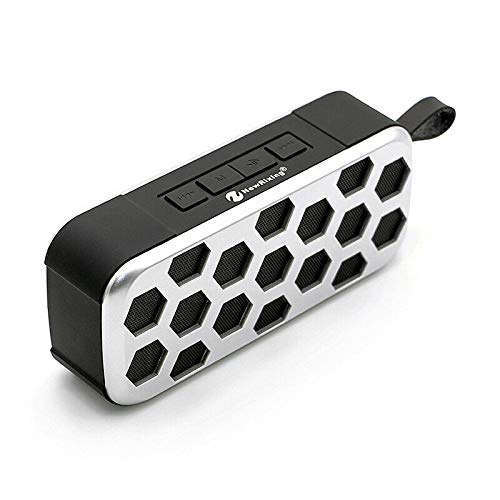
Figure 3.1: Angled view of the speaker, highlighting the control panel on top and the hexagonal grille design.
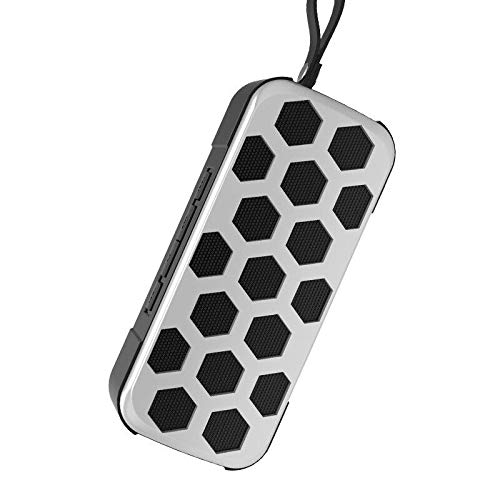
Figure 3.2: Vertical orientation of the speaker, illustrating its compact design and the durable carrying strap for portability.
Controls and Ports:
- Power Button: Press and hold to turn the speaker on or off.
- Play/Pause Button: Press to play or pause audio.
- Volume Up/Next Track Button: Press to increase volume; press and hold for next track.
- Volume Down/Previous Track Button: Press to decrease volume; press and hold for previous track.
- Mode Button: Press to switch between input modes (e.g., Bluetooth, AUX, if available).
- Charging Port: For connecting the USB charging cable.
4. Setup
4.1 Charging the Speaker
- Connect the small end of the USB charging cable to the charging port on the speaker.
- Connect the large end of the USB charging cable to a USB power adapter (not included) or a computer's USB port.
- The charging indicator light will illuminate, typically red, during charging.
- Once fully charged, the indicator light may change color or turn off. Disconnect the speaker from the power source.
Note: For first-time use, fully charge the speaker before operation.
5. Operating Instructions
5.1 Power On/Off
- To Power On: Press and hold the Power button for approximately 3 seconds. You will hear an audible prompt, and an indicator light will flash.
- To Power Off: Press and hold the Power button for approximately 3 seconds. You will hear an audible prompt, and the indicator light will turn off.
5.2 Bluetooth Pairing
- Ensure the speaker is powered on and in Bluetooth pairing mode (the Bluetooth indicator light will typically flash rapidly).
- On your smartphone or tablet, navigate to the Bluetooth settings menu.
- Enable Bluetooth and search for available devices.
- Select "Nr-3019" (or similar name) from the list of devices.
- Once paired, you will hear a confirmation sound, and the Bluetooth indicator light will remain solid.
- You can now play audio from your device through the speaker.
5.3 Music Playback and Volume Control
- Play/Pause: Press the Play/Pause button.
- Next Track: Press and hold the Volume Up button.
- Previous Track: Press and hold the Volume Down button.
- Volume Up: Press the Volume Up button repeatedly to increase volume.
- Volume Down: Press the Volume Down button repeatedly to decrease volume.
6. Maintenance
- Cleaning: Use a soft, dry cloth to clean the speaker. Do not use abrasive cleaners or solvents.
- Storage: Store the speaker in a cool, dry place away from direct sunlight and extreme temperatures.
- Battery Care: To prolong battery life, avoid fully discharging the speaker frequently. Charge it regularly, even if not in use for extended periods.
- Water Resistance: The speaker is waterproof. However, avoid submerging it for extended periods or exposing it to high-pressure water jets. Ensure the charging port cover is securely closed when near water.
7. Troubleshooting
| Problem | Possible Solution |
|---|---|
| Speaker does not power on. | Ensure the speaker is charged. Connect it to a power source using the USB cable. |
| Cannot pair with Bluetooth device. | Make sure the speaker is in pairing mode (flashing indicator). Ensure Bluetooth is enabled on your device and it is within range. Forget previous pairings on your device and try again. |
| No sound or low volume. | Check the volume levels on both the speaker and your connected device. Ensure the speaker is properly paired. |
| Sound distortion. | Reduce the volume on your device or the speaker. Ensure your device is not too far from the speaker. |
8. Specifications
- Model Name: Nr-3019
- Brand: ELECTROPRIME
- Speaker Type: Bookshelf (Portable)
- Special Feature: Waterproof
- Recommended Uses: Outdoor
- Compatible Devices: Smartphone, Tablet
- Connectivity Technology: Bluetooth
- Power Source: Battery Powered
- Control Method: Touch
- Audio Output Mode: Stereo
- Material: Others
- Item Part Number: ASHA20BEBUBEB29165
9. Warranty and Support
For warranty information and customer support, please refer to the documentation provided at the time of purchase or contact your retailer. Keep your proof of purchase for any warranty claims.


