
1. Product Overview
The Casio W-217HM-7B is a versatile digital wristwatch designed for everyday use. It features a clear digital display, a durable resin case, and a comfortable polyurethane band. This model includes essential functions such as a stopwatch, daily alarm, time signal, and an auto calendar, making it a reliable timepiece for various activities.
Key Features:
- Digital Display: Easy-to-read time, date, and day of the week.
- Stopwatch: 1/100 second stopwatch with 60-minute counting capacity and split function.
- Daily Alarm & Time Signal: Convenient alerts for daily routines.
- Auto Calendar: Automatically adjusts for different month lengths.
- 12/24 Hour Display: Switch between standard and military time formats.
- LED Light: Illuminates the display for visibility in low-light conditions.
- Water Resistance: Rated for 50 meters, suitable for everyday use and splashes.

Figure 1: Front view of the Casio W-217HM-7B Digital Wristwatch.
2. Initial Setup
Before using your watch, you may need to set the current time and date. The watch features four buttons: LIGHT (top left), MODE (bottom left), START/STOP (top right), and ADJUST (bottom right).
2.1 Setting the Time and Date
- From the Timekeeping Mode, press and hold the ADJUST button until the seconds begin to flash. This indicates the setting mode.
- Press the MODE button to cycle through the settings: Seconds → Hours → Minutes → Year → Month → Day.
- Use the START/STOP button to increase the flashing value. Use the LIGHT button to decrease the flashing value (if applicable, some models only increase).
- Once all settings are correct, press the ADJUST button to exit the setting mode.
2.2 12/24 Hour Format
In Timekeeping Mode, press the START/STOP button to switch between 12-hour and 24-hour time formats. The indicator for AM/PM (A/P) will appear in 12-hour format.
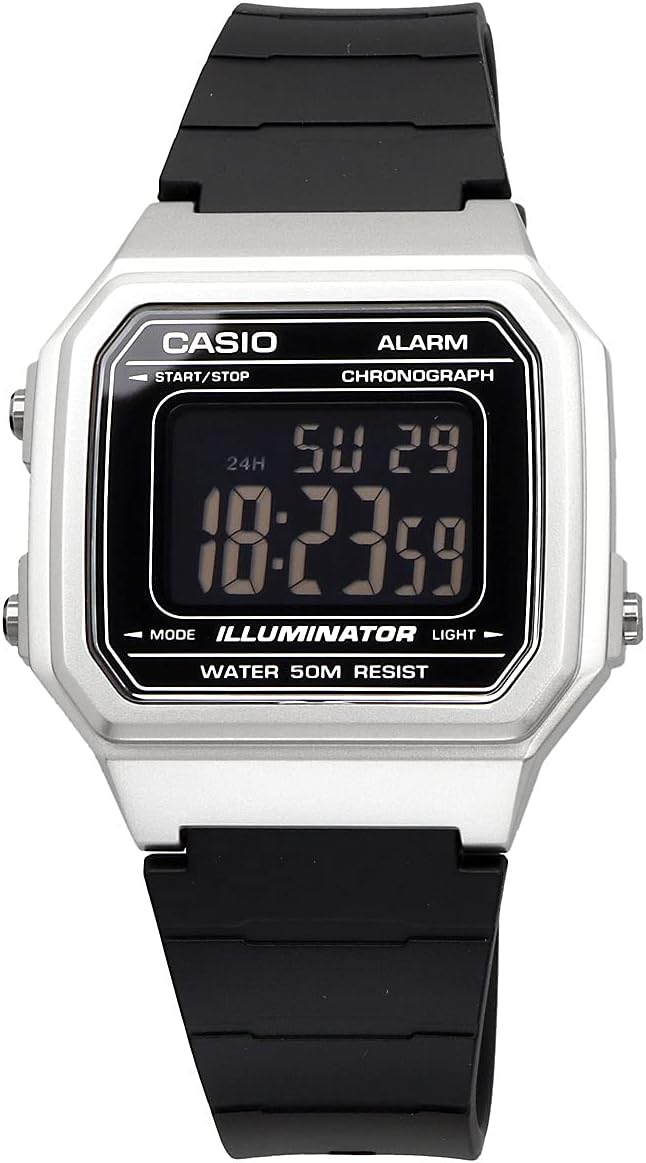
Figure 2: Close-up of the digital display, showing time and date.
3. Operating Instructions
3.1 Mode Selection
Press the MODE button to cycle through the different modes:
- Timekeeping Mode (displays current time, date, day)
- Alarm Mode (AL)
- Stopwatch Mode (ST)
3.2 Using the Alarm
- Enter Alarm Mode by pressing the MODE button.
- Press and hold the ADJUST button until the hour digits flash.
- Press the MODE button to switch between hour and minute settings.
- Use the START/STOP button to change the flashing digits.
- Press the ADJUST button to set the alarm.
- To turn the alarm ON/OFF, press the START/STOP button in Alarm Mode (without holding ADJUST). An alarm indicator will appear when active.
- To turn the hourly time signal ON/OFF, press the LIGHT button in Alarm Mode (without holding ADJUST). A signal indicator will appear when active.
3.3 Using the Stopwatch
- Enter Stopwatch Mode by pressing the MODE button.
- Press the START/STOP button to start the stopwatch.
- Press the START/STOP button again to pause/resume.
- To reset the stopwatch, press the ADJUST button while the stopwatch is paused.
- To record split times, press the ADJUST button while the stopwatch is running. The split time will be displayed for a few seconds, then the stopwatch will continue running.
3.4 Using the LED Light
Press the LIGHT button at any time to illuminate the display for a few seconds, improving visibility in dark environments.
Video 1: Demonstration of basic functions including time setting, alarm, stopwatch, and LED light on a similar Casio digital watch model (W-217H-1AVCF).
4. Maintenance
4.1 Water Resistance
This watch is rated for 50 Meters Water Resistance. This means it is suitable for everyday use, such as hand washing, showering, and light rain. It is generally not recommended for swimming, diving, or prolonged water submersion, despite being labeled "Waterproof" in some specifications. Avoid operating buttons while the watch is wet to prevent water intrusion.
4.2 Battery Replacement
The watch uses 1 Lithium Metal battery. The battery life is approximately 10 years. When the display becomes dim or functions become erratic, it may be time to replace the battery. It is recommended to have the battery replaced by a qualified watch technician to ensure proper sealing and maintain water resistance.
4.3 Cleaning
Wipe the watch regularly with a soft, dry cloth to remove dirt and moisture. For stubborn dirt, use a soft cloth dampened with mild soap and water, then wipe dry. Avoid using harsh chemicals or abrasive cleaners.

Figure 3: Back view of the watch, showing the stainless steel case back.
5. Troubleshooting
5.1 Blank or Dim Display
- Cause: Low battery.
- Solution: Replace the battery.
5.2 Incorrect Time/Date
- Cause: Time/date not set correctly or accidental button press.
- Solution: Re-adjust the time and date as described in Section 2.1.
5.3 Buttons Unresponsive
- Cause: Watch may be in a specific mode or internal issue.
- Solution: Try pressing the MODE button repeatedly to return to Timekeeping Mode. If unresponsive, a battery replacement might be needed.
6. Specifications
| Feature | Detail |
|---|---|
| Model Number | W-217HM-7B |
| Brand | CASIO |
| Display Type | Digital |
| Movement Type | Japanese Quartz |
| Case Material | Resin |
| Band Material | Polyurethane |
| Water Resistance | 50 Meters (Water Resistant) |
| Battery | 1 Lithium Metal (included) |
| Approx. Battery Life | 10 years |
| Case Diameter | 41.2 Millimeters |
| Case Thickness | 10.5 Millimeters |
| Band Width | 18 Millimeters |
7. Warranty and Support
For warranty information and customer support, please refer to the official Casio website or the warranty card included with your product. Keep your proof of purchase for any warranty claims.


