
1. Introduction and Overview
The Blink Mini is a compact indoor plug-in smart security camera designed to help you monitor the inside of your home day and night. It features 1080p HD video recording, infrared HD night vision, motion detection, and two-way audio communication. With its easy setup and integration with Alexa, the Blink Mini provides a convenient solution for home monitoring.
This manual provides detailed instructions on setting up, operating, and maintaining your Blink Mini camera, along with troubleshooting tips and product specifications.

Figure 1.1: Blink Mini Camera Overview highlighting key features.
2. What's Included
Your Blink Mini package includes the following components:
- Blink Mini camera (quantity dependent on package selected)
- 1 stand (attached to camera)
- 2 mounting screws (per camera)
- 1 USB cable (2 meters)
- 1 power adapter (100-240V 50/60 HZ 0.15A)
3. Setup Guide
Setting up your Blink Mini camera is a straightforward process. Follow these steps to get your camera operational:
- Download the Blink Home Monitor App: Search for "Blink Home Monitor" in your smartphone's app store (iOS 15.0+, Android 9.0+, or Fire 9.0+ required) and install it.
- Create an Account: Open the Blink Home Monitor app and follow the on-screen instructions to create a new account or log in if you already have one.
- Add Your Camera: In the app, tap the "+" icon to add a new device. Select "Blink Mini" and scan the QR code located on the back of your camera.
- Connect to Power: Plug the small end of the USB cable into the back of the Blink Mini camera and the larger end into the power adapter. Plug the power adapter into a standard electrical outlet. The camera's blue LED will illuminate.
- Connect to Wi-Fi: Follow the app's instructions to connect your Blink Mini to your home's 2.4 GHz Wi-Fi network (802.11g/n). Ensure your Wi-Fi network has a minimum 2 Mbps upload speed. The camera does not support ad-hoc or paywall Wi-Fi networks.
- Position Your Camera: Place your Blink Mini in the desired indoor location. The attached stand allows for flexible positioning on flat surfaces or can be mounted to a wall using the included screws.
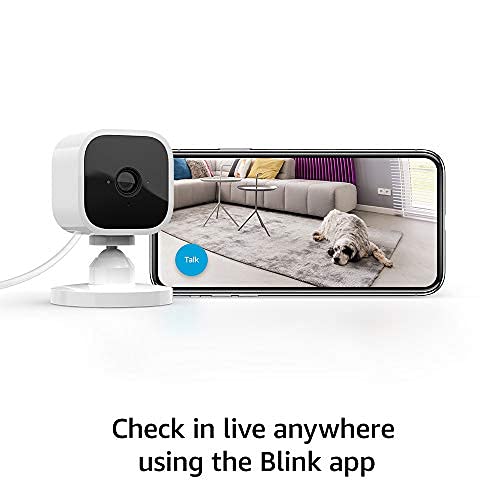
Figure 3.1: Connecting your Blink Mini to the Blink Home Monitor app.
4. Operating Your Blink Mini
4.1 Live View and Two-Way Audio
The Blink Mini allows you to see, hear, and speak to people and pets in your home directly from your smartphone. Open the Blink Home Monitor app and select your camera to initiate a live view. Use the microphone icon within the live view to enable two-way audio communication.
4.2 Motion Detection and Alerts
Receive alerts on your smartphone whenever motion is detected by your Blink Mini. You can customize motion detection zones within the app to focus on specific areas and reduce unnecessary notifications. Adjust sensitivity settings to optimize performance for your environment.
4.3 Alexa Integration
The Blink Mini works seamlessly with Alexa-enabled devices. Pair your Blink Mini with a supported Alexa device to engage live view, arm and disarm your camera, and more using simple voice commands. For example, you can say, "Alexa, show me the kitchen camera" to view the live feed on an Echo Show device.
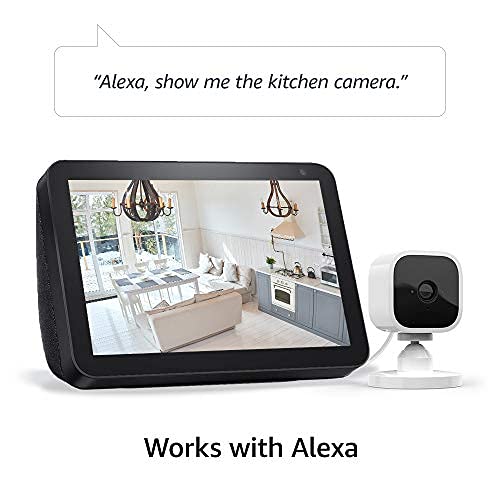
Figure 4.1: Using Blink Mini with Alexa for voice-controlled live view.
4.4 Video Storage Options
You have options for saving and sharing video clips:
- Blink Subscription Plan: Choose to save and share clips with a free 30-day trial of the Blink Subscription Plan. Continued use requires a subscription.
- Local Storage with Sync Module 2: You can store clips locally using the Blink Sync Module 2 (sold separately) and a USB flash drive.
5. Maintenance
To ensure optimal performance and longevity of your Blink Mini camera, consider the following maintenance tips:
- Cleaning: Gently wipe the camera lens and body with a soft, dry, lint-free cloth. Avoid using harsh chemicals or abrasive materials that could scratch the lens or damage the device.
- Software Updates: Your Blink Mini receives automatic software security updates. Ensure your camera is connected to Wi-Fi and powered on to receive these updates, which improve performance and add new features.
- Power Connection: Ensure the USB cable and power adapter are securely connected and free from damage.
6. Troubleshooting
If you encounter issues with your Blink Mini camera, try the following troubleshooting steps:
- Camera Offline:
- Check if the power adapter is securely plugged into the camera and the wall outlet.
- Verify your Wi-Fi network is active and the camera is within range of your router.
- Restart your Wi-Fi router.
- Unplug the camera for 30 seconds and then plug it back in.
- Poor Video Quality:
- Ensure the camera lens is clean and free from dust or smudges.
- Check your Wi-Fi signal strength in the Blink Home Monitor app. A weak signal can affect video quality.
- Ensure your internet connection meets the minimum 2 Mbps upload speed requirement.
- Motion Detection Issues:
- Review your motion detection settings and zones in the Blink Home Monitor app.
- Adjust the sensitivity level.
- Ensure there are no obstructions blocking the camera's field of view.
- Two-Way Audio Problems:
- Check the volume settings on your smartphone and within the Blink Home Monitor app.
- Ensure your phone's microphone is not muted or blocked.
For more detailed troubleshooting and support, please visit the official Blink Mini support page: Blink Mini Support Page.
7. Specifications
| Feature | Specification |
|---|---|
| Field of view | 110° diagonal |
| Camera resolution | Record and view in 1080p HD video during the day and with infrared HD night vision after dark |
| Camera frame rate | Up to 30 frames per second |
| Size | 2 in. x 1.9 in. x 1.4 in. (50 mm x 49 mm x 36 mm) |
| Weight | 1.7 ounces (48 grams) |
| CPU | Immedia Proprietary – AC1002B, 4 cores / 200 MHz |
| Power | 2 meter micro USB and power adapter, electrical rating: 100-240V 50/60 HZ 0.15A |
| Wifi connectivity | Supports 2.4 Ghz 802.11g/n; does not support connecting to ad-hoc (or peer-to-peer), or paywall wifi networks. Minimum 2 Mbps upload speed required. |
| Available colors | White, Black |
| Minimum smartphone requirements | iOS 15.0, Android 9.0, or Fire 9.0 |
| Blink app | Blink Home Monitor |
| Audio | Speaker output and 2-way audio recording |
| LEDs | One blue LED to help you know when it’s active (optional) |
| Generation | 1st generation – 2020 release |
8. Warranty and Support
Warranty: The Blink Mini comes with a 1-year limited warranty and service included. Use of Blink cameras is subject to the terms found on the official Blink website.
Software Security Updates: This device receives guaranteed software security updates until at least four years after the device is last available for purchase as a new unit on our websites. For more information on these updates, please refer to the official Blink documentation.
Support: For additional information, FAQs, and technical assistance, please visit the Blink Mini support page: Blink Mini Support Page.


