1. Introduction
This manual provides detailed instructions for the proper use and maintenance of your KAIDI KD-780 Bluetooth Sports Earphones. Designed for active lifestyles, these earphones feature Bluetooth connectivity and an IPX7 waterproof rating, making them suitable for various sports and outdoor activities. Please read this manual thoroughly before using the product to ensure optimal performance and longevity.
2. Product Overview
The KAIDI KD-780 earphones are engineered for comfort and durability, featuring an ergonomic design with ear hooks for a secure fit during physical activity. They offer high-quality audio and hands-free calling capabilities.
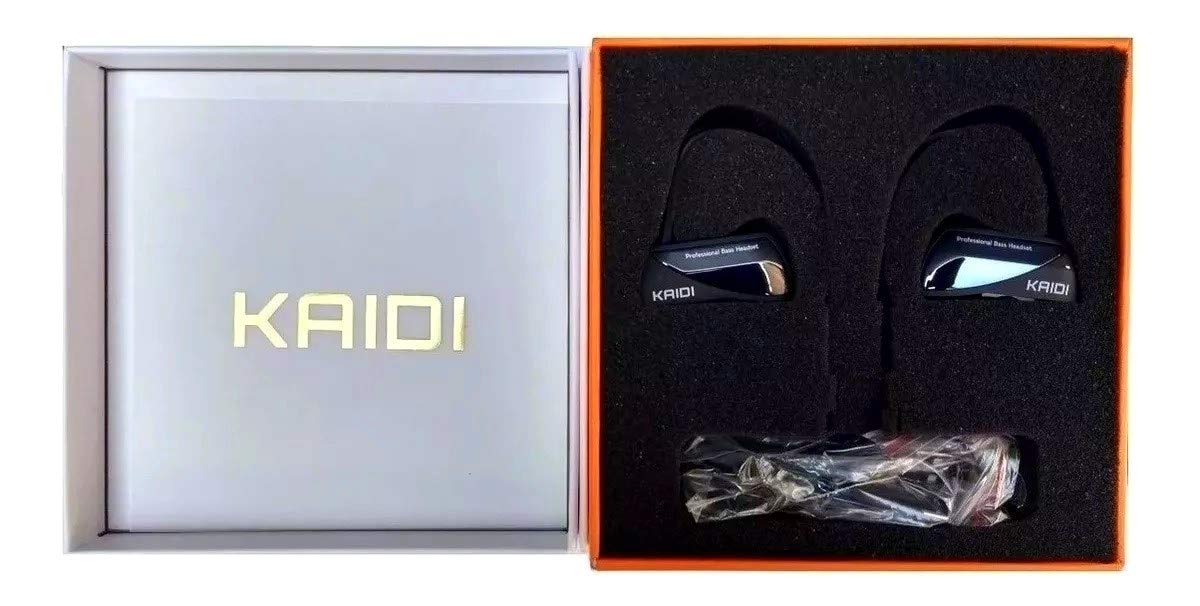
Image 2.1: KAIDI KD-780 Bluetooth Sports Earphones. This image displays the overall design of the earphones, highlighting the ear-hook style and the connecting cable.
2.1 Package Contents
Upon opening the package, ensure all items are present:
- KAIDI KD-780 Bluetooth Sports Earphones
- USB Charging Cable (Type-C)
- Multiple sizes of ear tips
- User Manual

Image 2.2: KAIDI KD-780 Earphones and Accessories. This image shows the earphones along with the included USB charging cable and various ear tip sizes.
3. Setup
3.1 Charging the Earphones
- Locate the USB Type-C charging port on the earphones.
- Connect the provided USB charging cable to the earphones and a compatible USB power source (e.g., computer USB port, wall adapter with DC 5V output).
- The indicator light will illuminate during charging.
- Charging typically takes less than 2 hours for a full charge. The indicator light will change or turn off once charging is complete.
Note: Ensure the earphones are fully charged before first use to maximize battery life.
3.2 Bluetooth Pairing
- Power On: Press and hold the Multi-function button (usually the center button) on the earphones until the indicator light flashes blue and red, indicating pairing mode.
- Activate Bluetooth: On your smartphone or Bluetooth-enabled device, go to the Bluetooth settings and turn on Bluetooth.
- Search for Devices: Your device will automatically search for nearby Bluetooth devices.
- Select "KD-780": From the list of available devices, select "KD-780" to connect.
- Confirmation: Once successfully paired, the earphone indicator light will flash blue slowly, and you may hear an audible confirmation.
Note: The earphones will automatically attempt to reconnect to the last paired device when powered on, if the device's Bluetooth is active and within range (up to 10 meters).
4. Operating Instructions
4.1 Power On/Off
- Power On: Press and hold the Multi-function button for approximately 3 seconds until the blue indicator light flashes.
- Power Off: Press and hold the Multi-function button for approximately 5 seconds until the red indicator light flashes and then turns off.
4.2 Music Playback
- Play/Pause: Press the Multi-function button once.
- Next Track: Press and hold the Volume Up (+) button.
- Previous Track: Press and hold the Volume Down (-) button.
- Volume Up: Press the Volume Up (+) button briefly.
- Volume Down: Press the Volume Down (-) button briefly.
4.3 Call Management
- Answer/End Call: Press the Multi-function button once during an incoming call or during an active call.
- Reject Call: Press and hold the Multi-function button for approximately 2 seconds during an incoming call.
- Redial Last Number: Double-press the Multi-function button when not on a call.
5. Maintenance
Proper maintenance ensures the longevity and optimal performance of your earphones.
5.1 Cleaning
- Gently wipe the earphones with a soft, dry, lint-free cloth.
- For ear tips, remove them and clean with a mild soap solution if necessary, then rinse thoroughly and dry completely before reattaching.
- Do not use harsh chemicals, cleaning solvents, or strong detergents.
5.2 Storage
- Store the earphones in a cool, dry place away from direct sunlight and extreme temperatures.
- Avoid storing with sharp objects that could damage the cables or earphone body.
5.3 Water Resistance (IPX7)
The KAIDI KD-780 earphones are rated IPX7 waterproof, meaning they can withstand immersion in water up to 1 meter for 30 minutes. This makes them resistant to sweat and rain. However, they are not designed for swimming or prolonged underwater use. Ensure the charging port cover is securely closed before exposure to water.
6. Troubleshooting
| Problem | Possible Solution |
|---|---|
| Earphones do not power on. | Ensure the earphones are fully charged. Connect to a power source and check the charging indicator. |
| Cannot pair with device. |
|
| No sound or low volume. |
|
| Intermittent connection. |
|
7. Specifications
| Feature | Detail |
|---|---|
| Model | KD-780 |
| Connectivity Technology | Bluetooth |
| Earphone Form Factor | In-Ear (Intra-auricular) with Ear Hooks |
| Waterproof Rating | IPX7 |
| Battery Capacity | 120 mAh |
| Playtime | 8-10 hours |
| Standby Time | Approximately 300 hours |
| Charging Time | Less than 2 hours |
| Charging Voltage | DC 5V |
| Frequency Range | 20Hz-20KHz |
| Operation Range | Up to 10 meters (33 feet) |
| Weight | 19.8g |
| Charging Port | USB Type-C |

Image 7.1: KAIDI KD-780 Product Box with Specifications. This image shows the product packaging, which lists key features and specifications such as IPX7 waterproof rating, battery capacity, and playtime.
8. Warranty and Support
This product is covered by a standard manufacturer's warranty. For specific warranty details, please refer to the documentation provided with your purchase or contact the retailer. If you encounter any issues or require technical assistance, please contact the seller or manufacturer's customer support with your purchase information.
Please retain your proof of purchase for any warranty claims.


