
1. Introduction
Welcome to the user manual for your Fujitsu FMV LIFEBOOK A574 laptop. This guide provides essential information to help you set up, operate, maintain, and troubleshoot your device. Please read this manual thoroughly to ensure proper use and to maximize the performance and longevity of your laptop.
2. Setup
2.1 Unboxing and Initial Inspection
Carefully remove the laptop and all accessories from the packaging. Verify that all components are present: the Fujitsu FMV LIFEBOOK A574 laptop, AC adapter, and power cord. Inspect the laptop for any physical damage. If any damage is found or components are missing, contact your vendor immediately.
2.2 Connecting Power
- Connect the AC adapter to the power input port on the side of the laptop.
- Plug the power cord into the AC adapter.
- Plug the other end of the power cord into a grounded electrical outlet.
The laptop battery will begin charging automatically. It is recommended to fully charge the battery before initial use.
2.3 Initial Boot and Windows 10 Setup
Press the power button to turn on the laptop. The system will guide you through the initial setup process for Windows 10. Follow the on-screen instructions to configure language, region, user accounts, and privacy settings.
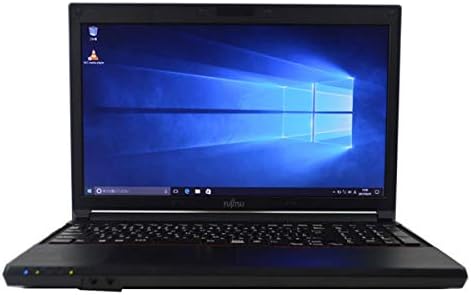
Figure 2.3.1: Fujitsu FMV LIFEBOOK A574 laptop powered on, displaying the Windows 10 desktop.
2.4 Connecting to Wi-Fi
- After Windows 10 setup, click the Wi-Fi icon in the taskbar (usually in the bottom-right corner).
- Select your desired wireless network from the list of available networks.
- Click 'Connect' and enter the network security key (password) if prompted.
- Once connected, the Wi-Fi icon will indicate an active connection.
2.5 Bluetooth Pairing
- Go to Settings > Devices > Bluetooth & other devices.
- Ensure Bluetooth is turned On.
- Put your Bluetooth device into pairing mode.
- Click Add Bluetooth or other device and select Bluetooth.
- Select your device from the list and follow any on-screen prompts to complete pairing.
3. Operating Instructions
3.1 Keyboard and Touchpad
The Fujitsu FMV LIFEBOOK A574 features a full-size keyboard with a dedicated numeric keypad for efficient data entry. The integrated touchpad allows for precise cursor control and supports multi-touch gestures.

Figure 3.1.1: Detailed view of the laptop's keyboard and touchpad area.
Keyboard Functions:
- Function Keys (F1-F12): Often combined with the 'Fn' key for special functions like brightness control, volume adjustment, Wi-Fi toggle, etc.
- Numeric Keypad: Provides a convenient layout for number input, similar to a desktop keyboard.
Touchpad Gestures:
- Single Tap: Left-click.
- Two-Finger Tap: Right-click.
- Two-Finger Scroll: Scroll up or down.
- Pinch-to-Zoom: Zoom in or out on content.
3.2 Optical Drive (DVDROM)
Your laptop is equipped with a DVDROM drive, allowing you to read CDs and DVDs.

Figure 3.2.1: The optical drive tray extended from the side of the laptop.
Using the Optical Drive:
- Press the eject button on the drive or right-click the drive icon in 'This PC' and select 'Eject'.
- Carefully place a CD or DVD onto the tray with the label side facing up.
- Gently push the tray back into the laptop until it clicks into place.
- The disc content should automatically appear or can be accessed via 'This PC'.
3.3 USB Ports and Audio Output
The laptop includes multiple USB ports for connecting peripherals such as external hard drives, mice, and keyboards. A 3.5mm audio jack is provided for connecting headphones or external speakers.
3.4 Pre-installed Office Software
This laptop comes with office software pre-installed, enabling you to perform productivity tasks such as word processing, spreadsheets, and presentations immediately.
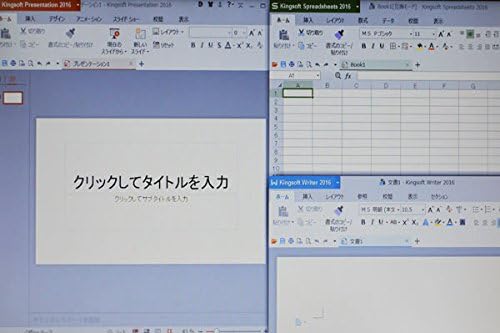
Figure 3.4.1: The laptop display showing multiple office applications running simultaneously.
4. Maintenance
4.1 Cleaning Instructions
- Screen: Use a soft, lint-free cloth slightly dampened with water or a screen cleaner. Avoid harsh chemicals.
- Keyboard and Casing: Use a soft, dry cloth. For stubborn dirt, a slightly damp cloth with mild soap solution can be used, ensuring no liquid enters the device.
- Ports: Use compressed air to remove dust from ports.
4.2 Software Updates
Regularly update your Windows 10 operating system and drivers to ensure optimal performance, security, and compatibility. Go to Settings > Update & Security > Windows Update to check for and install updates.
4.3 Battery Care
- Avoid fully discharging the battery frequently.
- Store the laptop in a cool, dry place when not in use for extended periods.
- If storing for a long time, ensure the battery is charged to about 50-60%.
5. Troubleshooting
This section addresses common issues you might encounter with your Fujitsu FMV LIFEBOOK A574.
5.1 No Power
- Ensure the AC adapter is securely connected to both the laptop and a working power outlet.
- Check if the power outlet is functional by plugging in another device.
- Try a different power outlet.
5.2 Wi-Fi Not Connecting
- Verify that Wi-Fi is enabled in Windows settings.
- Restart your wireless router and modem.
- Ensure you are entering the correct Wi-Fi password.
- Try connecting to a different Wi-Fi network if available.
5.3 Slow Performance
- Close unnecessary applications running in the background.
- Check for and install any pending Windows updates.
- Run a disk cleanup and defragmentation (for HDD).
- Scan for malware or viruses using reputable antivirus software.
If you continue to experience issues, please refer to the official Fujitsu support website or contact their customer service for further assistance.
6. Specifications
Below are the key technical specifications for the Fujitsu FMV LIFEBOOK A574 laptop:
| Feature | Specification |
|---|---|
| Brand | Fujitsu |
| Model Name | A574 |
| Form Factor | Laptop |
| Operating System | Windows 10 |
| CPU Type | Intel Core i3 4000M (4th Gen) |
| RAM Capacity | 8 GB DDR3 |
| Storage | 500 GB HDD |
| Display Size | 15.6 inches |
| Resolution | 1366 x 768 pixels |
| Graphics Processor | Intel Integrated Graphics |
| Optical Drive | DVDROM |
| Wireless Connectivity | Wi-Fi, Bluetooth |
| Ports | USB, Headphone Jack |
7. Warranty and Support
Your Fujitsu FMV LIFEBOOK A574 laptop is covered by a manufacturer's warranty. Please refer to the warranty card included with your product for specific terms and conditions, including warranty duration and coverage details.
For technical support, driver downloads, or service inquiries, please visit the official Fujitsu support website or contact their customer service department. Keep your product's serial number handy when seeking support.
Fujitsu Support Website: https://www.fujitsu.com/global/support/


