
1. Product Overview
The ASAKUKI 300ml Essential Oil Diffuser is a versatile 5-in-1 ultrasonic device designed to enhance your environment. It functions as an aromatherapy diffuser, humidifier, and air purifier, featuring LED lighting and an automatic shut-off for safety. This manual provides instructions for safe and effective use of your diffuser.

Image 1.1: ASAKUKI 300ml Essential Oil Diffuser in operation, showing mist output.
2. Safety Guidelines
- Always use purified water in the diffuser.
- Avoid direct skin contact with undiluted essential oils.
- Keep the device out of reach of children and pets.
- Be aware that certain essential oils (e.g., Eucalyptus, Jasmine, Chamomile, Lavender, Lemongrass) may cause skin irritation or allergic reactions if not used properly.
- Ensure proper ventilation during use.
- Do not exceed the maximum water fill line (300ml).
- Unplug the device before cleaning or refilling.
3. Setup Instructions
Follow these steps to set up your ASAKUKI Essential Oil Diffuser:
- Plug in the Power Adapter: Connect the power adapter to the diffuser's power input port.
- Add Water: Lift the aroma diffuser lid and fill the water tank with purified water. Do not exceed the 300ml maximum fill line.
- Add Essential Oil: Add 2-3 drops of your preferred essential oil directly into the water tank.
- Replace Cover: Carefully place the lid back onto the diffuser, ensuring it is securely seated.
- Connect to Power: Plug the power adapter into a wall outlet.

Image 3.1: Visual guide for setting up the diffuser, including connecting power, adding water, replacing the lid, and starting operation.
4. Operating Instructions
Your diffuser features two control buttons: 'LIGHT' and 'MIST'.
4.1. Mist Control
- Short Press 'MIST' Button: Press briefly to turn on the mist and cycle through timer settings: ON (continuous), 1 hour, 3 hours, 6 hours. The diffuser will automatically shut off when the timer expires or water runs out.
- Long Press 'MIST' Button (2 seconds): Press and hold for 2 seconds to adjust mist intensity. One beep indicates weak mist mode (up to 10 hours runtime), and two beeps indicate strong mist mode (up to 6 hours runtime).

Image 4.1: Illustration of the two available mist modes and their approximate runtimes.
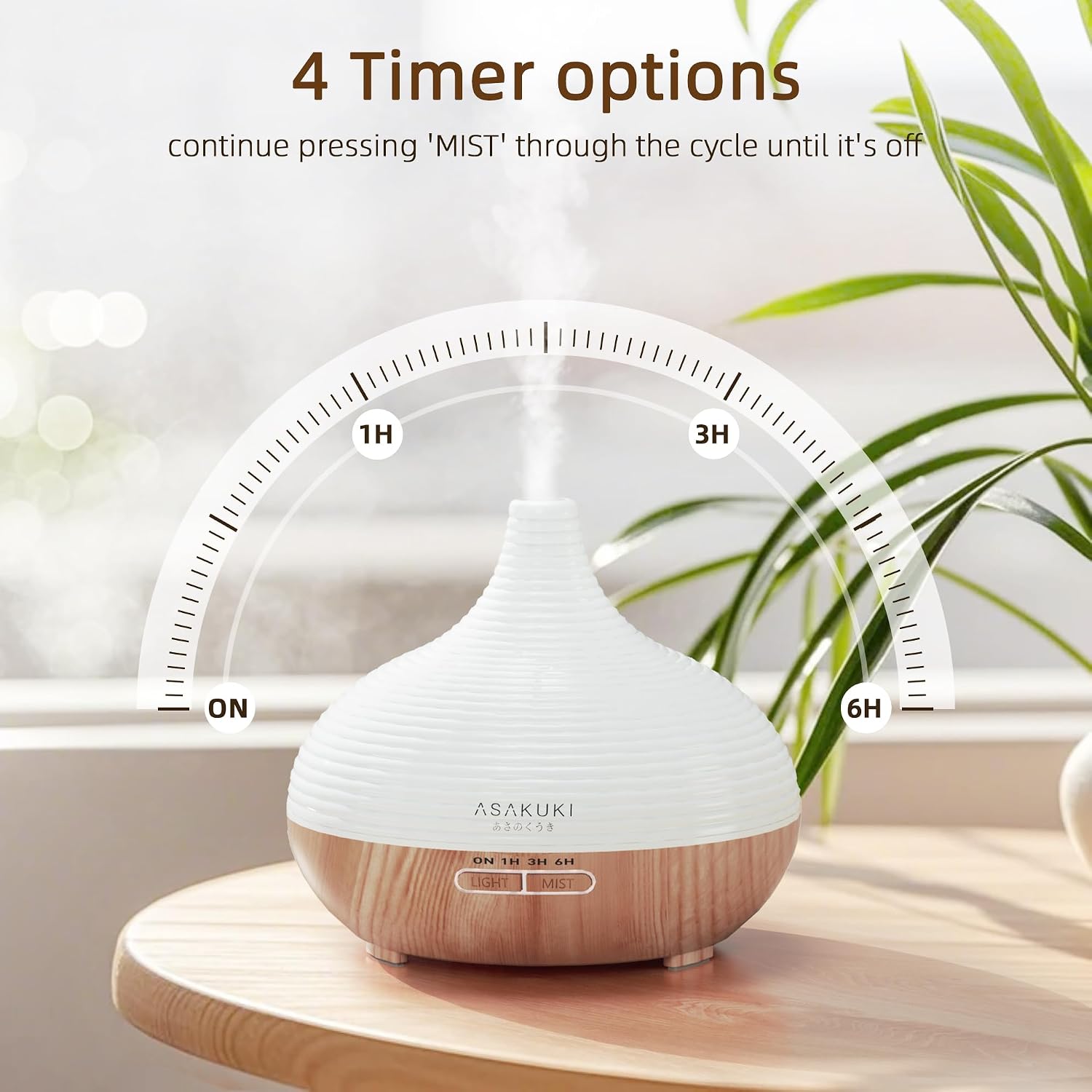
Image 4.2: Visual representation of the diffuser's timer settings.
4.2. Light Control
- 1st Short Press 'LIGHT' Button: Cycles through 14 LED color options.
- 2nd Short Press 'LIGHT' Button: Fixes the light at the current color.
- 3rd Short Press 'LIGHT' Button: Fixes the light at another color.
- Long Press 'LIGHT' Button: Press and hold to turn off the light function.

Image 4.3: Examples of the 14 LED color options available on the diffuser.

Image 4.4: Detailed view of the 'LIGHT' and 'MIST' button operations.
5. Maintenance
Regular cleaning ensures optimal performance and extends the lifespan of your diffuser.
5.1. Daily Maintenance
- After each use, unplug the diffuser and empty any remaining water from the tank.
- Wipe the inside of the water tank with a clean, soft cloth.
5.2. Weekly Cleaning
- Unplug the diffuser and remove the lid.
- Pour 1 cup of distilled white vinegar into the water tank.
- Let it sit for 30-60 minutes to dissolve any mineral buildup or essential oil residue.
- Carefully drain the vinegar from the tank, avoiding the air outlet.
- Wipe the tank and ultrasonic plate with a soft cloth or cotton swab.
- Rinse the tank with clean water and wipe dry.
- Do not immerse the base of the diffuser in water.
6. Troubleshooting
If you encounter issues with your diffuser, please refer to the following common solutions:
| Problem | Possible Cause | Solution |
|---|---|---|
| No mist or weak mist | Insufficient water; water level too high; mineral buildup on ultrasonic plate; diffuser not plugged in. | Ensure water is between min and max lines (preferably slightly below max). Clean the ultrasonic plate. Check power connection. |
| Diffuser not turning on | No power; water tank empty (automatic shut-off activated). | Check power adapter connection and wall outlet. Refill water tank. |
| Light not working | Light function turned off; electrical issue. | Press the 'LIGHT' button to activate. If problem persists, contact customer support. |
| Unusual noise | Water level too low; diffuser not on a flat surface. | Add water. Place diffuser on a stable, flat surface. |
7. Specifications
- Model Number: 100-DF003
- Water Tank Capacity: 300 Milliliters
- Material: BPA-free PP plastic (main body), Wood-grain finish (base)
- Power Source: Corded Electric
- Wattage: 220 watts
- Runtime: Up to 6 hours (strong mist), Up to 10 hours (weak mist)
- Automatic Shutoff: Yes (waterless auto shut-off)
- Light Source: 14-Color LED
- Coverage Area: Approximately 55.74 square meters (600 sq ft)
- Dimensions (L x W x H): 6.61" x 5.91" x 6.61"

Image 7.1: Summary of key diffuser specifications.
8. Warranty and Support
ASAKUKI is committed to customer satisfaction. While specific warranty details are not provided in this manual, if you encounter any issues with your diffuser or require assistance, please contact ASAKUKI customer support. Your satisfaction is our priority.
For support, please refer to the contact information provided with your purchase or visit the official ASAKUKI website.


