
Introduction
This manual provides instructions for the HCDZ Replacement Remote Control, designed for use with various Aiwa Compact Disc Stereo Systems. This remote control offers direct functionality without the need for programming.
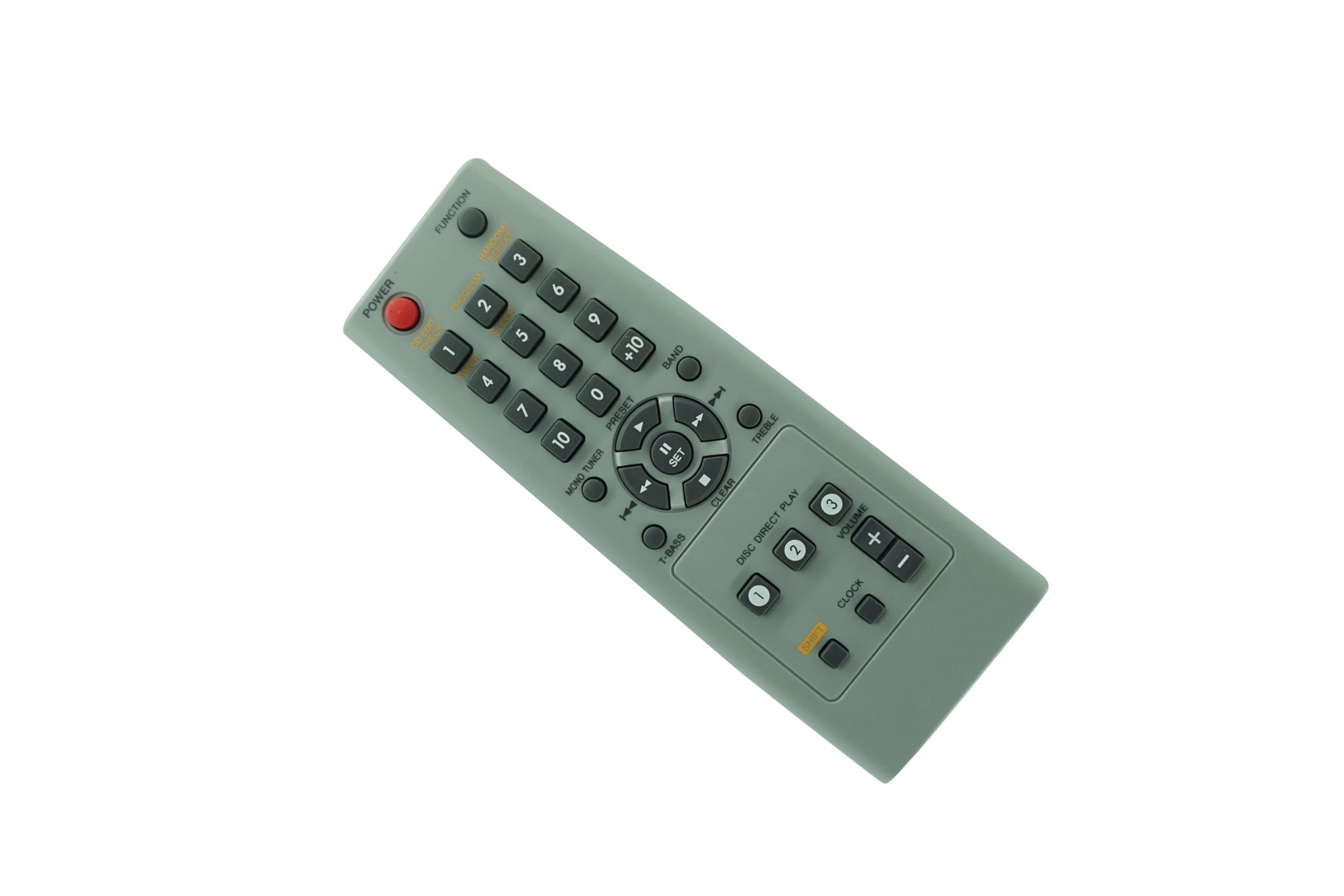
Figure 1: Front view of the HCDZ Replacement Remote Control.
Setup
Battery Installation
The remote control requires two AAA batteries (not included). Follow these steps to install the batteries:
- Locate the battery compartment cover on the back of the remote control.
- Slide the cover downwards or press the latch and lift to open the compartment.
- Insert two AAA batteries, ensuring the positive (+) and negative (-) terminals align correctly with the markings inside the compartment.
- Replace the battery compartment cover by sliding it back into place until it clicks securely.

Figure 2: Battery compartment with cover removed, showing battery placement.
Once batteries are installed, the remote control is ready for use. No programming is required.
Operating Instructions
This HCDZ replacement remote control functions identically to the original remote for compatible Aiwa Compact Disc Stereo Systems. Simply point the remote control towards your stereo system and press the desired function button.
- Power Button: Turns the stereo system on or off.
- Volume Up/Down: Adjusts the audio volume.
- Track Skip/Search: Navigates between tracks on a CD or radio stations.
- Play/Pause/Stop: Controls CD playback.
- Function/Source: Switches between different audio sources (e.g., CD, Tuner, Aux).
- Note: Specific button functions may vary slightly depending on your Aiwa stereo system model.
Maintenance
Battery Replacement
Replace batteries when the remote control's response becomes sluggish or stops functioning. Always replace both batteries simultaneously with new AAA batteries. Do not mix old and new batteries, or different types of batteries.
Cleaning
To clean the remote control, wipe it with a soft, dry cloth. Avoid using abrasive cleaners, solvents, or wet cloths, as these can damage the remote's surface or internal components.
Storage
If the remote control will not be used for an extended period, remove the batteries to prevent leakage and potential damage.
Troubleshooting
- Remote not responding:
- Ensure the remote is pointed directly at the stereo system's infrared receiver.
- Check if there are any obstructions between the remote and the stereo system.
- Replace the batteries with new AAA batteries, ensuring correct polarity.
- Some buttons not working:
- This remote is a direct replacement and does not require programming. If specific buttons are unresponsive, ensure the batteries are fresh.
- Verify that the function you are trying to control is supported by your specific Aiwa stereo system model.
- Short operating range:
- Replace the batteries. Low battery power can reduce the remote's effective range.
- Ensure there are no strong light sources (e.g., direct sunlight, fluorescent lights) interfering with the infrared signal.
Specifications
| Brand | HCDZ |
| Compatible Devices | Aiwa Compact Disc Stereo Systems (CX-N510, CX-N510G, CX-NA303, CX-N2100U, CX-N2700U, CX-N2700W) |
| Connectivity Technology | Infrared (IR) |
| Special Feature | No programming needed; works out of the package |
| Maximum Range | Approximately 10 meters (33 feet) |
| Battery Type | 2 x AAA batteries (not included) |
| Controller Type | Button Control |
Warranty and Support
Warranty Information
This HCDZ Replacement Remote Control comes with a 90-day warranty from the date of purchase. This warranty covers manufacturing defects. It does not cover damage caused by misuse, accidents, or unauthorized modifications.
Customer Support
For any questions or assistance regarding your HCDZ Replacement Remote Control, please refer to the seller's contact information on your purchase platform. Ensure you have your purchase details readily available.