
1. Introduction
Thank you for purchasing the SYMA S107H RC Helicopter. This manual provides essential information for the safe operation, setup, and maintenance of your new remote control helicopter. Please read this manual thoroughly before use to ensure proper function and to maximize your flying experience.
2. Safety Information
This product is suitable for users aged 14 years or above. It is not safe for users under the age of 14 to use without adult supervision.
Always operate the helicopter in a clear, open indoor space, away from obstacles, people, and pets. Ensure the helicopter is fully charged and the remote control batteries are fresh before each flight. Do not attempt to modify the helicopter or its components, as this may lead to malfunction or injury.
3. Package Contents
The SYMA S107H RC Helicopter package includes the following items:
- SYMA S107H RC Helicopter
- Remote Control Transmitter
- USB Charging Cable
- Spare Blades (if included in your specific package)
- Instruction Manual (this document)

Figure 1: Retail packaging of the SYMA S107H RC Helicopter, displaying the helicopter and remote control.
4. Product Overview
4.1 Helicopter Features
- Altitude Hold: Maintains a set height for stable hovering.
- Durable Construction: Built with a metal body and flexible blades for enhanced durability and safety.
- LED Lights: Bright LEDs for visibility in low-light conditions.
- 2 Speed Modes: Allows for varied flight experiences.
- Indoor Use: Designed for stable indoor flight.

Figure 2: The SYMA S107H RC Helicopter, showcasing its blue design and LED lights.
4.2 Remote Control Transmitter
The remote control transmitter operates on a 2.4 GHz frequency, providing a stable connection and a wider flight range of up to 65 feet. It features intuitive controls for easy operation.

Figure 3: Remote control diagram with labels for forward/backward, spin, up/down, and 1-key lift/land functions.
5. Setup
5.1 Remote Control Battery Installation
- Open the battery compartment on the back of the remote control.
- Insert four (4) AA batteries (not included), ensuring correct polarity (+/-).
- Close the battery compartment securely.
5.2 Charging the Helicopter
The helicopter includes a rechargeable 3.7V battery. Use the provided USB charging cable for charging.
- Connect the small end of the USB charging cable to the helicopter's charging port.
- Connect the larger end of the USB cable to a USB power source (e.g., computer USB port, USB wall adapter).
- The charging indicator light on the USB cable will illuminate during charging and turn off when fully charged.
- A full charge takes approximately 1 hour and provides about 5 minutes of flight time.
5.3 Pairing the Remote and Helicopter
- Ensure the helicopter is fully charged and turned off.
- Place the helicopter on a flat, level surface.
- Turn on the helicopter's power switch. The helicopter's indicator lights will flash.
- Turn on the remote control. The remote's indicator light will flash.
- Push the left joystick (throttle) all the way up, then pull it all the way down.
- Both the helicopter and remote control indicator lights will become solid, indicating successful pairing.
6. Operating Instructions
6.1 Basic Flight Controls
- 1-Key Lift/Land: Press the dedicated button on the remote for automatic takeoff or landing.
- Altitude Hold: After takeoff, the helicopter will automatically maintain its current altitude, allowing for easier control of direction.
- Throttle (Left Joystick): Push up to ascend, pull down to descend.
- Directional Control (Right Joystick):
- Push up to fly forward.
- Pull down to fly backward.
- Push left to rotate left.
- Push right to rotate right.
- Trim Control: Use the trim buttons on the remote to correct any drifting or tilting of the helicopter during flight. Adjust until the helicopter hovers steadily.

Figure 4: The SYMA S107H helicopter demonstrating its altitude hold feature, maintaining a stable hover.
6.2 Speed Modes
The SYMA S107H features two speed modes. Refer to your remote control for the specific button to switch between low and high speed settings. Low speed is recommended for beginners and indoor flying, while high speed offers a more responsive experience.
6.3 Indoor Flight Recommendations
This helicopter is designed for indoor use. Ensure you have sufficient space free from obstacles, ceiling fans, and open windows. Avoid flying near air vents or strong drafts, as these can affect stability.

Figure 5: An individual operating the SYMA S107H RC Helicopter indoors, highlighting its suitability for indoor environments.
7. Maintenance
7.1 Blade Replacement
In case of damage, the helicopter blades can be replaced. Follow these steps:
- Carefully remove the small screw securing the damaged blade.
- Remove the damaged blade.
- Place the new blade in position.
- Secure the new blade with the screw. Ensure the blade is free to rotate.
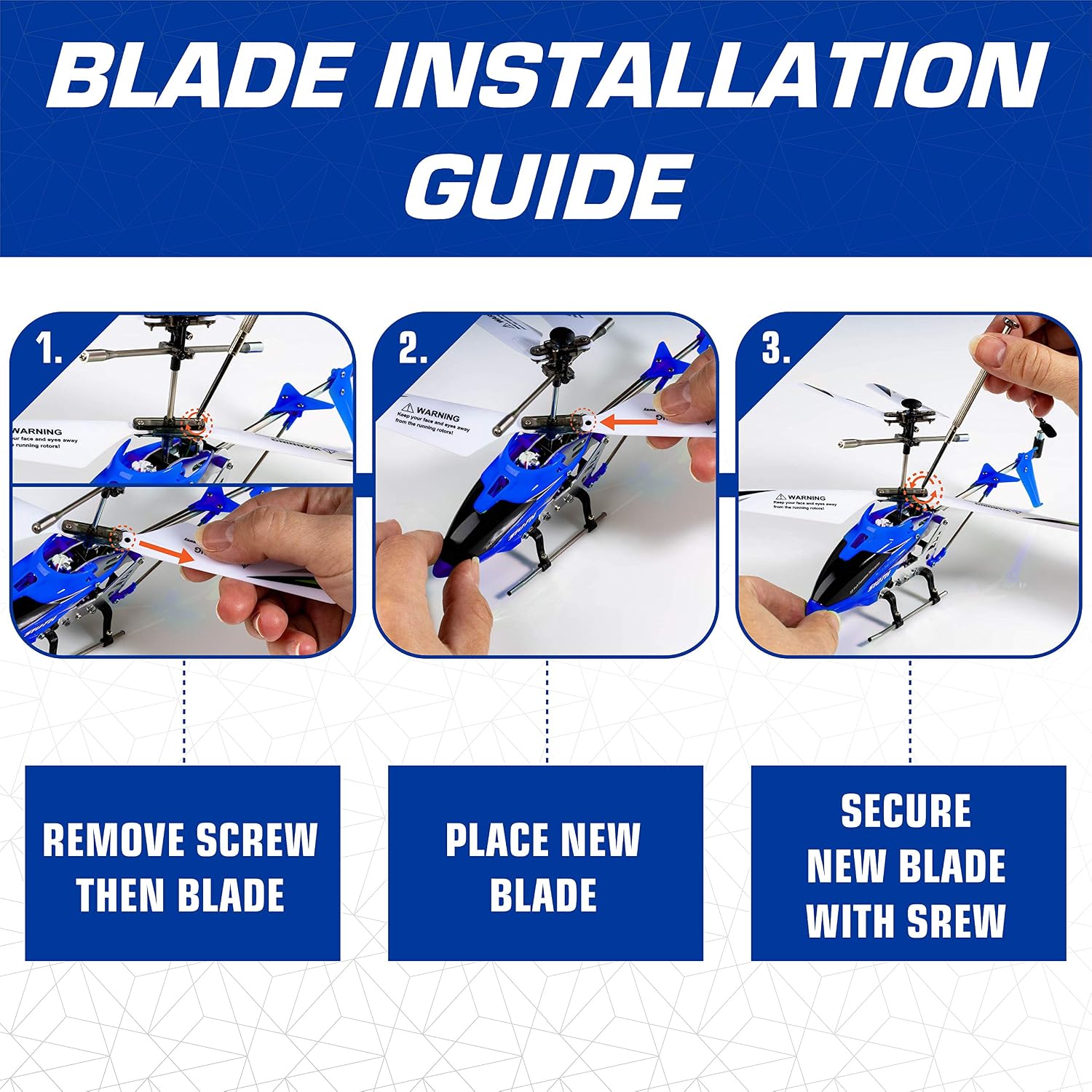
Figure 6: Visual guide for replacing the helicopter blades.
7.2 General Care
- Keep the helicopter and remote control clean and free from dust.
- Store in a cool, dry place away from direct sunlight and extreme temperatures.
- Do not immerse in water or other liquids.
- Regularly check for loose parts or damage.
8. Troubleshooting
If you encounter issues with your SYMA S107H RC Helicopter, please refer to the following common solutions:
| Problem | Possible Cause | Solution |
|---|---|---|
| Helicopter does not respond to remote. | Not paired, low remote batteries, low helicopter battery. | Re-pair the helicopter and remote. Replace remote batteries. Charge helicopter battery. |
| Helicopter drifts during flight. | Needs trim adjustment. | Use the trim buttons on the remote to stabilize flight. |
| Helicopter does not lift off. | Low helicopter battery, damaged blades. | Charge helicopter battery. Inspect and replace damaged blades. |
| Short flight time. | Battery not fully charged, aging battery. | Ensure full charge cycle. Consider replacing battery if performance degrades significantly over time. |
For more detailed troubleshooting, please refer to the official Troubleshooting Guide (PDF).
9. Specifications
| Feature | Detail |
|---|---|
| Brand | SYMA |
| Model Number | S107H |
| Dimensions | 8.6" L x 1.5" W x 4.1" H (Helicopter) |
| Material Type | Metal |
| Power Source | Battery Powered |
| Helicopter Battery | Rechargeable 3.7V Lithium-Ion Polymer |
| Remote Control Batteries | 4 AA batteries (not included) |
| Charging Time | Approx. 1 hour |
| Flight Time | Approx. 5 minutes |
| Control Range | Up to 65 feet |
| Operation Mode | Remote Control |
| Indoor/Outdoor Usage | Indoor |
| Recommended Age | 8+ years (Manufacturer Minimum Age: 14 years) |
10. Warranty Information
The SYMA S107H RC Helicopter comes with a 2 Year Limited Warranty from the manufacturer. Please retain your proof of purchase for warranty claims. For specific terms and conditions, refer to the warranty documentation included with your product or contact SYMA customer support.
11. Customer Support
For any questions, technical assistance, or support regarding your SYMA S107H RC Helicopter, please contact SYMA customer service:
- Phone: +1 (718) 312-0558
- Email: usa@symatoy.com (for USA customers)
SYMA is committed to providing high-quality products and customer satisfaction. They offer 24/7 customer support to assist you.


