
Introduction
This manual provides instructions for the proper use and maintenance of your MEDca Mini ITC (In-The-Canal) Hearing Amplifier Set. This device is designed to provide personal sound amplification, enhancing your ability to hear sounds clearly. It features digital amplification, a compact design for discreet wear, and digital volume control for user convenience.

Image: The MEDca Mini ITC Hearing Amplifier, highlighting its compact design.
Package Contents
Please verify that all items listed below are included in your package:
- Pair of In-the-Canal (ITC) Hearing Devices
- Batteries (x4)
- Ear Domes (x3 sizes)
- Ear Tip Adapters (x2)
- Key for Volume Control (x2)
- Cleaning Brush
- Hard zippered case
- Instruction Manual
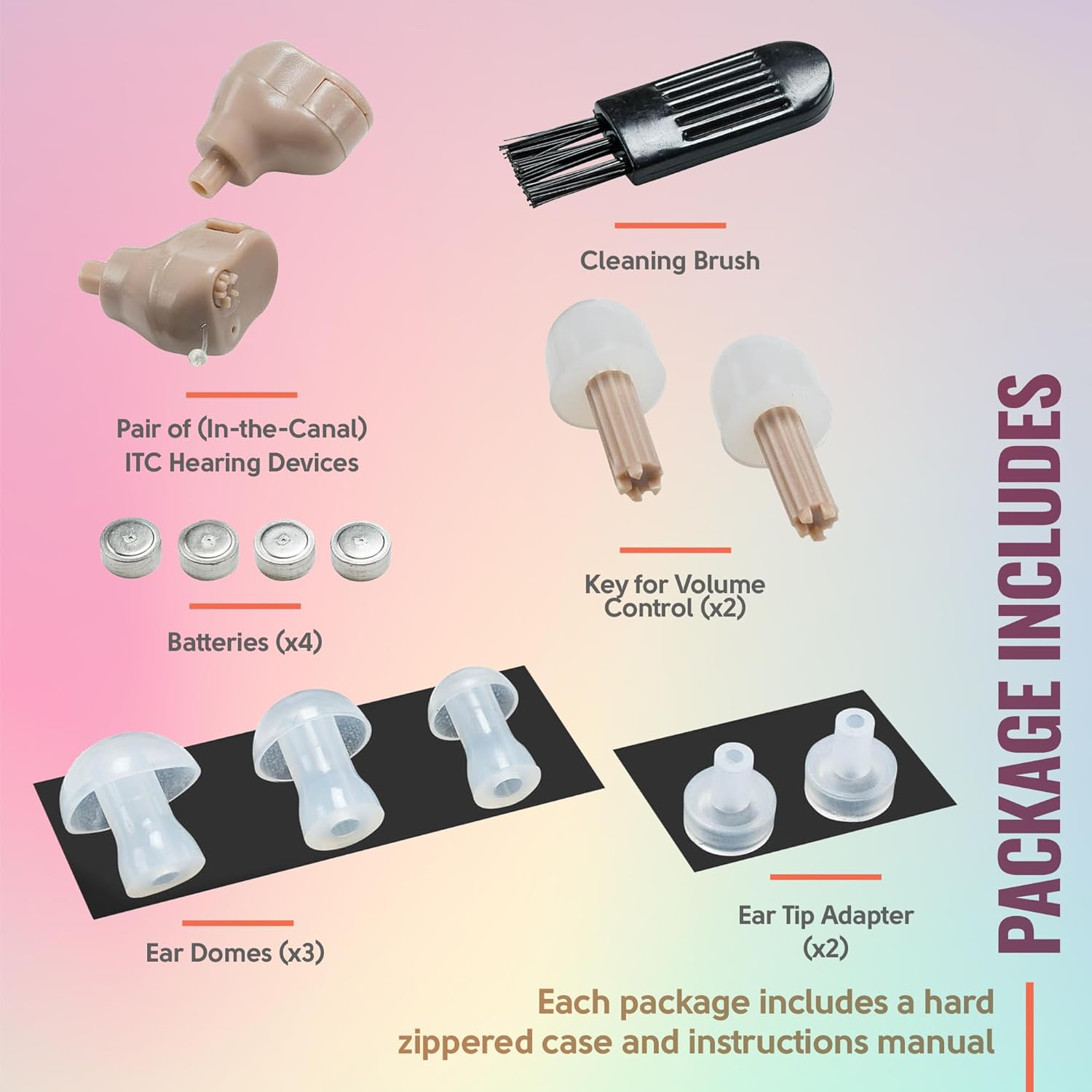
Image: All components included in the MEDca Mini ITC Hearing Amplifier Set.
Setup
1. Battery Installation
- Gently open the battery compartment door on the hearing amplifier.
- Insert one of the provided Lithium Polymer batteries, ensuring the positive (+) side faces the correct direction as indicated inside the compartment.
- Close the battery compartment door securely.

Image: Battery insertion into the hearing amplifier.
2. Ear Dome Selection and Attachment
Select an ear dome size that provides a comfortable and secure fit in your ear canal. A proper fit is essential for optimal sound quality and to prevent feedback.
- Gently push the chosen ear dome onto the sound outlet of the hearing amplifier until it is firmly attached.
- Test different sizes to find the best fit for each ear.
3. Device Insertion
- Hold the amplifier with the ear dome facing your ear canal.
- Gently insert the amplifier into your ear canal until it sits comfortably and discreetly. The small pull-string should be accessible for easy removal.

Image: Proper insertion of the hearing amplifier into the ear canal.
Operating Instructions
1. Power On/Off
- To turn the device on, ensure the battery compartment is fully closed.
- To turn the device off, gently open the battery compartment door slightly. This conserves battery life when not in use.
2. Volume Adjustment
The hearing amplifier features digital volume control. Use the provided volume key to adjust the sound level.
- Insert the tip of the volume key into the small adjustment hole on the device.
- Rotate the key clockwise to increase the volume.
- Rotate the key counter-clockwise to decrease the volume.
- Adjust the volume to a comfortable listening level. Avoid excessively high volumes to prevent potential hearing discomfort.
Maintenance
1. Cleaning
Regular cleaning helps maintain optimal performance and hygiene.
- Use the provided cleaning brush to gently remove earwax or debris from the ear dome and sound outlet.
- Wipe the body of the amplifier with a soft, dry cloth. Do not use water or cleaning solutions directly on the device.
- Clean your devices daily, especially after use.
2. Battery Replacement
Replace batteries when the sound becomes weak or the device stops functioning. Refer to the 'Battery Installation' section for instructions.
3. Storage
When not in use, store the hearing amplifiers in their hard zippered case in a cool, dry place, away from direct sunlight and moisture. Remove batteries if storing for an extended period.
Troubleshooting
| Problem | Possible Cause | Solution |
|---|---|---|
| No sound or weak sound | Dead battery, incorrect battery insertion, clogged ear dome/sound outlet, low volume setting. | Replace battery, re-insert battery correctly, clean ear dome/sound outlet, increase volume. |
| Whistling or feedback sound | Improper fit in ear, earwax buildup in ear canal, device not inserted deeply enough. | Try a different ear dome size for a tighter seal, clean ear canal, re-insert device properly. |
| Intermittent sound | Loose battery, dirty battery contacts, moisture. | Ensure battery is secure, clean battery contacts with a dry cotton swab, ensure device is dry. |
Specifications
- Model Name: JH-907V4g
- Product Dimensions: 0.39 x 0.39 x 0.39 inches
- Item Weight: 2.11 ounces
- Power Source: Battery Powered (2 Lithium Polymer batteries required, included)
- Style: Both Ear (Pair)
- Color: Beige
- Manufacturer: MED ca
Warranty and Support
For warranty information or technical support, please refer to the documentation included with your product or visit the official MEDca website. Contact details for customer service are typically provided on the manufacturer's packaging or website.