
1. Introduction
The BSIDE 600A Digital Clamp Multimeter is a versatile and reliable instrument designed for measuring AC current, AC/DC voltage, resistance, continuity, capacitance, and frequency. It features True RMS measurement, auto-ranging, non-contact voltage (NCV) detection, inrush current measurement, data hold, peak hold, a flashlight, and backlight for enhanced usability. This manual provides essential information for safe and effective operation of the device.
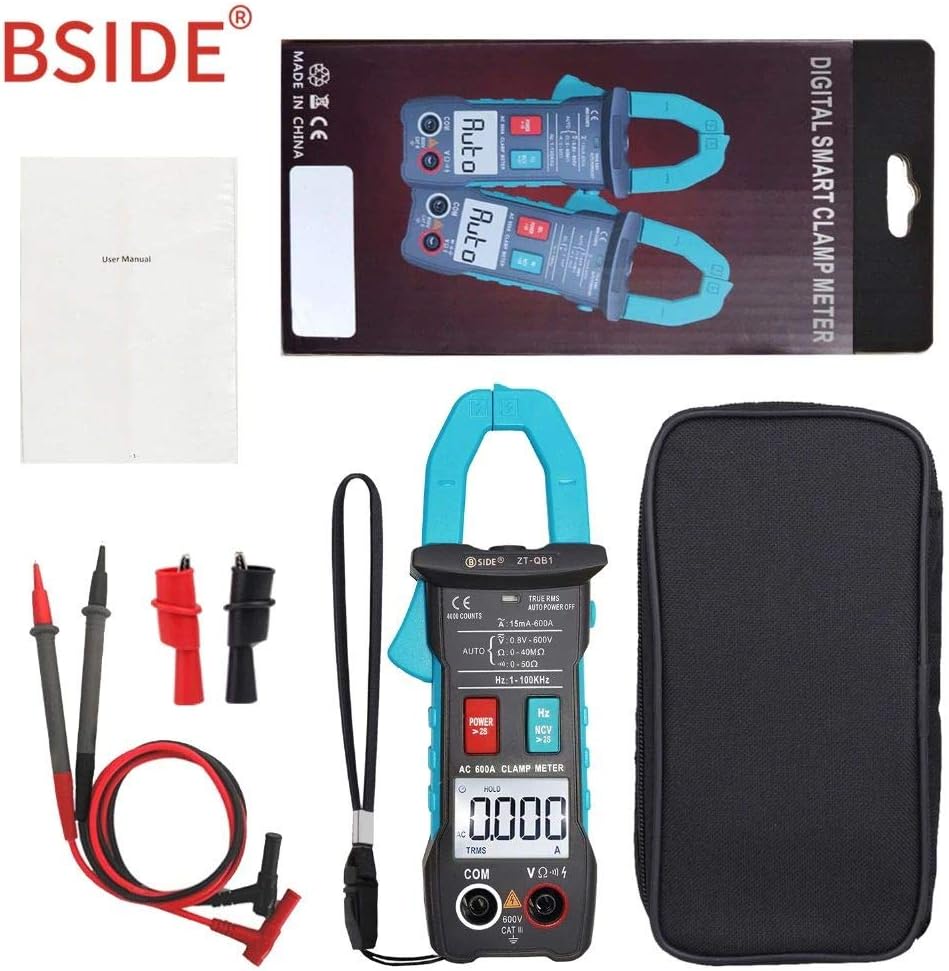
Image 1: The BSIDE 600A Digital Clamp Multimeter shown with its included test leads, carrying case, and user manual.
2. Safety Information
Please read and understand all safety information before operating this multimeter. Failure to follow these instructions may result in electric shock, fire, or damage to the meter or the equipment under test.
- Always ensure the test leads are in good condition and properly connected before making any measurements.
- Do not apply voltage or current that exceeds the maximum rated values for the meter.
- Exercise extreme caution when working with live circuits. Voltages above 30V AC RMS, 42V peak, or 60V DC pose a shock hazard.
- Before measuring current with the clamp, ensure the circuit is de-energized and the clamp jaws are fully closed around a single conductor.
- Replace batteries immediately when the low battery indicator appears to ensure accurate readings.
- Do not operate the meter if it appears damaged or if the case is open.
- This device features double insulation protection, enhancing user safety by providing an additional layer of insulation beyond basic insulation.

Image 2: The BSIDE 600A Digital Clamp Multimeter showcasing its double insulation protection feature, which enhances user safety.
3. Product Overview
The BSIDE 600A Digital Clamp Multimeter is designed for ease of use and accuracy. Key components include the clamp jaws for current measurement, the display screen, function buttons, and input terminals for test leads.

Image 3: A detailed front view of the BSIDE 600A Digital Clamp Multimeter, showing the clamp jaws, display, function buttons, and input terminals, along with the red and black test leads.
3.1 Key Features
- 600A AC Current Measurement: Measures AC current without breaking the circuit.
- Automatic Identification: Automatically detects measurement parameters and selects the appropriate range.
- Inrush Current Test: Accurately captures inrush current.
- Peak Hold Function: Holds the peak value of a measurement.
- True RMS: Provides accurate readings for non-sinusoidal waveforms.
- NCV (Non-Contact Voltage) Detection: Detects AC voltage without physical contact.
- Flashlight & Backlight: Illuminates the measurement area and display in low-light conditions.
- Auto Power Off: Conserves battery life.

Image 4: The BSIDE 600A Digital Clamp Multimeter's display, illustrating various function icons such as AC/DC Voltage, AC Current, Resistance, Capacitance, Continuity, Frequency, True RMS, NCV, Data Hold, Inrush Current, Auto Power Off, Flashlight, and Peak Hold.
4. Setup
4.1 Battery Installation
- Ensure the multimeter is powered off.
- Locate the battery compartment cover on the back of the device.
- Use a screwdriver to open the battery compartment.
- Insert two 1.5V AAA batteries, observing the correct polarity (+/-).
- Replace the battery compartment cover and secure it with the screw.

Image 5: The open battery compartment of the BSIDE 600A Digital Clamp Multimeter, showing the slots for two AAA batteries and a warning label regarding battery replacement.
4.2 Connecting Test Leads
For voltage, resistance, continuity, and capacitance measurements, connect the test leads:
- Insert the black test lead into the 'COM' (common) input jack.
- Insert the red test lead into the 'VΩHz' input jack.
5. Operating Instructions
The BSIDE 600A Digital Clamp Multimeter features automatic identification for most measurement types, simplifying operation. Press the 'POWER' button for more than 2 seconds to turn the device on or off.
5.1 AC Current Measurement (Clamp)
- Ensure the meter is in AC current mode (indicated by 'AC' on the display).
- Open the clamp jaws by pressing the trigger.
- Enclose only one conductor of the circuit within the clamp jaws. Ensure the jaws are fully closed.
- Read the AC current value on the display.

Image 6: The BSIDE 600A Digital Clamp Multimeter actively measuring AC current by clamping its jaws around a single electrical conductor, displaying the reading on its screen.
5.2 Voltage Measurement (AC/DC)
- Connect the test leads as described in Section 4.2.
- The meter will automatically detect AC or DC voltage.
- Connect the test probes in parallel to the circuit or component you wish to measure.
- Read the voltage value on the display.
5.3 Resistance, Continuity, and Capacitance Measurement
- Connect the test leads as described in Section 4.2.
- Ensure the circuit or component under test is de-energized before connecting the probes.
- Connect the test probes across the component. The meter will automatically identify the measurement type.
- For continuity, if resistance is less than 30Ω, the buzzer will sound.
5.4 Frequency Measurement
- Connect the test leads as described in Section 4.2.
- Connect the test probes to the circuit where frequency needs to be measured.
- Read the frequency value in Hertz (Hz) or Kilohertz (kHz) on the display.
5.5 NCV (Non-Contact Voltage) Detection
- Press the 'Hz NCV' button for more than 2 seconds to activate NCV mode.
- Bring the top of the clamp meter near the conductor or outlet.
- The meter will indicate the presence of AC voltage through an audible beep and visual indicator.
5.6 Inrush Current Test
- Ensure the meter is in AC current mode.
- Press the 'POWER' button briefly to activate the Inrush function.
- Clamp the jaws around the single conductor of the device you want to test as it starts up.
- The meter will capture and display the peak inrush current.
5.7 Data Hold and Peak Hold
- Data Hold: Press the 'HOLD' button briefly to freeze the current reading on the display. Press again to release.
- Peak Hold: In certain modes, pressing and holding the 'HOLD' button may activate Peak Hold, capturing the maximum value.

Image 7: A side view of the BSIDE 600A Digital Clamp Multimeter, clearly showing the 'HOLD' button, which is used to freeze the current measurement on the display.
5.8 Flashlight and Backlight
- Press the 'HOLD' button for more than 2 seconds to turn the flashlight and backlight on or off. This feature is useful in dimly lit environments.

Image 8: A hand holding the BSIDE 600A Digital Clamp Multimeter, demonstrating its ergonomic design and the integrated flashlight illuminating the area in front of the clamp jaws.
6. Maintenance
6.1 Cleaning
Wipe the meter's case with a damp cloth and mild detergent. Do not use abrasives or solvents. Keep the input terminals free of dirt and moisture.
6.2 Battery Replacement
When the low battery indicator appears on the display, replace the batteries as described in Section 4.1. Always use two new 1.5V AAA batteries.
6.3 Storage
If the meter is not used for an extended period, remove the batteries to prevent leakage. Store the device in a cool, dry place, away from direct sunlight and extreme temperatures.
7. Troubleshooting
- No Display: Check battery installation and ensure batteries are not depleted. Replace if necessary.
- Incorrect Readings: Verify correct function selection and proper test lead connection. Ensure the circuit is de-energized for resistance/continuity/capacitance. For current, ensure only one conductor is within the clamp jaws.
- Meter Does Not Respond: Turn the meter off and then on again. If the issue persists, replace batteries.
8. Specifications
| Parameter | Specification |
|---|---|
| Display | 4000 counts |
| AC Current | 4.000A (5%+5counts), 40.00A/400.0A/600A (2.5%+8counts) |
| DC Voltage | 4.000V/40.00V/400.0V/600V (0.5%+3counts) |
| AC Voltage | 4.000V/40.00V/400.0V/600V (1.0%+3counts) |
| Resistance | 4.000kΩ (1.5%+3counts), 40.00kΩ/400.0kΩ/4.000MΩ (1.0%+3counts), 40.00MΩ (1.5%+3counts) |
| Frequency | 4.000Hz/40.00Hz/400.0Hz/4.000kHz/40.00kHz (0.1%+2counts) |
| Continuity Buzzer | Sounds if resistance is less than 30Ω |
| Jaw Capacity | 25mm |
| Power | 1.5V (AAA) x 2 (not included) |
| Size | 172mm x 64mm x 32mm |
| Weight | 172g |
| Measurement Type | Multimeter |
| Power Source | Battery Powered, Electric |
| Style | Digital |
| Item Model Number | BSIDE 600A Digital Clamp Multimeter |
| ASIN | B07WWWHNN2 |
| Date First Available | August 21, 2019 |


