
1. Safety Information
Please read this entire instruction manual before installation and assembly. If you have any questions regarding any of the instructions or warnings, please contact your local distributor for assistance. Failure to follow the instructions and warnings may result in serious personal injury, property damage, or both.
- This product is designed for installation on drywall, plasterboard, or wall panels only. Do not install on concrete, brick, or wood studs without appropriate anchors (not included).
- Ensure the mounting surface can safely support the combined weight of the equipment and all attached hardware and components.
- Never exceed the maximum load capacity of 35 kg (77 lbs).
- Use this product only for its intended purpose as described in this manual. Do not use attachments not recommended by the manufacturer.
- This product contains small items that could be a choking hazard if swallowed. Keep these items away from children.
- Always use a qualified installation contractor for installation if you are unsure about the process.
2. Package Contents
Verify that all components are included and undamaged. If any parts are missing or damaged, do not attempt installation. Contact customer support for replacement parts.
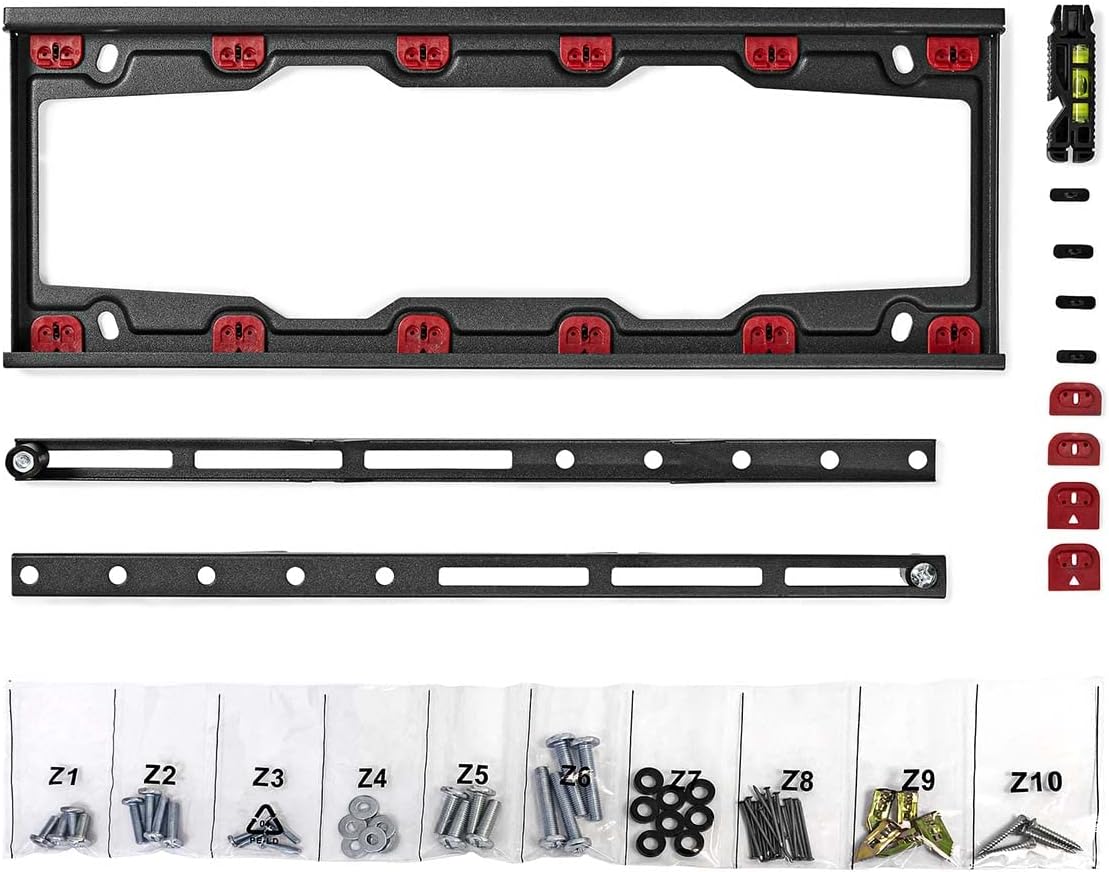
Image: All components of the NEDIS Fixed TV Wall Mount, including the main wall plate, two vertical TV brackets, a small spirit level, and bags of screws, washers, and drywall anchors.
- TV Wall Mount (Main Frame)
- Mounting materials (Arrow nails and dowels for drywall, various screws, washers)
- Quick start guide (This manual)
- Two vertical TV attachment brackets
- Small spirit level (often included with mounting hardware)
3. Product Overview
The NEDIS Fixed TV Wall Mount is designed for securely mounting televisions with screen sizes ranging from 23 to 55 inches. It offers a robust and durable solution with a maximum load capacity of 35 kg. This mount is specifically engineered for installation on drywall, plasterboard, or wall panels, providing a slim profile with only 28 mm distance from the wall.
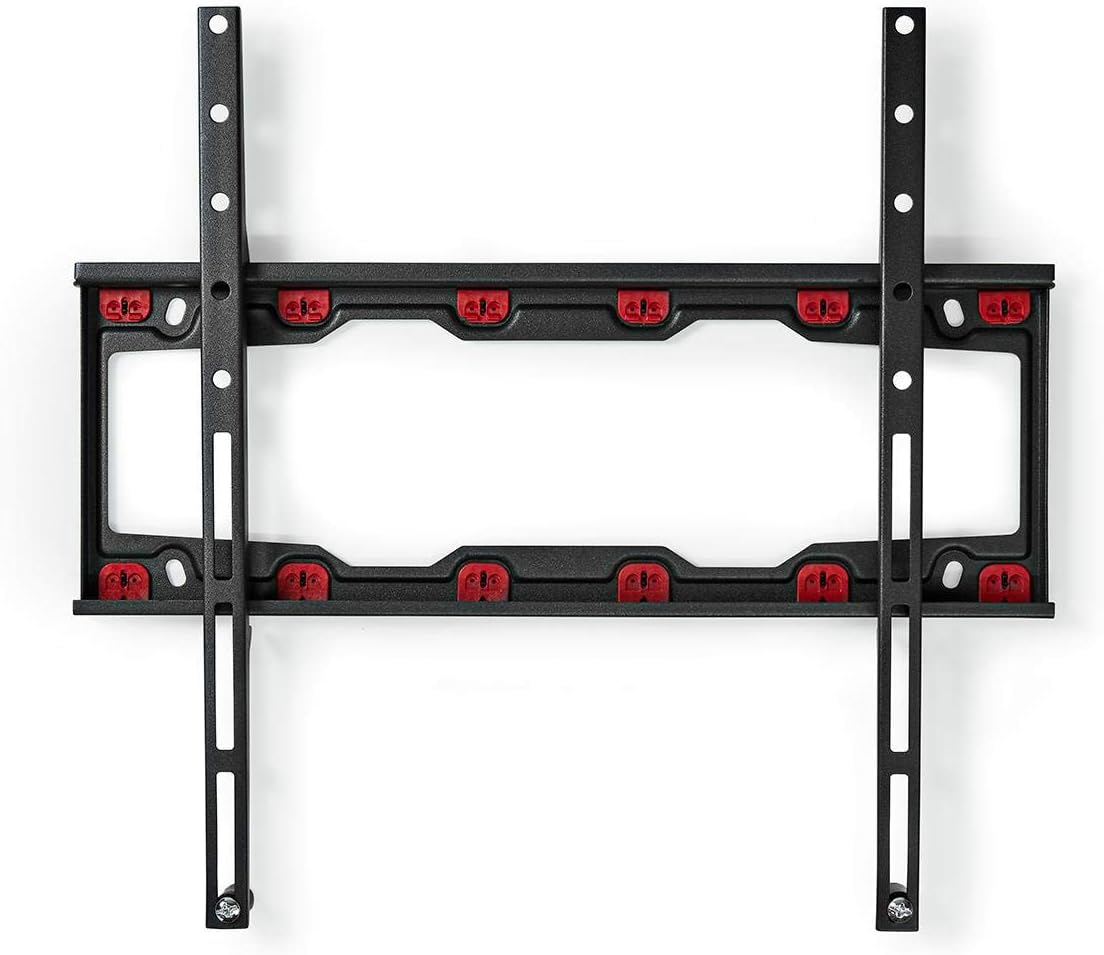
Image: The NEDIS Fixed TV Wall Mount with a television attached, viewed from the side, highlighting the minimal distance from the wall.
Key features include:
- Screen Size Compatibility: Suitable for 23 to 55 inch televisions.
- Weight Capacity: Supports TVs up to 35 kg (77 lbs).
- Wall Clearance: Fixed design with a slim 28 mm distance from the wall.
- Installation: Specifically designed for drywall, plasterboard, and wall panels, utilizing Arrow nails and dowels for a no-drilling installation on these surfaces.
- Material: Constructed from durable alloy steel.
4. Setup and Installation
Follow these steps carefully to ensure a secure and proper installation of your TV wall mount. It is recommended to have a second person assist during the installation process, especially when lifting the television.
4.1 Tools Required (Not Included)
- Pencil
- Measuring Tape
- Phillips Head Screwdriver
- Stud Finder (optional, if confirming drywall structure)
4.2 Attaching TV Brackets to the Television
- Carefully place your TV face-down on a soft, clean surface to prevent screen damage.
- Identify the VESA mounting holes on the back of your TV. These are typically in a square or rectangular pattern.
- Select the appropriate screws (M4, M6, or M8) and washers from the mounting hardware bags that fit your TV's VESA holes. Ensure the screws are long enough to securely fasten the brackets but not so long that they damage internal components.
- Attach the two vertical TV attachment brackets to the back of your TV using the selected screws and washers. Ensure the brackets are centered and level, with the hooks facing downwards and towards the bottom of the TV. Do not overtighten.
4.3 Mounting the Wall Plate to the Wall
This mount is designed for drywall, plasterboard, and wall panels using the provided Arrow nails and dowels, eliminating the need for drilling into studs.
- Determine the desired height and position for your TV. Hold the wall plate against the wall at this position and use a pencil to mark the mounting holes. Use the included spirit level to ensure the wall plate is perfectly horizontal.
- For each marked hole, insert an Arrow nail and dowel (if applicable for your wall type) according to the instructions provided with the specific drywall hardware. These are designed to expand and grip the drywall securely without pre-drilling.
- Align the wall plate with the installed Arrow nails/dowels and secure it firmly using the appropriate screws. Ensure the wall plate is tightly fastened to the wall and does not wobble.

Image: The main wall plate of the NEDIS Fixed TV Wall Mount securely installed on a wall, showing the mounting points.
4.4 Hanging the Television
- With assistance, carefully lift the television with the attached brackets.
- Align the hooks on the TV brackets with the top edge of the wall plate.
- Gently lower the TV, ensuring the hooks engage securely with the wall plate. The TV should sit flush against the wall plate.
- Locate the safety screws or locking mechanisms at the bottom of the TV brackets. Tighten these screws to secure the TV to the wall plate and prevent accidental dislodgement.
- Double-check that the TV is level and securely attached to the wall mount.
5. Operating Instructions
Once installed, the NEDIS Fixed TV Wall Mount provides a stable and secure platform for your television. As a fixed mount, it does not offer tilt, swivel, or extension capabilities. The primary operation involves ensuring the TV remains securely attached.
- Secure Attachment: Always ensure the safety screws or locking mechanisms at the bottom of the TV brackets are tightened to prevent the TV from being accidentally lifted off the wall plate.
- Cable Management: Route all necessary cables (power, HDMI, etc.) before or during the final hanging of the TV. Due to the minimal wall clearance, flat cables are recommended for a neat appearance.
6. Maintenance
Regular maintenance helps ensure the longevity and safety of your TV wall mount.
- Periodic Inspection: Every 6-12 months, visually inspect the wall mount and all fastening points. Check for any signs of loosening, wear, or damage.
- Tighten Fasteners: If any screws appear loose, gently tighten them. Do not overtighten.
- Cleaning: Clean the mount with a soft, dry cloth. Avoid using abrasive cleaners or solvents, which may damage the finish.
- Weight Limit: Do not hang additional items or exceed the maximum weight capacity of 35 kg.
7. Troubleshooting
If you encounter issues during or after installation, refer to the following common problems and solutions.
- TV is not level:
- Ensure the wall plate was installed perfectly level using a spirit level. If not, you may need to adjust its position.
- Some TV brackets have minor vertical adjustment slots. Check if your brackets allow for slight leveling adjustments.
- Mount feels loose on the wall:
- Ensure all screws securing the wall plate to the wall are fully tightened.
- Verify that the Arrow nails and dowels are properly engaged in the drywall. If the wall material is compromised, professional assistance may be required.
- Confirm that the wall material is indeed drywall, plasterboard, or wall panel. This mount is not designed for direct installation into concrete or brick without specific anchors.
- TV does not fit the mount:
- Check your TV's VESA pattern against the mount's compatibility. This mount supports common VESA patterns for 23-55 inch TVs.
- Ensure the TV's weight does not exceed the 35 kg maximum load capacity.
- TV cannot be lifted onto the wall plate:
- Ensure the TV brackets are correctly oriented with the hooks facing downwards and aligned with the wall plate.
- Confirm there are no obstructions preventing the TV from engaging with the wall plate.
8. Specifications
| Feature | Specification |
|---|---|
| Brand | NEDIS |
| Model Number | B07WW8THDK |
| Mounting Type | Wall Mount |
| Movement Type | Fixed |
| Material | Alloy Steel |
| Color | Black |
| Compatible Devices | Television |
| Minimum Supported Screen Size | 23 Inches |
| Maximum Supported Screen Size | 55 Inches |
| Maximum Load Capacity | 35 kg (77 lbs) |
| Minimum Wall Clearance | 28 mm |
| Item Weight | 923 Grams |
9. Warranty and Support
For warranty information and customer support, please refer to the documentation provided with your purchase or visit the official NEDIS website. Keep your proof of purchase for any warranty claims.
If you require technical assistance or have questions not covered in this manual, please contact NEDIS customer service.


