1. Introduction
This manual provides detailed instructions for the installation, operation, and maintenance of your Hemudu Top Shelf TV Mounting Bracket, Model HD03P. Please read this manual thoroughly before use to ensure proper functionality and safety.
2. Safety Information
- Do not exceed the maximum weight limit of 13.2 lbs (6 kg). Overloading the shelf can lead to instability and damage to your devices or the shelf itself.
- Ensure proper installation and usage to prevent accidents.
- Keep the shelf away from direct heat sources to prevent material degradation.
- Allow for proper air circulation around any electronic devices placed on the shelf to prevent overheating.
- Verify the stability of the shelf after installation and periodically during use.
3. Product Features
- Wide Compatibility: Designed to fit various flat-panel displays, including TVs and monitors.
- Space-Saving Design: Provides additional storage space on top of your display for media boxes, speakers, streaming devices, and other small items.
- Easy Installation: Tool-free installation with a simple rotary-knob design.
- Stable Structure: Features a reinforced gear structure for enhanced stability.
- Security Fence: Equipped with a 7mm fence to help prevent items from slipping off.
- Air Vents: Integrated air vents promote proper air circulation to prevent device overheating.
- Non-Marring Design: Includes rubberized feet and flocked fabric to protect your display from scratches.
4. Specifications
| Feature | Detail |
|---|---|
| Brand | Hemudu |
| Model Number | HD03P |
| Product Dimensions | 13"W x 5.3"D x 1.8"H (33cm W x 13.5cm D x 4.6cm H) |
| Weight Limit | 13.2 Pounds (6 kg) |
| Material | Durable plastic structure |
| Color | Black |
| Installation Type | Freestanding (on top of display) |
| Assembly Required | No |
5. Setup and Installation
The Hemudu Top Shelf HD03P is designed for quick and easy installation without the need for additional tools.
- Unfold the Shelf: Gently unfold the support legs from beneath the shelf until they are fully extended.
- Position on Display: Place the shelf on top of your TV or monitor. Ensure the front lip of the shelf rests securely on the top edge of your display.
- Adjust Support Legs: Adjust the angle of the support legs at the back of the display. The legs should press firmly against the back of your TV or monitor to provide stability.
- Secure with Rotary Knobs: Tighten the rotary knobs on the support legs until the shelf is firmly secured and stable. Do not overtighten.
- Verify Stability: Gently test the shelf to ensure it is stable and does not wobble before placing any items on it.

Figure 1: Hemudu Top Shelf TV Mounting Bracket HD03P

Figure 2: Close-up of the rotary knob and gear structure for stability

Figure 3: Adjusting the support legs of the Hemudu Top Shelf
Installation Video
Video 1: HEMUDU Top Shelf HD03P Installation Guide. This video demonstrates the simple, tool-free installation process of the Hemudu Top Shelf HD03P on a television.
6. Operating and Usage
The Hemudu Top Shelf HD03P is designed to organize and hold various items on top of your flat-panel display.
- Placement of Devices: Use the shelf to place streaming devices, media boxes, AV receivers, speakers, sound bars, or other small electronic accessories.
- Decorative Items: The shelf can also hold lightweight home decor items such as framed photos or small plants, provided they do not exceed the weight limit.
- Weight Distribution: Distribute the weight evenly across the shelf to maintain stability. Do not concentrate heavy items in one area.
- Airflow: Ensure that items placed on the shelf do not block the air vents of your display or the shelf itself, especially for electronic devices that generate heat.
- Security Fence: The 7mm fence helps prevent items from accidentally falling off the shelf.

Figure 4: Hemudu Top Shelf holding a cable box and remote on a TV, demonstrating practical usage.

Figure 5: Hemudu Top Shelf used for various media devices and small decor items, showcasing its versatility.

Figure 6: Close-up of the 7mm security fence on the Hemudu Top Shelf, highlighting its protective feature.
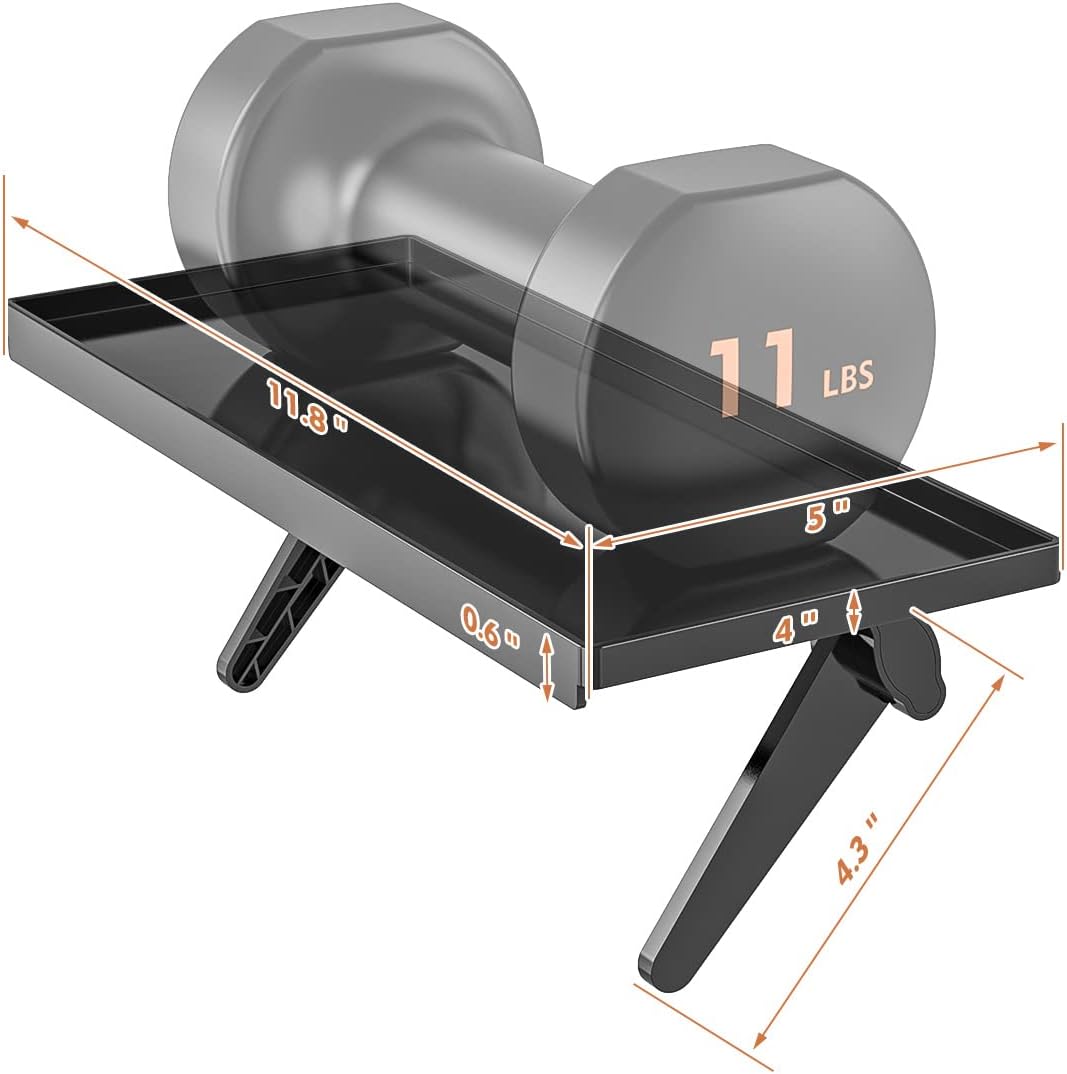
Figure 7: Dimensions and weight capacity of the Hemudu Top Shelf, indicating its load-bearing capability.
7. Maintenance
- Cleaning: Wipe the shelf with a dry cloth to remove dust and debris. Avoid using abrasive cleaners or harsh chemicals that may damage the surface.
- Regular Check: Periodically check the tightness of the rotary knobs and the stability of the support legs to ensure the shelf remains securely in place.

