
Introduction
The DOKIO series of charge controllers are designed for a variety of off-grid solar applications. This manual provides essential information for the safe and efficient operation of your DOKIO Solar Controller (20A), ensuring optimal performance for your solar power system.
Key Features
- Built-in industrial microcontroller with a large LCD display for adjustable parameters.
- Full 3-level PWM charge management for efficient battery charging.
- Excellent heat dissipation with double MOSFET reverse current protection, ensuring low heat generation.
- Intuitive digital LCD display for easy setting, timing, and parameter configuration with one-button operation.
- User-friendly interface with clear display status and data, simplifying mode switching and parameter adjustments for various applications.
Package Contents
Upon opening your package, please verify that all the following items are included:
- 1 x DOKIO 10A/20A Solar Charging Controller
- 1 x Connection Cable Set
- 1 x User Manual (this document)
Product Overview
Familiarize yourself with the components and interface of your DOKIO Solar Controller.
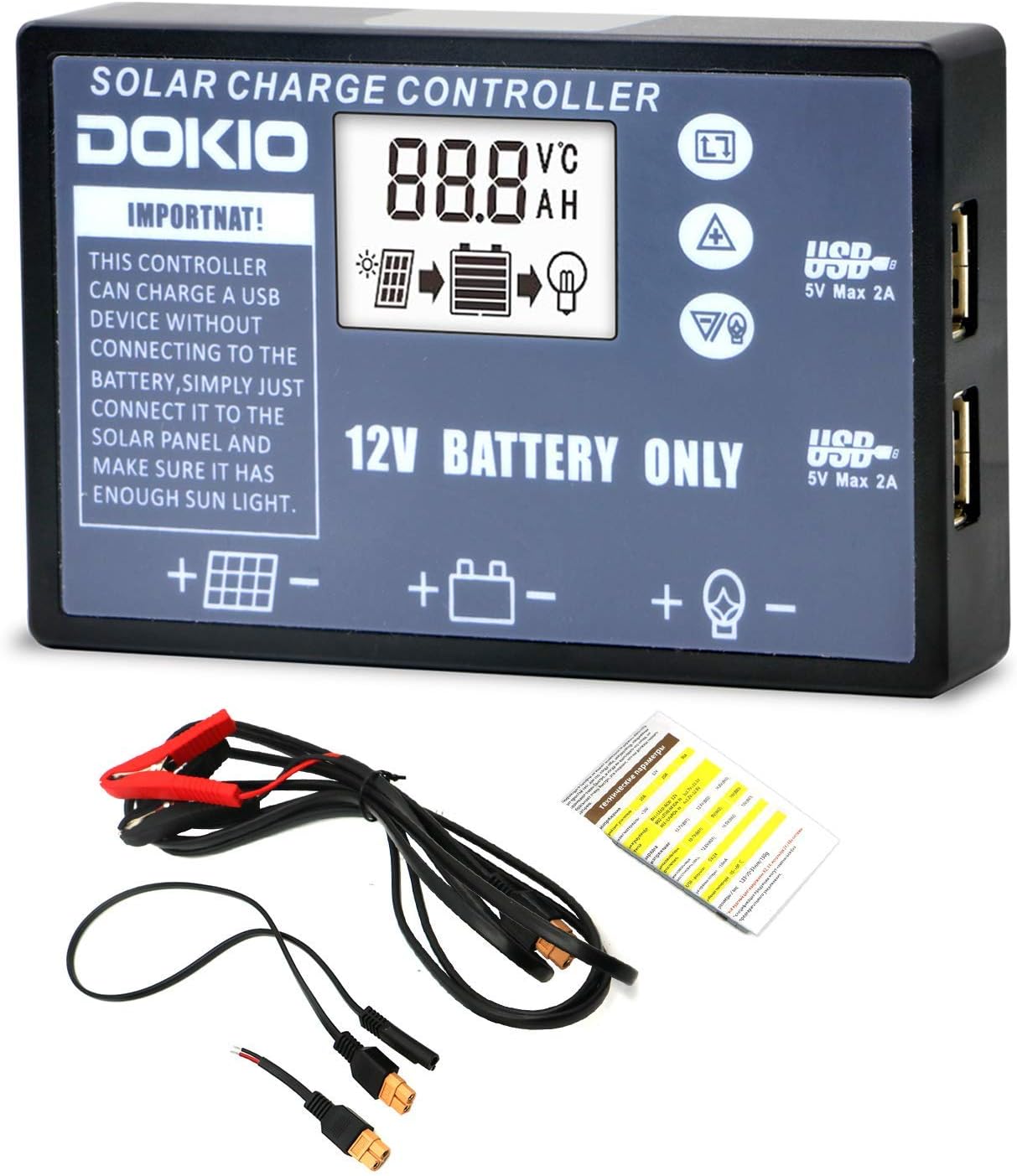
Figure 1: DOKIO Solar Charge Controller and accessories.

Figure 2: LCD Display and Button Functions. This image illustrates the various indicators on the display, including temperature, voltage, hour, ampere, solar panel symbol, charging symbol (solid for buck, flashing for float), battery capacity, and output symbol. It also shows the functions of the three control buttons: MENU (switch display/enter/exit setting), UP (increase value), and DOWN (decrease value).

Figure 3: Controller Dimensions and Wiring Diagram. This diagram shows the physical dimensions of the controller (0.23 inch height, 0.38 inch width) and the correct wiring sequence for connecting the solar panel, battery, and load to the controller's terminals.

Figure 4: USB Charging Ports. The controller features two USB ports (5V, 2A max) that can charge USB devices directly, even without a battery connected, provided there is sufficient sunlight to the solar panel.
Setup and Installation
Follow these steps carefully to set up your DOKIO Solar Controller. Incorrect wiring can damage the controller or connected devices.
- Connect the Battery: First, connect the battery to the charge controller. Ensure correct polarity (+ to + and - to -). The controller will detect the battery voltage.
- Connect the Solar Panel: Next, connect the solar panel to the charge controller. Ensure correct polarity. The controller will begin charging the battery if sunlight is available.
- Connect the Load (Optional): Finally, connect your DC load to the charge controller's load terminals. Ensure correct polarity.
Important: Always connect the battery first and disconnect it last. Refer to Figure 3 for a visual wiring diagram.
Operating Instructions
LCD Display and Button Functions
The LCD display provides real-time information about your solar system. Use the buttons to navigate and adjust settings.
- MENU Button: Press briefly to switch between different display screens (e.g., voltage, current, temperature). Press and hold to enter or exit setting mode.
- UP Button: In setting mode, press to increase the value of the selected parameter.
- DOWN Button: In setting mode, press to decrease the value of the selected parameter.
Refer to Figure 2 for a detailed explanation of display symbols and button icons.
USB Charging Function
The DOKIO Solar Controller is equipped with two USB ports (5V, 2A max) for charging mobile phones, power banks, and other USB-powered devices. These ports can supply power even without a battery connected, provided there is sufficient sunlight to the solar panel. Simply connect your USB device to one of the available ports.
Maintenance
To ensure the longevity and optimal performance of your DOKIO Solar Controller, follow these maintenance guidelines:
- Cleaning: Periodically clean the controller's exterior with a dry, soft cloth to remove dust and dirt. Do not use liquid cleaners or solvents.
- Ventilation: Ensure the controller is installed in a well-ventilated area to allow for proper heat dissipation. Avoid direct sunlight or moisture exposure, as all electronic components generate heat during operation.
- Connections: Regularly check all wiring connections to ensure they are secure and free from corrosion.
Troubleshooting
If you encounter issues with your DOKIO Solar Controller, refer to the following common problems and solutions:
| Problem | Possible Cause | Solution |
|---|---|---|
| No display on controller | Battery not connected or low voltage; reverse polarity. | Ensure battery is connected correctly with sufficient voltage. Check polarity. |
| Battery not charging | Solar panel not connected; insufficient sunlight; reverse polarity of solar panel. | Verify solar panel connection and polarity. Ensure adequate sunlight. |
| Load not working | Load not connected; reverse polarity of load; battery low; overload protection. | Check load connection and polarity. Ensure battery is charged. Reduce load if overloaded. |
If the problem persists after attempting these solutions, please contact DOKIO customer support.
Specifications
| Attribute | Value |
|---|---|
| Brand | DOKIO |
| Model | DOKIO Solar Controller (20A) |
| ASIN | B07WW2SK14 |
| UPC | 682559947410 |
| Charging Port Type | Solar Panel Input, Battery Output |
| Display Type | LCD |
| Color | Grey |
| Parcel Dimensions | 18.3 x 17.8 x 4.8 cm; 559 g |
| Date First Available | Nov. 26 2019 |
Application Scenarios
The DOKIO Solar Controller is versatile and suitable for a wide range of off-grid solar power applications, including:
- Farm solar power systems
- Solar street lighting
- Solar patio lighting
- Solar billboards
- Outdoor camping solar systems
- Ship solar systems

Figure 5: Examples of DOKIO Solar Controller in various off-grid applications, including marine, residential rooftop, RV, street lighting, and ground-mounted solar panel setups.
Warranty and Support
DOKIO provides a 24-month warranty for this solar charging controller. If you have any questions, concerns, or require technical assistance, please do not hesitate to contact DOKIO customer service. We are committed to replying to your inquiries within 24 hours.
For support, please refer to the contact information provided with your product packaging or visit the official DOKIO website.


