
BEBANG YW-3006
BEBANG 100X-2000X Compound Microscope User Manual
Model: YW-3006
1. Introduction
This user manual provides detailed instructions for the assembly, operation, and maintenance of your BEBANG 100X-2000X Compound Microscope. Designed for adults, kids, students, and amateur scientists, this microscope is an excellent tool for exploring the microscopic world in school, laboratory, or home settings. Please read this manual thoroughly before using the microscope to ensure proper function and longevity of the instrument.

Figure 1.1: The BEBANG microscope is suitable for various applications, from scientific research to educational exploration at home.
2. Package Contents
Upon opening your BEBANG microscope package, please verify that all the following components are included and in good condition:

Figure 2.1: All items included in the BEBANG microscope kit.
- BEBANG Compound Microscope
- WF25X Eyepiece
- 2X Lens (Barlow Lens)
- Objective Lenses: 4X, 10X, 40X
- Phone Adapter
- Wire Shutter
- Power Adapter
- 15pcs Microscope Slides Set (pre-prepared and blank slides)
- 10 Operating Accessories (e.g., droppers, tweezers, collection bottles)
- Carrying Bag
- User Manual (this document)
3. Product Overview and Components
Familiarize yourself with the main parts of your BEBANG microscope:

Figure 3.1: Key components including the rotatable head, objective lenses, and bottom illumination.
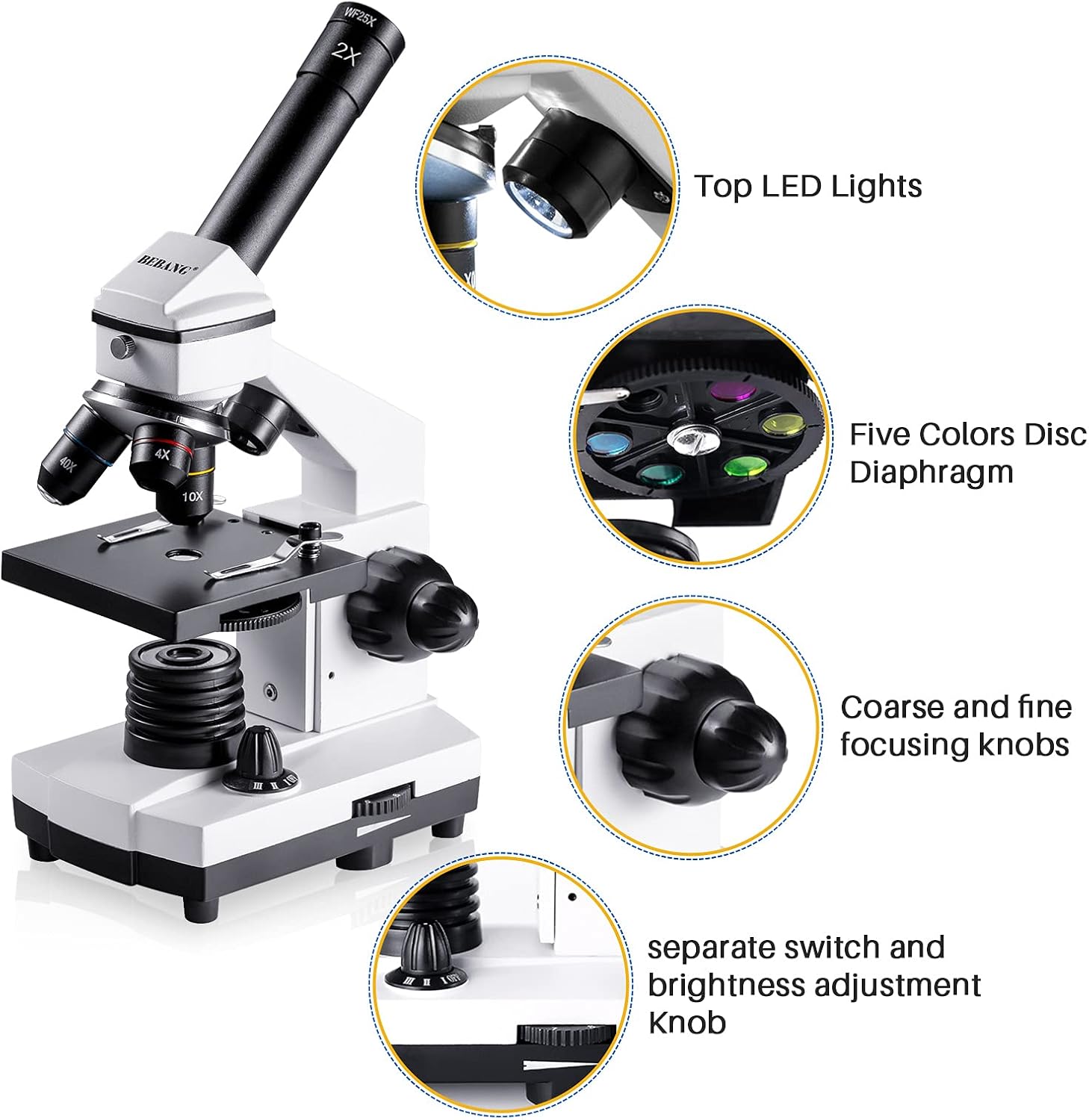
Figure 3.2: Additional features such as top illumination, diaphragm, and focusing controls.
- Eyepiece (Ocular Lens): WF25X eyepiece for viewing the magnified image. Can be used with or without the 2X Barlow lens.
- Monocular Head: Rotates 360 degrees for flexible viewing positions.
- Objective Lenses: Revolving nosepiece holds 4X, 10X, and 40X achromatic objective lenses.
- Stage: Flat platform where the microscope slide is placed. Equipped with stage clips to hold the slide in place.
- Coarse Focus Knob: Large knob for large adjustments to focus.
- Fine Focus Knob: Smaller knob for precise adjustments to focus.
- Illumination System: Dual LED lights (top and bottom) for brightfield illumination.
- Diaphragm: A 0.65 NA single-lens condenser with a disc diaphragm (five colors) to control the amount of light reaching the specimen.
- Brightness Adjustment Knob: Controls the intensity of the LED illumination.
- Power Switch: Turns the microscope on/off.
4. Setup
- Unpacking: Carefully remove all components from the packaging. Retain the original packaging for future storage or transport.
- Placement: Place the microscope on a stable, flat surface away from direct sunlight and vibrations. Ensure there is access to a power outlet.
- Power Connection: Connect the power adapter to the microscope's power input and then plug it into a standard 120V AC outlet.
- Eyepiece Installation: Insert the WF25X eyepiece into the top of the monocular head. If desired, insert the 2X Barlow lens into the eyepiece tube before inserting the WF25X eyepiece to double the magnification.
- Objective Lens Selection: Rotate the revolving nosepiece to select the lowest power objective lens (4X) for initial viewing.
5. Operating Instructions
5.1 Basic Observation
- Prepare the Slide: Place a prepared microscope slide onto the stage, securing it with the stage clips. Ensure the specimen is centered over the opening in the stage.
- Turn On Illumination: Flip the power switch to turn on the LED lights. Adjust the brightness using the brightness adjustment knob. You can choose between top, bottom, or dual illumination depending on the specimen (transparent specimens use bottom light, opaque specimens use top light).
- Select Objective: Start with the 4X objective lens. Rotate the nosepiece until it clicks into place.
- Lower the Stage: Use the coarse focus knob to lower the stage until the objective lens is just above the slide, but not touching.
- Focus: While looking through the eyepiece, slowly turn the coarse focus knob to raise the stage until the specimen comes into view. Then, use the fine focus knob for sharp, detailed focusing.
- Adjust Diaphragm: Rotate the disc diaphragm to adjust the amount of light passing through the specimen. Experiment with different aperture sizes and colors to achieve optimal contrast and clarity.
- Change Magnification: To increase magnification, rotate the nosepiece to the 10X or 40X objective. After changing objectives, only use the fine focus knob for minor adjustments. Note: The 40X objective requires very careful focusing and may not be suitable for all specimens or viewing conditions.

Figure 5.1: Examples of magnification levels and the effect of the five-color disc diaphragm.
5.2 Using the Phone Adapter
The included phone adapter allows you to capture images and videos of your observations directly with your smartphone.
- Attach Adapter to Eyepiece: Securely attach the phone adapter to the WF25X eyepiece.
- Mount Phone: Place your smartphone into the adapter's clamp, ensuring the phone's camera lens is aligned with the eyepiece.
- Adjust View: Open your phone's camera app. Adjust the phone's position within the adapter until the microscope's field of view is visible and centered on your phone screen.
- Focus and Capture: Use the microscope's focus knobs to get a clear image on your phone screen. Use the wire shutter or your phone's camera controls to take photos or record videos.

Figure 5.2: Capturing microscope images and videos using the smartphone adapter.
6. Maintenance
Proper care and maintenance will ensure the longevity and optimal performance of your microscope.
- Cleaning Lenses: Use only specialized lens cleaning paper or a soft, lint-free cloth with a small amount of lens cleaning solution. Gently wipe the lenses in a circular motion. Avoid touching the lenses with your fingers.
- Cleaning Body: Wipe the microscope body with a soft, damp cloth. Do not use abrasive cleaners or solvents.
- Storage: When not in use, cover the microscope with the included dust cover or store it in the carrying bag to protect it from dust and moisture. Store in a cool, dry place.
- Handling: Always carry the microscope by its arm and base. Avoid sudden impacts or dropping the instrument.
- Electrical Safety: Always unplug the microscope from the power outlet when not in use or before cleaning.
7. Troubleshooting
| Problem | Possible Cause | Solution |
|---|---|---|
| No illumination | Power cord unplugged; Power switch off; Brightness knob set to minimum. | Check power connection; Turn on power switch; Increase brightness. |
| Image blurry or out of focus | Incorrect focus knob used; Objective lens not clicked into place; Slide upside down; Dirty lens. | Use coarse then fine focus; Rotate nosepiece until objective clicks; Flip slide; Clean lenses. |
| Dark field of view | Diaphragm closed too much; Insufficient illumination; Objective lens too high. | Adjust diaphragm opening; Increase brightness; Lower stage slightly with fine focus. |
| Cannot achieve high magnification focus (e.g., 2000X) | High magnification requires extremely precise focusing; Specimen too thick or not suitable for high power. | Use only fine focus for high power; Ensure specimen is very thin and flat; Practice focusing at lower magnifications first. |
8. Specifications
- Model: YW-3006
- Magnification Range: 100X - 2000X
- Eyepiece: WF25X
- Barlow Lens: 2X
- Objective Lenses: 4X, 10X, 40X (Achromatic)
- Head: 360° Rotatable Monocular
- Focusing: Coarse and Fine Adjustment Knobs
- Illumination: Dual LED (Top & Bottom)
- Condenser: 0.65 NA Single-lens with Disc Diaphragm (5 colors)
- Power Supply: 120 Volts AC
- Material: Metal body
- Dimensions: Approximately 11.1 x 5.5 x 3.9 inches (28.2 x 14 x 9.9 cm)
- Weight: Approximately 2.43 pounds (1.1 kg)
- Compatible Devices: Smartphone (with included adapter)
9. Warranty and Support
BEBANG provides customer support for its products. For any issues, questions, or warranty claims, please refer to the contact information provided with your purchase documentation or visit the official BEBANG website. Please have your model number (YW-3006) and purchase date ready when contacting support.
For additional resources and product information, you may visit the BEBANG Store on Amazon.
Related Documents - YW-3006
 |
TOA WT-770 Wireless Tuner: Operating Instructions and Specifications Comprehensive operating instructions, specifications, and installation guide for the TOA WT-770 VHF high band wireless tuner. Learn about features, connections, and maintenance. |
 |
FORSAFE YW-0199TX Digital Wireless Camera System User Manual User manual for the FORSAFE YW-0199TX Digital Wireless Camera System with Split View for 2 Cameras. Includes installation, operation, troubleshooting, and technical specifications. |
 |
S.old Digital Kitchen Scale Instruction Manual Instruction manual for the S.old Digital Kitchen Scale (models YW-C023(A-D), YW-C025(A-D)). Learn about features, operation, power supply, calibration, and troubleshooting tips for accurate weighing. |
 |
Hope Industrial YW Series Heavy Industrial Wall Yoke Installation Instructions Comprehensive installation guide for the Hope Industrial YW Series Heavy Industrial Wall Yoke, detailing mounting patterns, hardware assembly, and compatibility with various monitor models. |
 |
IDEC Ø22 YW Series Switches & Pilot Lights Catalog Comprehensive catalog detailing IDEC's Ø22 YW Series switches and pilot lights, including emergency stop switches, pushbuttons, pilot lights, selector switches, key selector switches, and accessories. Features detailed specifications, part numbers, and dimensions for industrial automation and control applications. |
 |
Forsafe YW-0629 Digital Wireless Camera System User Manual User manual for the Forsafe YW-0629 Digital Wireless Camera System, covering installation, operation, technical specifications, and troubleshooting for this vehicle backup camera system. |