
Hot Wheels FML03
Hot Wheels FML03 Super Ultimate Garage Playset Instruction Manual
Model: FML03 | Brand: Hot Wheels
1. Introduction
Welcome to the Hot Wheels Super Ultimate Garage Playset. This manual provides essential information for the safe assembly, operation, and maintenance of your playset. Please read all instructions carefully before use.
Safety Information
- WARNING: CHOKING HAZARD - Small Parts. Not for children under 3 years.
- Recommended for ages 5 years and up.
- Adult supervision is recommended during assembly and play.
- Keep fingers and hair away from moving parts, especially the motorized elevator and gorilla mechanism.
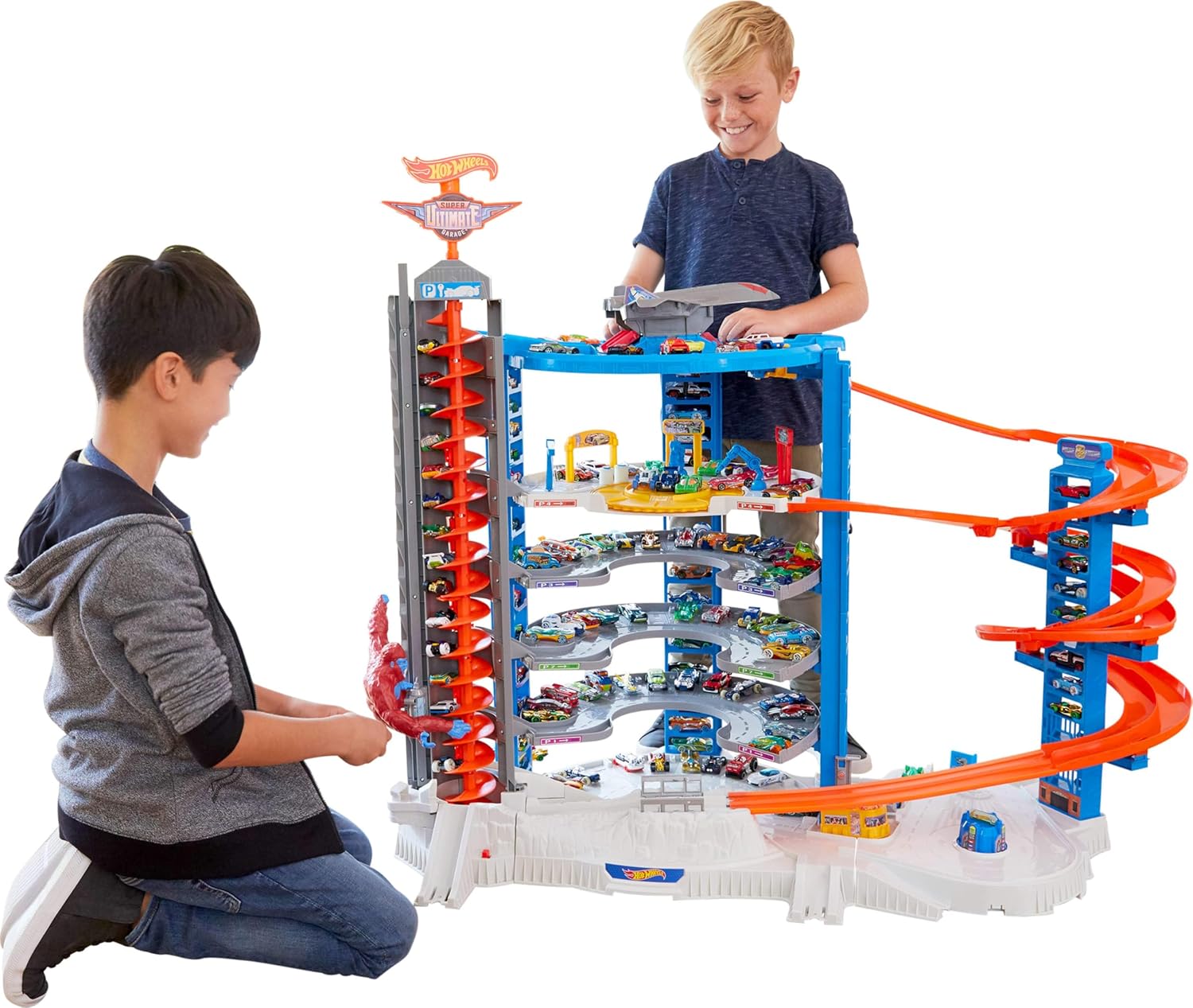
The Hot Wheels Super Ultimate Garage is designed to store over 140 cars and features multiple play zones, including a motorized elevator, a massive jet plane with a penthouse landing pad, and a side-by-side racetrack. It also includes a menacing gorilla figure.
2. Setup and Assembly
Included Components
- Super Ultimate Garage Playset components
- 4 x Hot Wheels Cars
- 1 x Jet Plane
Battery Installation
The playset requires 4 D batteries (not included) for the motorized features. Follow these steps:
- Locate the battery compartment, typically on the base or a main support structure.
- Using a Phillips head screwdriver, open the battery compartment cover.
- Insert 4 D batteries, ensuring correct polarity (+/-) as indicated inside the compartment.
- Replace the cover and secure it with the screw.
Assembly Instructions
Assembly typically takes approximately 5 minutes. Refer to the visual guide below and the detailed instructions provided in the playset packaging for step-by-step assembly.
- Unpack all components and verify against the parts list.
- Connect the base sections securely.
- Attach the main support pillars and ramps.
- Install the motorized elevator tower and the gorilla mechanism.
- Place the jet plane on its designated landing pad.
- Ensure all connections are firm before play.

3. Operating the Playset
Motorized Elevator
The playset features a motorized elevator that transports cars to different levels. To operate:
- Place a Hot Wheels car onto the elevator platform at the ground level.
- Activate the elevator using the designated switch or button (refer to playset markings).
- The elevator will ascend, lifting cars to various parking spots or the penthouse level.
Gorilla Mechanism
A gorilla figure is integrated into the elevator tower, designed to interact with cars as they ascend.
- As cars move up the elevator, the gorilla may attempt to swipe them off the track.
- Ensure cars are properly seated on the elevator to minimize interference.

Jet Plane and Penthouse Landing Pad
The playset includes a large jet plane that can be placed on the penthouse landing pad.
- The penthouse level serves as a starting point for the side-by-side racetrack.
- Cars can be launched from this level for racing.

Side-by-Side Racetrack
Engage in thrilling races from the penthouse level down the spiral ramps.
- Place two cars side-by-side at the starting gate on the penthouse.
- Release the gate to initiate a race down the multi-level track.
Additional Play Zones
Explore other interactive areas such as the drive-up diner and car wash.
- Manually move cars through these zones for imaginative play.
- The playset also features multiple connection points to link with other Hot Wheels track sets (sold separately).


4. Maintenance
Cleaning
- Wipe the playset surfaces with a soft, damp cloth. Do not immerse in water.
- Avoid using harsh chemicals or abrasive cleaners, as these may damage the plastic.
Battery Care
- Remove batteries if the playset will not be used for an extended period to prevent leakage.
- Dispose of used batteries responsibly according to local regulations.
- Do not mix old and new batteries, or different types of batteries.
5. Troubleshooting
| Problem | Possible Cause | Solution |
|---|---|---|
| Motorized elevator not working | Batteries are dead or incorrectly installed. | Check battery polarity and replace with fresh D batteries. |
| Cars getting stuck in the spiral lift or on tracks | Incorrect car placement; debris on track; switches not fully open/closed. | Ensure cars are placed correctly. Clear any obstructions. Verify all track switches are in the intended position (fully open or fully closed). |
| Gorilla mechanism not moving smoothly | Obstruction; low battery power. | Check for any foreign objects. Replace batteries if they are low. |
6. Specifications
| Feature | Detail |
|---|---|
| Model Number | FML03 |
| Brand | Hot Wheels |
| Dimensions (L x W x H) | 147 x 70 x 107 cm (approximately 57.9 x 27.6 x 42.1 inches) |
| Weight | 1 Kilogram |
| Material | Polypropylene |
| Power Source | Battery Powered |
| Batteries Required | 4 x D batteries (not included) |
| Included Components | Playset, 4 Cars, 1 Jet Plane |
| Car Storage Capacity | Over 140 cars |
| Recommended Age | 5 years and up |
| Assembly Time | Approx. 5 minutes |
| Safety Warning | Choking Hazard - Small Parts |
7. Warranty and Support
Warranty Information
For specific warranty details, please refer to the warranty card included with your product packaging or visit the official Hot Wheels website. Keep your purchase receipt as proof of purchase.
Customer Support
If you have any questions, require assistance with assembly, or encounter issues not covered in this manual, please contact Hot Wheels customer support. Contact information can typically be found on the product packaging or the official brand website.
Ask a question about this manual
Ask about setup, troubleshooting, compatibility, parts, safety, or missing instructions. Manuals+ will review the question and use this page’s manual context to help answer it.