
Introduction
This manual provides essential instructions for setting up, operating, and maintaining your HAMMER ID128 Smart Fitness Band. Please read this manual thoroughly before using the device to ensure proper function and to maximize its capabilities.
What's in the Box
- HAMMER ID128 Smart Fitness Band
- User Manual
Setup
1. Charging the Device
Before initial use, fully charge your fitness band. The ID128 features convenient USB direct charging.
- Locate the USB charging port on the fitness band.
- Plug the band directly into any standard USB 2.0 port (e.g., computer, USB wall adapter). No separate charger cable is required.
- Charge for 1-2 hours. A full charge provides approximately 7 days of standby time.

Image: The HAMMER ID128 Smart Fitness Band demonstrating its USB direct charging capability and highlighting its soft, skin-friendly band material.
2. App Installation and Pairing
The HAMMER ID128 requires the 'Very Fit Pro' application for full functionality and data synchronization.
- Download the App: Search for 'Very Fit Pro' in your smartphone's app store (Google Play Store for Android, Apple App Store for iOS) and install it.
- Compatibility: Ensure your smartphone runs iOS 8.0 or above, or Android 4.4 or above.
- Enable Bluetooth: Turn on Bluetooth on your smartphone.
- Open App and Pair: Open the 'Very Fit Pro' app, create an account if prompted, and follow the on-screen instructions to search for and pair with your ID128 fitness band.
- Initial Setup: Complete your personal profile within the app (age, height, weight, gender) for accurate activity tracking.
Operating Instructions
Device Overview and Navigation
The ID128 features a 0.96-inch color screen and touch control for navigation.
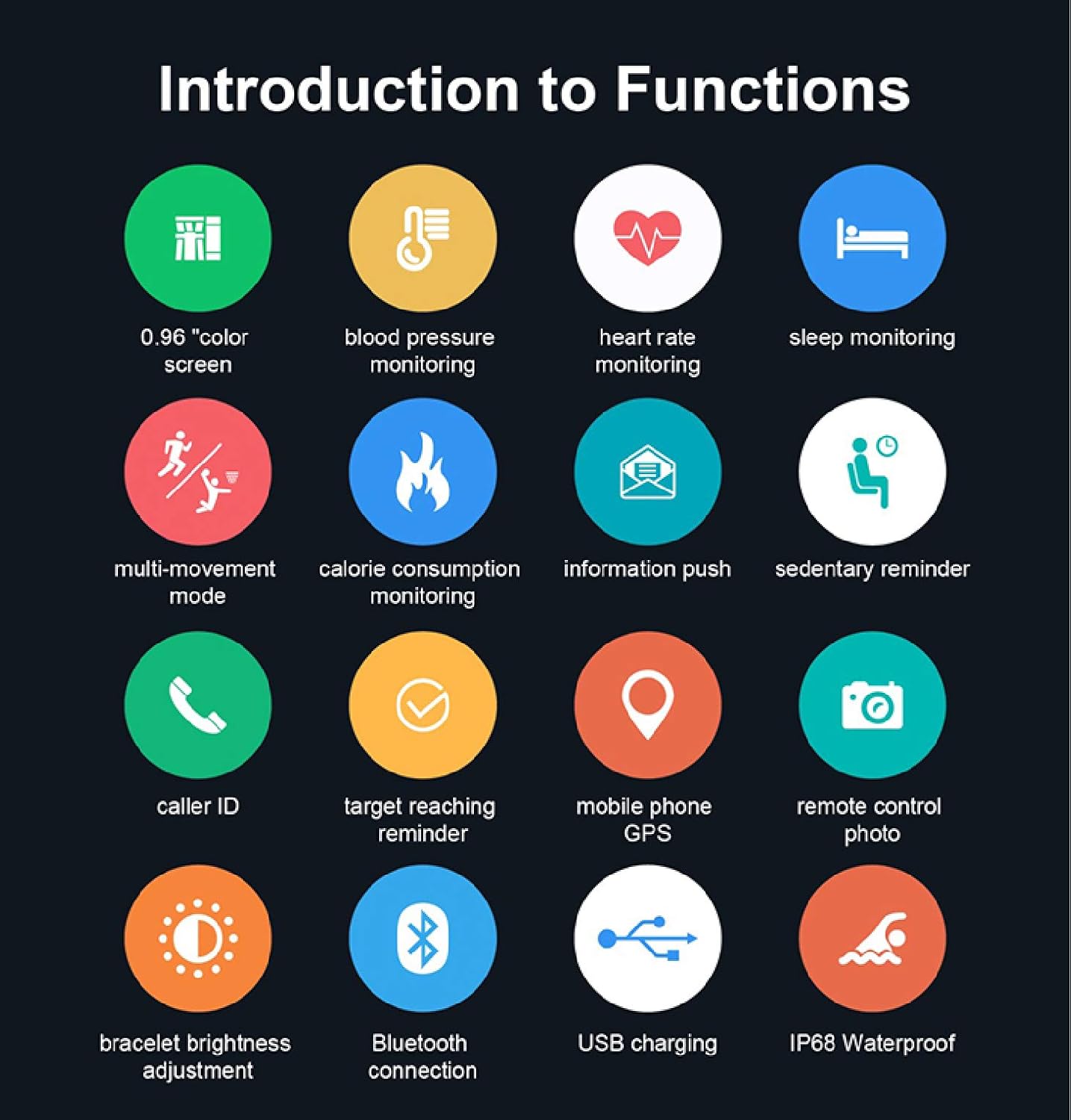
Image: An infographic displaying the various functions of the HAMMER ID128 Smart Fitness Band, such as heart rate monitoring, sleep tracking, and notification alerts.
Key Functions
- Activity Tracking: The band automatically tracks your steps, distance traveled, and calories burned throughout the day. View detailed data in the 'Very Fit Pro' app.
- Heart Rate Monitoring: The band provides 24-hour real-time heart rate monitoring. You can set it to monitor automatically or manually. The app analyzes your heart rate data to assess your sports status.
- Blood Pressure Monitoring: The band can monitor blood pressure. For accurate readings, ensure correct posture: the wrist band should be at the same height as the heart. Avoid movement during measurement.
- Sleep Monitoring: The band intelligently monitors your sleep duration, depth, and awakening times to help improve your sleep quality.
- Notifications (Information Push & Caller ID): Receive notifications for WhatsApp messages, SMS, and incoming calls directly on your wrist when connected to your smartphone.
- Sedentary Reminder: Customize sedentary reminders in the app to prompt you to move if you've been inactive for too long, promoting an active lifestyle.
- Remote Camera Control: Use the fitness band as a remote shutter to take photos on your connected smartphone.
- Brightness Control: Adjust the screen brightness directly from the band's settings.
- Mobile Phone GPS: The band uses your smartphone's GPS to track routes and distance during outdoor activities.
- Waterproof (IP68): The ID128 is IP68 rated, meaning it is resistant to dust and can withstand immersion in water up to 1 meter for 30 minutes. It is suitable for daily use, hand washing, and light rain, but not recommended for swimming or showering with hot water.

Image: A smartphone screen showing detailed activity tracking data from the fitness band, including steps, distance, and calories.

Image: The HAMMER ID128 Smart Fitness Band actively monitoring heart rate, with a visual representation of heart rate data.

Image: A visual representation of the sleep monitoring feature, showing sleep patterns and duration.

Image: The fitness band displaying an incoming notification, demonstrating its information push and call display feature.

Image: The fitness band on a user's wrist, illustrating the sedentary reminder feature and the clear display.

Image: A user utilizing the fitness band to remotely control their smartphone camera for a photo.
Maintenance
Cleaning
- Regularly clean the band and the device body with a soft, damp cloth.
- Avoid using harsh chemicals or abrasive cleaners, as these can damage the device.
- Ensure the charging contacts are clean and dry before charging.
Battery Care
- Avoid fully discharging the battery frequently.
- Charge the device regularly to maintain battery health.
- Store the device in a cool, dry place if not used for extended periods.
Troubleshooting
- Device not turning on: Ensure the device is fully charged. Plug it into a USB port for at least 10 minutes.
- Cannot pair with phone:
- Ensure Bluetooth is enabled on your phone.
- Make sure the 'Very Fit Pro' app is installed and running.
- Check if the band is within Bluetooth range of your phone.
- Restart both your phone and the fitness band.
- Inaccurate readings (HR/BP/Steps):
- Ensure the band is worn snugly but comfortably on your wrist.
- For blood pressure, maintain correct posture as described in the operating section.
- Ensure your personal information (height, weight, age) in the app is accurate.
- Notifications not appearing:
- Check app permissions on your phone to ensure 'Very Fit Pro' has access to notifications.
- Verify notification settings within the 'Very Fit Pro' app.
- Ensure the band is connected via Bluetooth.
Specifications
| Feature | Specification |
|---|---|
| Model Number | ID128 |
| Operating System Compatibility | Android 4.4+, iOS 8.0+ |
| Connectivity Technology | Bluetooth, USB (for charging) |
| Water Resistance Level | IP68 (Waterproof up to 1 meter) |
| Display Type | Digital, 0.96" Color Screen |
| Band Material | Silicone |
| Case Material | Ceramic |
| Battery Cell Composition | Lithium Polymer |
| Supported Application | Very Fit Pro |
| Metrics Measured | Heart Rate, Sleep Duration, Blood Pressure |
| Human Interface Input | Buttons, Touch Control |
Warranty and Support
For warranty information and customer support, please contact HAMMER directly.
- Website: Hammeronline.in
- Customer Care: 9991108081


