
1. Introduction
This manual provides essential information for the safe and efficient operation of your Kolibri B-KolibriUV Money Counter Machine. Please read these instructions thoroughly before using the device to ensure proper setup, operation, and maintenance. The Kolibri B-KolibriUV is designed for rapid and accurate bill counting, incorporating advanced counterfeit detection technologies.

Image 1.1: Kolibri B-KolibriUV Money Counter Machine in operation.
2. Product Overview and Components
Familiarize yourself with the components included with your Kolibri B-KolibriUV Money Counter Machine.
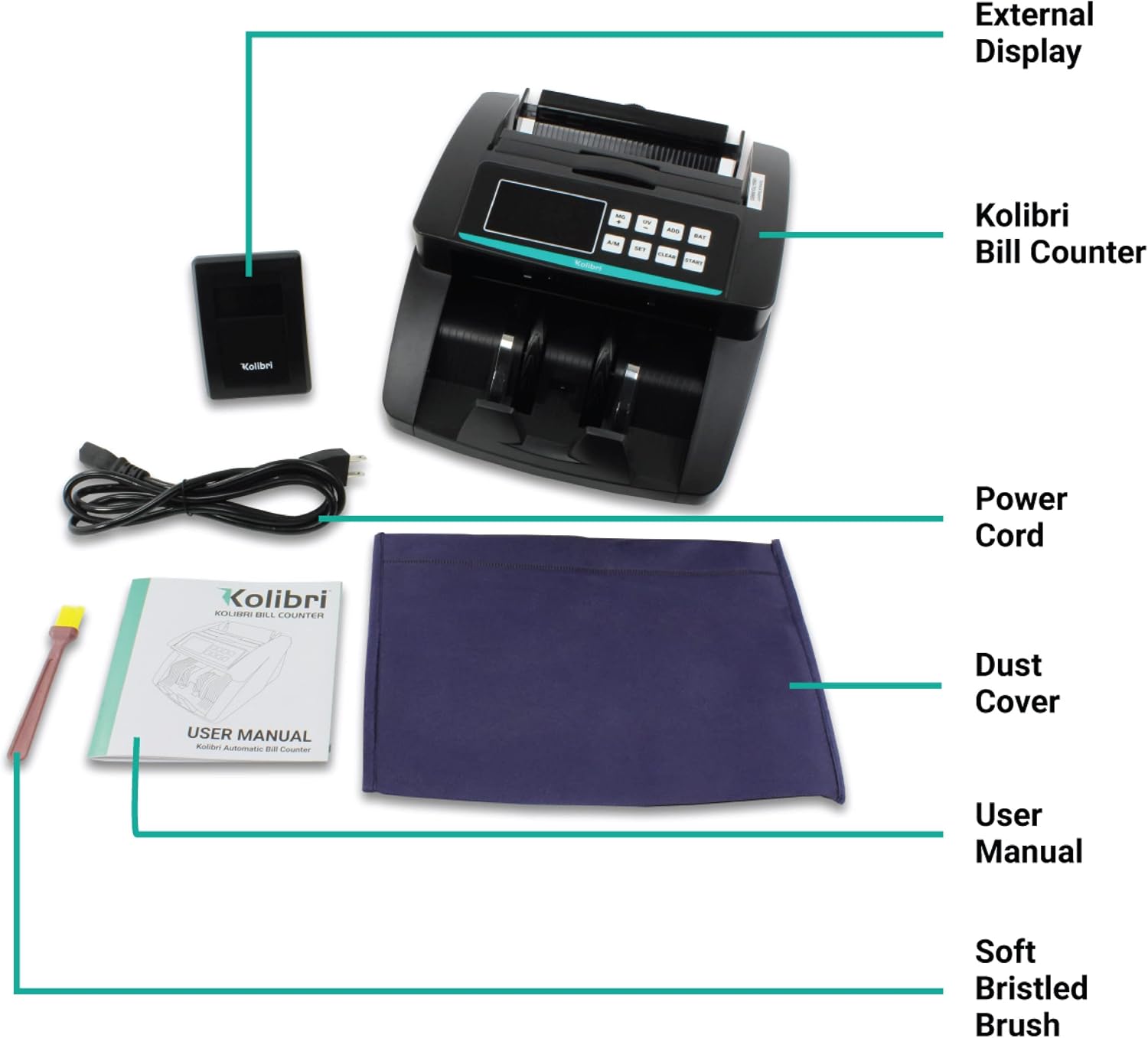
Image 2.1: Included components of the Kolibri B-KolibriUV Money Counter Machine.
2.1 Package Contents:
- Kolibri Bill Counter Machine
- External Display
- Power Cord
- Dust Cover
- User Manual (this document)
- Soft Bristled Brush for cleaning
2.2 Key Features and Controls:

Image 2.2: Front panel features and operational highlights.
- Large LED Screen: Displays batch amount and total bills counted.
- UV & MG Counterfeit Detection: Integrated ultraviolet and magnetic detection.
- Batch & Add Modes: For specific counting requirements.
- Auto/Manual Count: Selectable counting initiation.
- High Counting Speed: Up to 1,500 bills per minute.
2.3 Rear Panel Features:

Image 2.3: Rear panel connections and controls.
- Convenient Carrying Handle: For portability.
- Feed Gap Adjustment Screw: Adjusts for different bill thicknesses.
- Power Switch: Turns the machine on or off.
- External Display Outlet: Connects the included external display.
- Power Outlet: Connects the power cord to a wall outlet.
3. Setup Instructions
Follow these steps to set up your Kolibri B-KolibriUV Money Counter Machine for first use.
- Unpack the Machine: Carefully remove the money counter and all accessories from the packaging. Place the machine on a stable, flat surface.
- Connect Power: Insert the power cord into the Power Outlet on the rear of the machine (refer to Image 2.3). Plug the other end into a grounded electrical outlet.
- Connect External Display (Optional): If desired, connect the external display cable to the External Display Outlet on the rear of the machine.
- Power On: Flip the Power Switch on the rear of the machine to the 'ON' position. The machine will perform a self-test, and the display will illuminate.
- Adjust Feed Gap: If necessary, use the Feed Gap Adjustment Screw to optimize the gap for the thickness of the bills you will be counting. This helps prevent misfeeds or jams.
4. Operating Modes
The Kolibri B-KolibriUV offers several operational modes to suit various counting needs. Use the control panel buttons (refer to Image 2.2) to select your desired mode.

Image 4.1: Kolibri B-KolibriUV display and control panel during operation.
4.1 Count Mode
This is the default mode. The machine will count the total number of bills placed in the hopper. Counterfeit detection is active in this mode.
- Place a stack of bills into the hopper.
- The machine will automatically start counting (if in Auto mode) or press 'START' (if in Manual mode).
- The total count will be displayed on the screen.
4.2 Add Mode
In Add mode, the machine keeps a running tally of all bills counted across multiple batches. This is useful for summing large quantities of cash.
- Press the 'ADD' button to activate Add mode.
- Count your first stack of bills. The total will be displayed.
- Place subsequent stacks into the hopper. The machine will add the new count to the previous total.
- Press 'CLEAR' to reset the accumulated total.
4.3 Batch Mode
Batch mode allows you to count bills into specific, pre-set quantities.
- Press the 'BAT' (Batch) button.
- Use the number pad or '+' / '-' buttons to set the desired batch quantity (e.g., 100 bills).
- Place bills into the hopper. The machine will count until the batch quantity is reached, then pause.
- Remove the counted batch and press 'START' to continue counting the next batch from the remaining bills.
4.4 Add + Batch Mode
This mode combines the functionalities of Add and Batch modes, allowing you to create batches while simultaneously maintaining a running total of all bills counted.
- Activate both 'ADD' and 'BAT' modes.
- Set your desired batch quantity.
- The machine will count bills into batches, pausing at the set quantity, while the 'ADD' display continuously updates the grand total.
5. Counterfeit Detection
The Kolibri B-KolibriUV employs multiple advanced detection methods to identify suspect counterfeit bills, ensuring accuracy and security.

Image 5.1: Overview of the multiple detection sensors.
- Ultraviolet (UV) Detection: Checks for UV security features present in genuine currency.
- Magnetic (MG) Detection: Scans for magnetic ink patterns found in authentic bills.
- Infrared (IR) Detection: Verifies infrared security marks and patterns.
- Fluorescence Analysis: Detects specific fluorescent properties.
- Paper Thickness Detection: Measures bill thickness to identify anomalies.
- Paper Dimension Detection: Checks for correct bill size.
- Paper Quality Detection: Assesses the texture and material of the bill.
- Color Changing Ink Detection: Identifies color-shifting ink features.
If a suspect bill is detected, the machine will stop, and an error code or message will appear on the display. Remove the suspect bill and press 'START' to resume counting.
6. Maintenance
Regular cleaning and maintenance will ensure the longevity and optimal performance of your Kolibri B-KolibriUV Money Counter Machine.
6.1 Cleaning
- Power Off: Always turn off and unplug the machine before cleaning.
- Dust Removal: Use the provided soft bristled brush to gently remove dust and debris from the bill path, sensors, and rollers.
- Sensor Cleaning: Carefully wipe the UV, MG, and IR sensors with a soft, dry, lint-free cloth. Avoid using abrasive materials or liquid cleaners directly on sensors.
- Exterior Cleaning: Wipe the exterior of the machine with a slightly damp cloth. Do not allow water to enter the machine.
6.2 Storage
When not in use, cover the machine with the provided dust cover to protect it from dust and environmental elements. Store in a cool, dry place.
7. Troubleshooting
If you encounter issues with your Kolibri B-KolibriUV, refer to the following common problems and solutions.
| Problem | Possible Cause | Solution |
|---|---|---|
| Machine does not power on | Power cord not connected; Power switch off; Outlet issue | Ensure power cord is securely plugged in; Turn power switch ON; Test outlet with another device. |
| Bills jam frequently | Improper bill placement; Feed gap incorrect; Worn bills; Dust/debris on rollers | Ensure bills are neatly stacked and aligned; Adjust feed gap screw; Remove excessively worn or damaged bills; Clean rollers and bill path. |
| Inaccurate count | Bills not properly aligned; Sensors dirty; Feed gap incorrect | Straighten bills before placing in hopper; Clean all sensors; Adjust feed gap. |
| Counterfeit detection errors | Sensors dirty; Bills are suspect; Bills are extremely worn | Clean UV, MG, and IR sensors; Verify suspect bills manually; Avoid counting severely damaged bills. |
If the problem persists after attempting these solutions, please contact Kolibri Customer Support.
8. Specifications
Technical specifications for the Kolibri B-KolibriUV Money Counter Machine.

Image 8.1: Physical dimensions of the Kolibri B-KolibriUV.
- Model: B-KolibriUV
- Counting Speed: Up to 1,500 bills per minute
- Detection Methods: Ultraviolet (UV), Magnetic (MG), Infrared (IR), Fluorescence, Paper Thickness, Paper Dimension, Paper Quality, Color Changing Ink
- Item Weight: 9.9 pounds
- Package Dimensions: 25 x 14.5 x 10 inches
- Machine Dimensions (Approx.): Length: 14.4 inches, Height: 9.8 inches, Width: 6.9 inches
- Power Supply: Standard AC (refer to machine label for specific voltage)
9. Warranty and Customer Support
Kolibri is committed to providing reliable products and excellent customer service.
9.1 Warranty Information
The Kolibri B-KolibriUV Money Counter Machine is backed by a one-year warranty from the date of purchase. This warranty covers manufacturing defects and malfunctions under normal use. Please retain your proof of purchase for warranty claims. Note that this machine counts only the number of bills and detects counterfeits, NOT the denomination.
9.2 Customer Support
For technical assistance, troubleshooting, or warranty inquiries, please contact Kolibri's dedicated US-based customer support team.

Image 9.1: Kolibri Customer Support contact details.
- Email: Support@KolibriUSA.com
- Phone: 1-877-898-8750
Our support team is available to assist you with any questions or concerns regarding your Kolibri product.


