
ANENG ANH01
ANENG ANH01 Digital Multimeter User Manual
Model: ANH01
1. Introduction
The ANENG ANH01 Digital Multimeter is a versatile and reliable tool designed for electrical measurements. It features auto-ranging capabilities and a 4000-count display, making it suitable for a wide range of applications, from basic home electrical checks to professional circuit diagnostics. This manual provides detailed instructions for the safe and effective use of your multimeter.
2. Safety Information
Always observe safety precautions when using any electrical testing equipment. Failure to do so may result in injury or damage to the meter or equipment under test.
- Do not input voltage at the Current Mode, Resistance Mode, Diode Mode, or Continuity Mode.
- Do not input voltage exceeding 36V DC or 25V AC when you are at the setting of measuring current.
- Ensure the test leads are properly connected and the function switch is set to the correct range before making any measurements.
- Do not use the meter if it appears damaged or if the test leads are damaged.
- Always disconnect power to the circuit before connecting or disconnecting test leads, especially when measuring current.
- Be cautious when working with voltages above 30V AC RMS, 42V peak, or 60V DC. These voltages pose a shock hazard.
- Replace batteries when the low battery indicator appears to ensure accurate readings.
3. Product Overview
Familiarize yourself with the components of your ANENG ANH01 Digital Multimeter.

Figure 3.1: Front view of the ANENG ANH01 Digital Multimeter with key components labeled.
- LCD Display: Shows measurement readings, units, and function indicators. Features a backlight for dim environments.
- SELECT Button: Used to switch between different measurement modes within a single rotary switch position (e.g., AC/DC voltage, Diode/Continuity).
- RAN (Range) Button: Toggles between auto-ranging and manual ranging modes.
- HOLD Button: Freezes the current display reading. Long press for 2 seconds to activate backlight.
- Rotary Switch: Selects the primary measurement function (Voltage, Current, Resistance, Capacitance, Frequency, NCV, etc.).
- Input Jacks:
- COM (Common) Jack: For the black (negative) test lead.
- VΩmA Jack: For the red (positive) test lead when measuring voltage, resistance, capacitance, frequency, diode, continuity, and milliampere/microampere current.
- 10A Jack: For the red (positive) test lead when measuring current up to 10A.
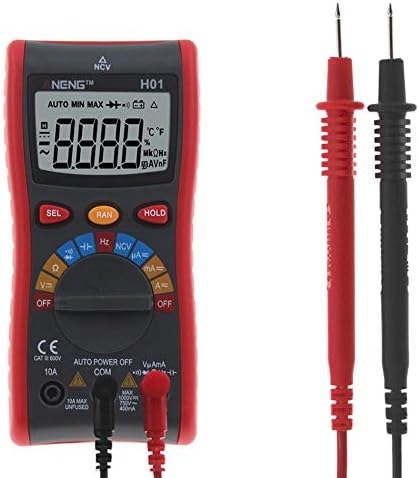
Figure 3.2: The ANENG ANH01 Multimeter with its included test leads.
4. Setup
4.1. Battery Installation
The ANENG ANH01 Multimeter requires 2 x 1.5V AAA batteries (not included) for operation.
- Locate the battery compartment cover on the back of the multimeter.
- Use a screwdriver to open the battery compartment.
- Insert two AAA batteries, ensuring correct polarity (+ and -).
- Replace the battery compartment cover and secure it with the screw.
4.2. Connecting Test Leads
Proper connection of test leads is crucial for accurate and safe measurements.
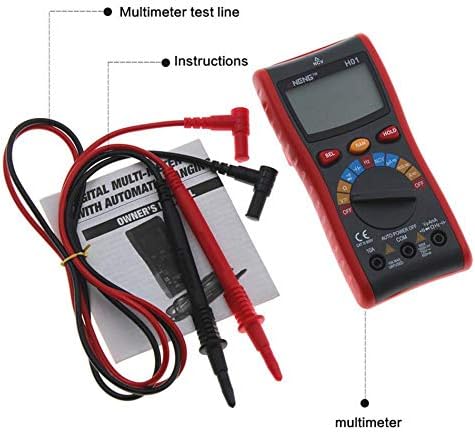
Figure 4.1: Contents of the ANENG ANH01 package, including the multimeter, test leads, and instruction manual.
- Always insert the black test lead into the COM (Common) input jack.
- For most measurements (Voltage, Resistance, Capacitance, Frequency, Diode, Continuity, and milliampere/microampere current), insert the red test lead into the VΩmA input jack.
- For measuring high current (up to 10A), insert the red test lead into the 10A input jack.
5. Operating Instructions
This section details how to perform various measurements with your ANENG ANH01 Multimeter.
5.1. Measuring AC/DC Voltage
- Set the rotary switch to the V~ (AC Voltage) or V- (DC Voltage) position.
- If measuring AC voltage, ensure the red lead is in the VΩmA jack. If measuring DC voltage, ensure the red lead is in the VΩmA jack.
- Connect the test leads in parallel to the circuit or component you wish to measure.
- Read the voltage value on the LCD display.
5.2. Measuring AC/DC Current
- IMPORTANT: Disconnect power to the circuit before connecting the multimeter in series.
- Set the rotary switch to the appropriate current range: mA~ (AC mA), mA- (DC mA), uA~ (AC uA), uA- (DC uA), or A~ (AC A), A- (DC A).
- Insert the red test lead into the VΩmA jack for mA/uA measurements, or the 10A jack for A measurements.
- Connect the multimeter in series with the circuit.
- Apply power to the circuit and read the current value on the LCD display.
5.3. Measuring Resistance (Ohm)
- Ensure the circuit is de-energized before measuring resistance.
- Set the rotary switch to the Ω (Ohm) position.
- Connect the test leads across the component whose resistance you want to measure.
- Read the resistance value on the LCD display.
5.4. Measuring Capacitance
- Ensure the capacitor is fully discharged before measuring.
- Set the rotary switch to the F (Capacitance) position.
- Connect the test leads across the capacitor terminals.
- Read the capacitance value on the LCD display.
5.5. Measuring Frequency
- Set the rotary switch to the Hz (Frequency) position.
- Connect the test leads in parallel to the circuit where you want to measure frequency.
- Read the frequency value on the LCD display.
5.6. Diode Test and Continuity
- Ensure the circuit is de-energized.
- Set the rotary switch to the Diode/Continuity position.
- Use the SELECT button to toggle between Diode Test and Continuity Test.
- Diode Test: Connect the red lead to the anode and the black lead to the cathode of the diode. The display will show the forward voltage drop. Reverse the leads to check for open circuit.
- Continuity Test: Connect the test leads across the component or circuit path. A continuous beep indicates a good connection (low resistance).
5.7. Non-Contact Voltage (NCV) Detection
The NCV function allows for detection of AC voltage without direct contact, enhancing safety.
- Set the rotary switch to the NCV position.
- Move the top part of the multimeter (where the NCV sensor is located) close to the wire or outlet you suspect has AC voltage.
- The meter will emit an audible beep and the NCV indicator will light up if AC voltage is detected (range: 12V-1000V AC).

Figure 5.1: Example of a Live Wire Test using the NCV function. The display shows a large value for a live line and a small value for a null line.
5.8. Data Hold and Backlight
- Data Hold: Press the HOLD button briefly to freeze the current reading on the display. Press again to release.
- Backlight: Long press the HOLD button for approximately 2 seconds to turn the LCD backlight on or off.
6. Maintenance
6.1. Cleaning
Wipe the case with a damp cloth and mild detergent. Do not use abrasives or solvents.
6.2. Battery Replacement
When the low battery indicator appears on the display, replace the batteries as described in Section 4.1. Battery Installation.
6.3. Fuse Replacement
If the current measurement function fails, the fuse may need replacement. Refer to the specifications for the correct fuse type. Fuse replacement should only be performed by qualified personnel.
7. Troubleshooting
| Problem | Possible Cause | Solution |
|---|---|---|
| No display or dim display | Low or dead batteries | Replace batteries (2 x 1.5V AAA). |
| Incorrect readings | Incorrect function/range selected; Poor test lead connection; External interference. | Verify rotary switch setting; Ensure leads are firmly connected; Move away from strong electromagnetic fields. |
| Current measurement not working | Blown fuse. | Replace the fuse (refer to specifications for type). |
| "OL" (Overload) displayed | Measurement exceeds selected range or meter's maximum capacity. | Select a higher range (if in manual mode) or ensure the measured value is within the meter's limits. |
8. Specifications
Detailed technical specifications for the ANENG ANH01 Digital Multimeter.
- Brand: ANENG
- Model: H01
- Material: ABS
- Display Type: 4000 Counts LCD
- Operating Mode: Automatic range/manual range
- Operating Temperature: 0 - 40 ℃
- Power Source: 2pcs x 1.5V AAA Battery (NOT included)
- DC Voltage Range: 400.0mV / 4.000V / 40.00V / 400.0V / 1000V
- AC Voltage Range: 400.0mV / 4.000V / 40.00V / 400.0V / 750V
- DC Current Range: 40.00uA / 400.0uA / 40.00mA / 400.0mA / 4.000A / 10.00A
- AC Current Range: 40.00uA / 400.0uA / 40.00mA / 400.0mA / 4.000A / 10.00A
- Resistance Range: 400.0Ω / 4.000kΩ / 40.00kΩ / 400.0kΩ / 4.000MΩ / 40.00MΩ
- Capacitance Range: 4.000nF / 40.00nF / 400.0nF / 4.000uF / 40.00uF / 200.0uF / 400.0uF
- Frequency Range: 99.99Hz / 999.9Hz / 9.999kHz / 99.99kHz / 999.9kHz / 9.999MHz
- NCV: Yes (AC 12V-1000V)
- Diode Test: Yes
- Continuity: Yes
- Data Hold: Yes
- Backlight: Yes
- Low Battery Alert: Yes
- Auto Power Off: Yes
- Color: Red
- Test Lead Length: Approx. 100cm/39.4inch
- Size: Approx. 150*72*33mm / 5.9*2.8*1.3inch
- Weight: Approx. 268g / 9.5oz
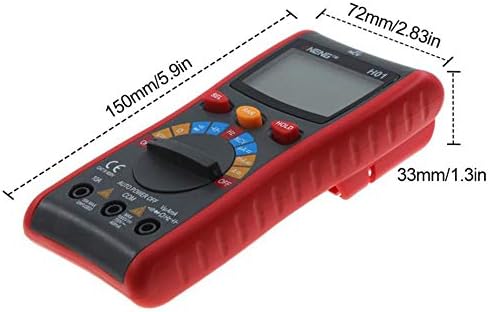
Figure 8.1: Dimensions of the ANENG ANH01 Digital Multimeter.
9. Warranty and Support
For warranty information or technical support, please refer to the contact details provided with your purchase or visit the official ANENG website. Keep your purchase receipt as proof of purchase.
Related documentsANH01


Ask a question about this manual
Ask about setup, troubleshooting, compatibility, parts, safety, or missing instructions. Manuals+ will review the question and use this page’s manual context to help answer it.