
Tronic T3000
Tronic T-Fan T3000 Handheld Mini Fan User Manual
Model: T3000
1. Introduction
Thank you for choosing the Tronic T-Fan T3000 Handheld Mini Fan. This portable and versatile fan is designed to provide personal cooling wherever you go. Featuring a powerful 3000mAh rechargeable battery, a magnetic base for easy mounting, and a compact design, the T-Fan T3000 is ideal for use at your desk, during travel, or outdoors. Please read this manual carefully before use to ensure proper operation and maintenance.
2. Safety Information
- Do not insert fingers or any objects into the fan grille when the fan is operating.
- Keep the fan away from water and moisture. Do not use in wet environments.
- Do not disassemble, repair, or modify the fan yourself. Contact customer support for assistance.
- Keep out of reach of children.
- Use only the provided USB cable or a certified equivalent for charging.
- Do not expose the fan to extreme temperatures or direct sunlight for prolonged periods.
- Ensure the fan is placed on a stable surface when not handheld.
3. Package Contents
Please check the package for the following items:
- Tronic T-Fan T3000 Handheld Mini Fan
- USB Charging Cable
- Magnetic Metal Plate (with adhesive backing)
- User Manual
4. Product Diagram
Familiarize yourself with the components of your Tronic T-Fan T3000.

Figure 4.1: Front view of the Tronic T-Fan T3000 handheld mini fan, showcasing its compact design and fan grille.

Figure 4.2: Side view of the Tronic T-Fan T3000, highlighting the USB-C charging port located on the handle.
- Fan Grille: Protects the fan blades.
- Fan Blades: Generate airflow.
- Power Button/Speed Control: Located on the handle, used for turning the fan on/off and adjusting speed.
- USB-C Charging Port: For connecting the charging cable.
- LED Indicator: Shows charging status and operation.
- Magnetic Base: Allows the fan to attach to metallic surfaces or the included metal plate.
- Adjustable Head: The fan head can be tilted up to 15 degrees for directional airflow.
5. Setup
5.1 Initial Charging
Before first use, fully charge the fan. Connect the USB charging cable to the fan's USB-C port and the other end to a USB power source (e.g., computer, wall adapter). The LED indicator will illuminate during charging and change color or turn off when fully charged.
5.2 Attaching the Magnetic Metal Plate
The included magnetic metal plate allows you to mount your fan on non-metallic surfaces.
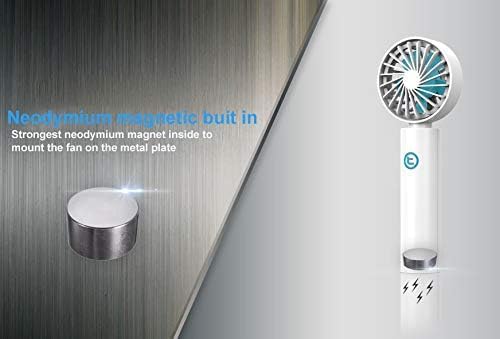
Figure 5.1: The leather-covered magnetic metal plate with 3M adhesive backing, used for mounting the fan.
- Clean the desired surface thoroughly to ensure it is free of dust and grease.
- Peel off the protective film from the adhesive backing of the metal plate.
- Firmly press the metal plate onto the clean surface and hold for a few seconds to ensure strong adhesion.
- Allow the adhesive to set for at least 24 hours before attaching the fan.
6. Operating Instructions
6.1 Power On/Off and Speed Adjustment
The Tronic T-Fan T3000 features a single button for control.
- To Turn On: Press the power button once. The fan will start at its default speed.
- To Adjust Speed: Press the power button repeatedly to cycle through available speed settings (e.g., Low, Medium, High, Off). Refer to the LED indicator for current speed if applicable.
- To Turn Off: Continue pressing the power button until the fan stops, or press and hold the button for a few seconds.
6.2 Adjusting Airflow Direction
The fan head can be manually tilted up to 15 degrees to direct the airflow as needed.

Figure 6.1: Illustration showing the 15-degree adjustable tilt of the fan head for customized airflow.
7. Charging
When the battery is low, the fan's performance may decrease, or it may stop operating. Recharge the fan using the provided USB cable.
- Connect the USB-C end of the cable to the fan's charging port.
- Connect the USB-A end to a compatible power source (e.g., 5V USB adapter, computer USB port, power bank).
- The LED indicator will show the charging status. A full charge typically takes approximately 3-4 hours.
- Avoid overcharging the battery by disconnecting the fan once fully charged.
8. Magnetic Mounting
The Tronic T-Fan T3000 features a strong neodymium magnet in its base, allowing it to attach to various metallic surfaces or the included metal plate.
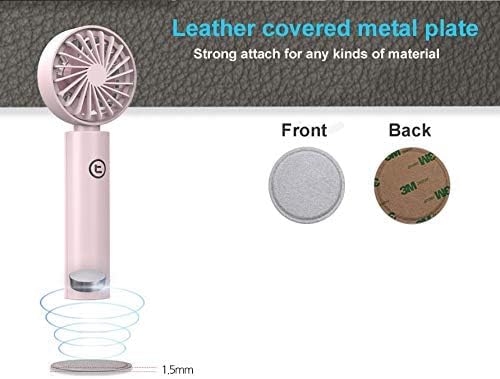
Figure 8.1: Examples of the Tronic T-Fan T3000 magnetically mounted in a car, kitchen, office, and desk environment.
- Ensure the surface is clean and dry before mounting.
- Place the fan's magnetic base directly onto a metallic surface or the previously installed metal plate.
- Verify that the fan is securely attached before releasing it.
9. Maintenance
9.1 Cleaning
- Ensure the fan is turned off and disconnected from any power source before cleaning.
- Use a soft, dry cloth to wipe the exterior of the fan.
- For the fan grille, use a cotton swab or a soft brush to gently remove dust. Do not use water or harsh cleaning agents.
9.2 Storage
When not in use for extended periods, store the fan in a cool, dry place, away from direct sunlight and extreme temperatures. It is recommended to charge the fan every 3 months to maintain battery health.
10. Troubleshooting
| Problem | Possible Cause | Solution |
|---|---|---|
| Fan does not turn on. | Battery is depleted. | Charge the fan fully. |
| Fan does not turn on. | Power button not pressed correctly. | Ensure the power button is pressed firmly. |
| Fan does not charge. | Charging cable or adapter is faulty. | Try a different USB cable or power adapter. |
| Fan does not charge. | Charging port is dirty or damaged. | Gently clean the charging port. If damaged, contact support. |
| Weak airflow. | Low battery. | Recharge the fan. |
| Weak airflow. | Fan grille is obstructed. | Clean the fan grille to remove dust or debris. |
11. Specifications
- Brand: Tronic
- Model: T3000
- Type: Handheld Mini Fan
- Power Source: Battery Powered (USB Rechargeable)
- Battery Capacity: 3000mAh (Lithium Ion)
- Voltage: 5 Volts
- Control Method: Button Control (Touch)
- Special Feature: Portable, Magnetic Base, Adjustable Tilt (15 degrees)
- Item Weight: Approximately 5.9 ounces (0.17 Kilograms)
- Package Dimensions: 7.24 x 2.91 x 1.65 inches
- Indoor/Outdoor Usage: Outdoor
12. Product Overview Video
Watch this official product video for a visual guide to the Tronic T-Fan T3000's features and usage.
Video Description: This video provides an overview of the Tronic T-Fan T3000, showcasing its compact size, various color options, magnetic mounting capabilities, and portability. It highlights the fan's design and ease of use in different scenarios.
13. Warranty and Support
The Tronic T-Fan T3000 comes with a standard manufacturer's warranty. For detailed warranty information, product support, or to report any issues, please contact Tronic customer service through the retailer where you purchased the product or visit the official Tronic website.
Please retain your proof of purchase for warranty claims.
Related documentsT3000

Ask a question about this manual
Ask about setup, troubleshooting, compatibility, parts, safety, or missing instructions. Manuals+ will review the question and use this page’s manual context to help answer it.