
PROHEAR PROHEAR 036
PROHEAR Electronic Shooting Earmuffs User Manual
Model: PROHEAR 036
Designed for optimal hearing protection and situational awareness in shooting and hunting environments.
Introduction
The PROHEAR 036 Electronic Shooting Earmuffs are engineered to provide superior hearing protection while enhancing your ability to hear important ambient sounds. With advanced noise reduction and sound amplification technology, these earmuffs are ideal for shooting, hunting, and other noisy environments where communication and situational awareness are crucial.
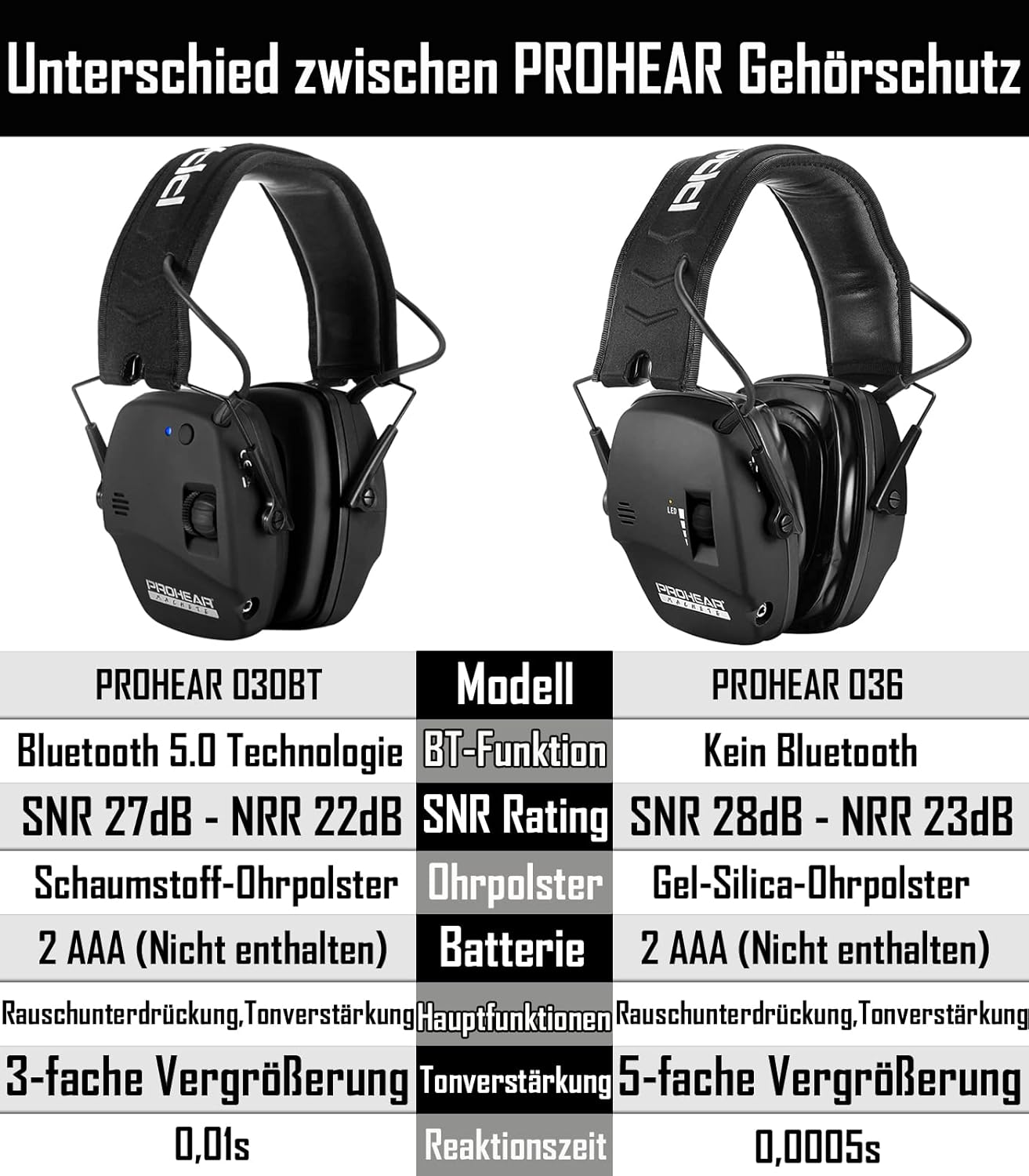
Key features include a Noise Reduction Rating (NRR) of 22dB and a Signal-to-Noise Ratio (SNR) of 27dB, ultra-fast sound activated compression, 5X sound amplification, and comfortable gel ear pads designed for extended wear.
Product Overview and Components
This diagram illustrates the main components of your PROHEAR 036 Electronic Shooting Earmuffs:
- Adjustable, Padded Headband with Metal Wire Frame: Ensures a secure and comfortable fit for various head sizes.
- High-quality Rubber Paint: Provides a durable and pleasant tactile finish.
- Gel Ear Pads: Designed for enhanced comfort and a better seal, especially when wearing eyewear. Easy to clean.
- Audio Input (AUX Jack): Allows connection to external audio devices like smartphones or MP3 players.
- Ergonomic Volume Control Knobs: For easy adjustment of sound amplification levels.
- 2 Omni-microphones: Directional microphones that help pinpoint the source of sounds.
- LED Light: Indicates the operational status of the earmuffs.
- Cut-outs Design for Rifle Aiming: Slim, low-profile ear cups designed to prevent interference with firearm stocks.
- Battery Compartment: Located on one of the ear cups, powered by 2 AAA batteries.
Setup
- Battery Installation:
Locate the battery compartment on one of the ear cups. Open the cover and insert 2 AAA batteries, ensuring correct polarity (+/-). Close the compartment securely.
Image: Detail showing the battery compartment and installation.
Note: Batteries are not included with the product.
- Adjusting the Headband:
Extend or retract the metal wire frame on each side of the headband to achieve a snug yet comfortable fit over your head. The earmuffs should cover your ears completely without excessive pressure.
- Wearing the Earmuffs Correctly:
Position the earmuffs so that the ear cups fully enclose your ears, creating a tight seal. Ensure no hair or clothing interferes with the seal around the ear pads, as this can compromise noise reduction effectiveness. The slim profile of the ear cups is designed to allow for comfortable rifle aiming without obstruction.

Image: Proper wearing of PROHEAR earmuffs during shooting activity.
Operating Instructions
- Powering On/Off and Volume Control:
To power on the earmuffs, rotate the volume control knob clockwise. The LED indicator light will illuminate, confirming the unit is active. Continue rotating the knob clockwise to increase the amplification volume of ambient sounds. Rotate counter-clockwise to decrease volume and to power off the unit.

Image: Close-up of the volume control knob and LED indicator.
- Sound Amplification:
The PROHEAR 036 features 5X sound amplification, allowing you to hear low-level ambient sounds such as animal movements or conversations more clearly. The two omni-directional microphones help in accurately detecting the direction of sound sources.

Image: Illustrating the 5X sound amplification feature for improved situational awareness.
- Noise Reduction Technology:
The earmuffs are equipped with an ultra-fast sound-activated compression system that reacts in 0.0005 seconds to suppress harmful noises above 82 dB. This protects your hearing from sudden loud impulses like gunshots while still allowing you to hear lower-level sounds.

Image: Visualizing the rapid noise suppression capability of the earmuffs.
- Using the Audio Input (AUX Jack):
Connect an external audio device (e.g., smartphone, MP3 player) to the AUX jack on the earmuffs using a 3.5mm audio cable. This allows you to listen to music or other audio content through the earmuffs while still benefiting from hearing protection.
Image: The AUX input port and its connection to an external device.
Maintenance
- Cleaning:
Regularly wipe down the exterior of the earmuffs and the gel ear pads with a damp cloth. For the gel ear pads, use a mild soap solution if necessary, then wipe dry. Avoid using harsh chemicals or abrasive cleaners.

Image: Highlighting the easy-to-clean nature of PROHEAR gel ear pads.
- Replacing Ear Pads:
The gel ear pads are replaceable. If they become worn or damaged, gently peel them off the ear cups and replace them with new, compatible PROHEAR ear pads. Ensure the new pads are securely attached to maintain an effective seal.
- Battery Replacement:
When the sound amplification becomes weak or the LED indicator light dims, it's time to replace the batteries. Follow the battery installation steps outlined in the "Setup" section.
- Storage:
Store the earmuffs in a clean, dry place away from extreme temperatures and direct sunlight. Collapse the earmuffs for compact storage if applicable.
Troubleshooting
| Problem | Possible Cause | Solution |
|---|---|---|
| No sound amplification / Unit not turning on. |
|
|
| Weak or distorted sound. |
|
|
| Poor noise reduction. |
|
|
Specifications
| Feature | Detail |
|---|---|
| Model | PROHEAR 036 |
| Noise Reduction Rating (NRR) | 22dB |
| Signal-to-Noise Ratio (SNR) | 27dB |
| Sound Amplification | Up to 5X |
| Reaction Time | 0.0005 seconds (Sound Activated Compression) |
| Power Source | 2 x AAA Batteries (not included) |
| Auto Shut-off Function | 4 Hours (to conserve battery life) |
| Ear Pad Type | Gel Ear Pads (replaceable) |
| Microphones | 2 Omni-directional Microphones |
| Audio Input | 3.5mm AUX Jack |

Image: Detailed comparison of PROHEAR 036 specifications with another model.
Warranty and Support
PROHEAR stands behind the quality of its products. The PROHEAR 036 Electronic Shooting Earmuffs come with a ONE-YEAR WARRANTY from the date of purchase.
This warranty covers manufacturing defects and issues arising from normal use. It does not cover damage caused by misuse, accidents, unauthorized modifications, or improper maintenance.
For warranty claims, technical support, or any questions regarding your PROHEAR earmuffs, please contact PROHEAR customer service. Refer to the product packaging or the official PROHEAR website for the most current contact information.
Related documentsPROHEAR 036


Ask a question about this manual
Ask about setup, troubleshooting, compatibility, parts, safety, or missing instructions. Manuals+ will review the question and use this page’s manual context to help answer it.