
Anlapus Security Camera Outdoor
Anlapus 1080P Outdoor Surveillance Camera Instruction Manual
Brand: Anlapus
Model: Security Camera Outdoor
1. Introduction
This manual provides comprehensive instructions for the installation, operation, and maintenance of your Anlapus 1080P Outdoor Surveillance Camera. Please read this manual carefully before using the product to ensure proper functionality and safety.
The Anlapus 1080P camera is designed for both indoor and outdoor surveillance, offering high-definition video quality and robust performance. Key features include:
- 1080P Full HD CCTV Camera: Provides high-resolution images at 2.0 megapixels with a 3.6mm lens offering a 90-degree viewing angle. Signal system: PAL.
- 20M Night Vision: Equipped with 24 built-in IR LEDs and an IR-CUT filter for clear black and white images up to 20 meters in darkness.
- High Compatibility: A 4-in-1 camera compatible with CVBS, TVI, AHD, and CVI DVR recorders. Output mode can be adjusted via the OSD button.
- IP66 Waterproof Shell: Durable plastic housing designed for extreme weather conditions, suitable for both indoor and outdoor use.
2. Package Contents
Please verify that all items listed below are included in your package. If any items are missing or damaged, please contact customer support.
- Camera x1
- Mounting Screw Bag x1
- Mounting Hole Template x1
- Quick Start Guide x1

Figure 2.1: Package Contents
3. Product Overview
Familiarize yourself with the different components of your Anlapus surveillance camera:
- 3.6 mm Lens: Provides a 90° viewing angle.
- IR-Cut Filter: Ensures crisper and clearer images by automatically switching between day and night modes.
- Durable Housing: IP66 rated for weather resistance, suitable for outdoor installation.
- OSD Joystick: Used to switch between AHD/TVI/CVBS/CVI camera output modes.
- Glass Cover: Protects the lens from rain, dust, and fog.
- 24 pcs LEDs: Provide up to 80ft (24m) night vision.
- Power Port: 12V DC power input.
- Video Output: BNC connector for video signal.

Figure 3.1: Camera Components
4. Setup
4.1 Installation Guidelines
Before installation, ensure you have a suitable location that provides a clear field of view and is within reach of power and video cables. The camera's IP66 rating makes it suitable for outdoor environments, but consider sheltered positions for prolonged durability.
4.2 Connection Diagram
Follow these steps to connect your Anlapus surveillance camera to your DVR system:
- Connect the camera's video output (yellow BNC connector) to the video input of your DVR using a BNC cable (not included).
- Connect the camera's power input (red connector) to a 12V DC power adapter (not included).
- Connect the power adapter to a power outlet.
- Connect your DVR to a display monitor using a VGA or HDMI cable.

Figure 4.1: Connection Diagram
Note: Only the camera is included in the package. DVR, power supply, and video cables are sold separately.
4.3 Camera Output Mode Conversion
The Anlapus camera supports multiple video output formats (CVBS, TVI, AHD, CVI). The default mode is CVBS 960H. To switch the output mode to match your DVR, use the OSD joystick located on the camera cable:
- Ensure you know which video format your DVR supports.
- Connect your 4-in-1 camera to the DVR.
- Press and hold the OSD joystick for 5 seconds to switch the output mode. The joystick directions correspond to different modes:
- Default/Up: CVBS 960H
- Down: CVI
- Left: AHD
- Right: TVI
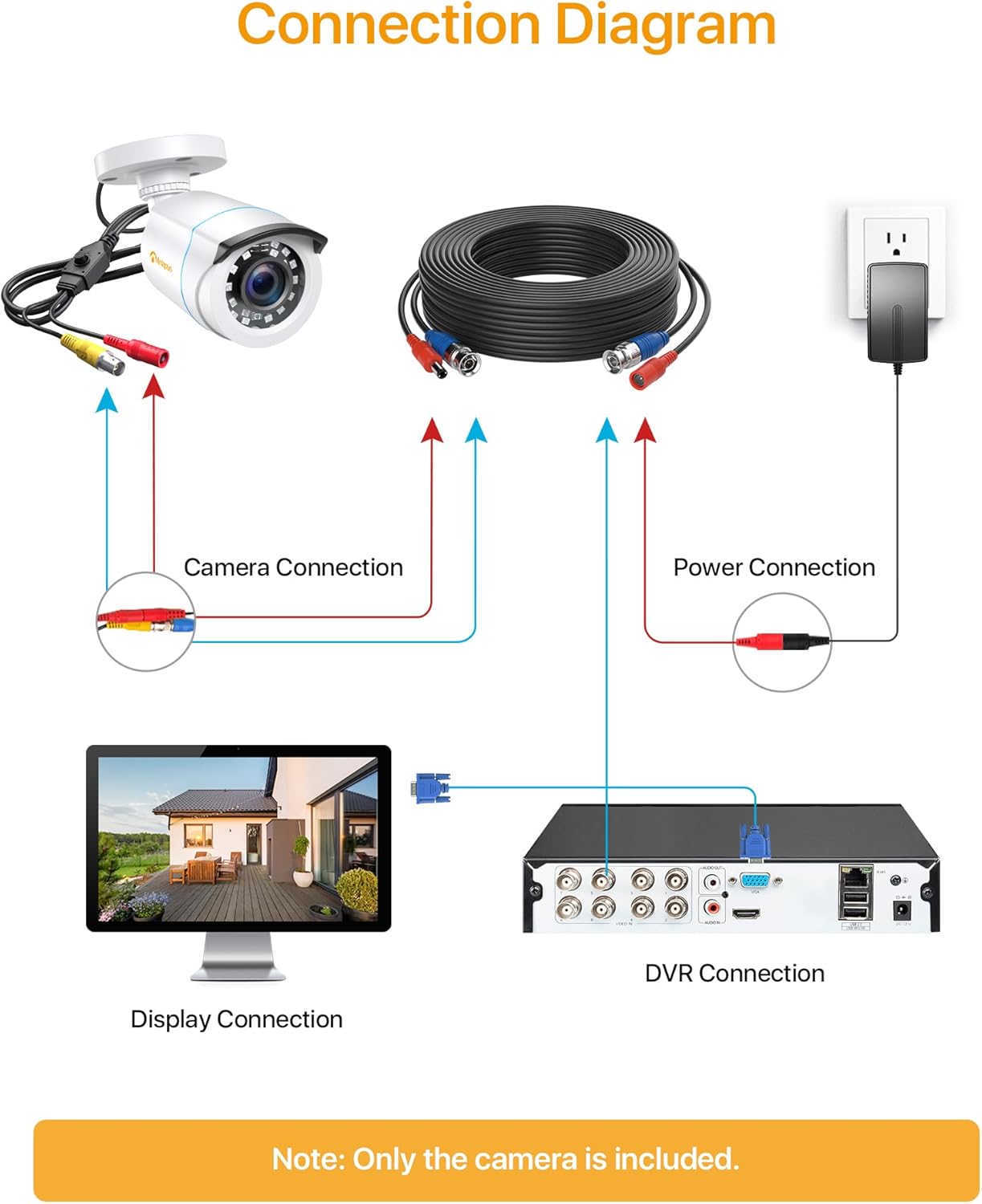
Figure 4.2: Camera Output Mode Conversion
5. Operating Instructions
5.1 Day and Night Vision
The camera automatically switches between day (color) and night (black and white) vision modes based on ambient light conditions. The built-in IR LEDs activate in low light to provide clear images up to 20 meters.

Figure 5.1: Day and Night Vision
5.2 Wide Viewing Angle
The 3.6mm lens provides a 90-degree wide viewing angle, allowing for extensive coverage of your surveillance area.

Figure 5.2: 90° Wide Viewing Angle
5.3 4-in-1 Compatibility
This camera is designed for broad compatibility, supporting 960H, CVI, AHD, and TVI video output modes. This flexibility ensures it can integrate with various existing DVR systems.
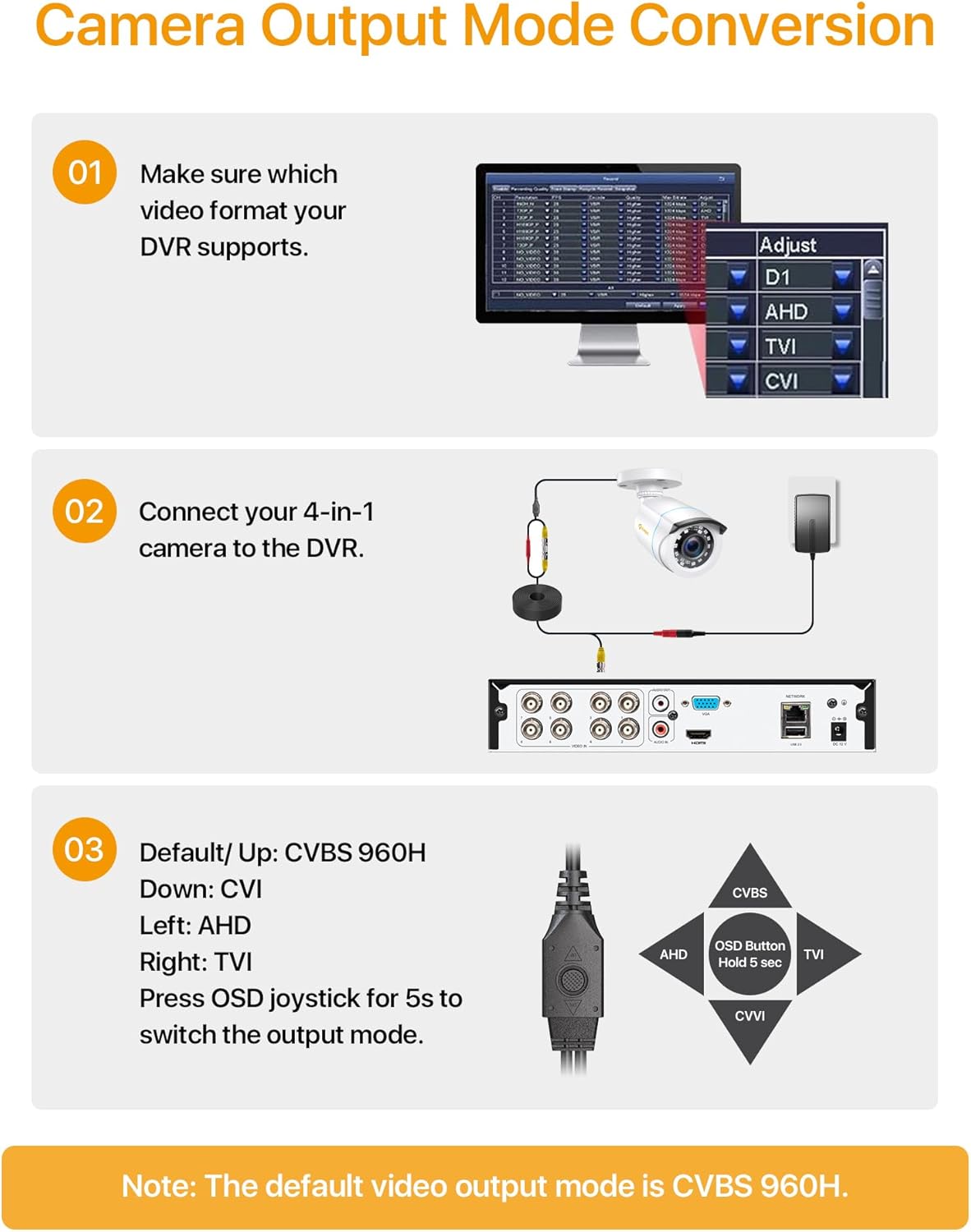
Figure 5.3: 4-in-1 Camera Compatibility
6. Maintenance
To ensure optimal performance and longevity of your Anlapus surveillance camera, follow these maintenance guidelines:
- Cleaning: Regularly wipe the camera's glass cover with a soft, damp cloth to remove dust, dirt, or water spots that may obstruct the view. Avoid using harsh chemicals or abrasive materials.
- Weather Resistance: The camera features an IP66 waterproof shell, designed to withstand various extreme weather conditions, including rain and temperature fluctuations from 14°F to 151°F (-10°C to 66°C).
- Cable Inspection: Periodically check the power and video cables for any signs of wear, damage, or loose connections. Ensure all connections are secure.

Figure 6.1: Durable for Indoors & Outdoors
7. Troubleshooting
If you encounter issues with your Anlapus surveillance camera, refer to the following common problems and solutions:
| Problem | Possible Cause | Solution |
|---|---|---|
| No image on display | Incorrect video output mode; Loose cable connection; No power to camera/DVR. | Verify camera output mode matches DVR (Section 4.3); Check all video and power cable connections; Ensure power adapters are plugged in and functional. |
| Poor image quality / blurry image | Dirty lens; Incorrect focus (if adjustable); Insufficient lighting at night. | Clean the camera lens with a soft cloth; Ensure adequate lighting for night vision; Check for obstructions in the camera's field of view. |
| Night vision not working | IR LEDs not activating; IR-CUT filter malfunction. | Ensure the camera is in a dark environment to trigger IR LEDs; Check power supply; Contact support if issue persists. |
| Camera not recognized by DVR | Incompatible video format; Faulty BNC cable. | Adjust camera output mode to match DVR (Section 4.3); Try a different BNC cable. |
8. Specifications
| Feature | Detail |
|---|---|
| Manufacturer | Anlapus |
| Model Number | Security Camera Outdoor |
| Product Dimensions | 25.4 x 5.08 x 7.62 cm; 240 grams |
| Color | White |
| Material | Plastic |
| Power Type | Wired Electric |
| Voltage | 12 Volts |
| Wattage | 4 watts |
| Number of Items | 1 |
| Bulb Type | LED |
| Special Features | HD Resolution, Image Sensor, Night Vision |
| Video Capture Resolution | 1080p |
| Connectivity Technology | Wired |
| Number of Channels | 1 |
9. Warranty and Support
Anlapus provides a two-year quality warranty for this product. In the event that the product becomes defective within the first year, a new camera will be replaced instead of a repair.
Additionally, lifetime technical support is available to assist you with any questions or issues you may encounter during the setup, operation, or maintenance of your camera.
For warranty claims or technical assistance, please refer to the contact information provided in your Quick Start Guide or visit the official Anlapus website.
Ask a question about this manual
Ask about setup, troubleshooting, compatibility, parts, safety, or missing instructions. Manuals+ will review the question and use this page’s manual context to help answer it.