
1. Product Overview
This manual provides instructions for the Yimaut Replacement Remote Control, designed for use with Hisense Roku TVs and various Roku streaming devices. This package includes two remote controls and two protective silicone covers (one black, one yellow/blue glow-in-the-dark).

Figure 1: Yimaut Replacement Remote Controls with Protective Covers. The blue cover glows in the dark for easy visibility at night, while the black cover provides standard protection.
The remote controls feature dedicated shortcut buttons for popular streaming services and essential TV functions like power, volume, and mute. The included silicone covers offer enhanced grip, shock protection, and an anti-lost wrist strap.
2. Compatibility
The Yimaut Replacement Remote Control is broadly compatible with a range of devices. Please review the compatibility details below to ensure proper function with your equipment.
2.1. Compatible with Built-in Roku TVs
This remote is a direct replacement for remotes used with various brands of TVs that have Roku built-in, including but not limited to:
- TCL Roku TV
- Hisense Roku TV
- Onn Roku TV
- Sharp Roku TV
- Haier Roku TV
- Insignia Roku TV
- Sanyo Roku TV
- Hitachi Roku TV
- RCA Roku TV
- Philips Roku TV
- Element Roku TV
- LG Roku TV
- JVC Roku TV
- Magnavox Roku TV
- Westinghouse Roku TV
2.2. Compatible with Roku Players
The remote is also compatible with various Roku streaming players, including:
- Roku Box
- Roku 1, 2, 3, 4 HD LT XS XD
- Roku Express / Express+
- Roku Premiere / Premiere+
- Roku Ultra LT
- Roku Ultra
- Roku Soundbar Remote
2.3. Incompatible Devices
IMPORTANT: This remote control is NOT compatible with Roku Stick or Roku Streaming Stick models.

Figure 2: Visual guide to compatible and incompatible Roku devices. The remote works with most Roku TVs and boxes but not with USB stick models.
3. Setup and Initial Use
Follow these steps to set up your new Yimaut Replacement Remote Control.
3.1. Battery Installation
- Locate the battery compartment on the back of the remote control.
- Slide open the battery cover.
- Insert two (2) AAA batteries (not included), ensuring the correct polarity (+ and -) as indicated inside the compartment.
- Close the battery cover securely.
3.2. Pairing (for Roku Players)
For Roku streaming players (Roku Box, Express, Premiere, Ultra, etc.), the remote typically works immediately via infrared (IR) without complex pairing. Simply point the remote at your Roku device.
If you experience issues, ensure there are no obstructions between the remote and the Roku device's IR receiver.
3.3. Programming TV Functions (Power, Volume, Mute)
For built-in Roku TVs, the power, volume, and mute buttons may require a simple programming step to control your specific TV brand. This process typically involves using the Roku TV's settings menu:
- On your Roku TV, navigate to Settings.
- Select Remotes & Devices.
- Choose Remote or Set up remote for TV control.
- Follow the on-screen prompts to select your TV brand and test the power, volume, and mute functions. You may need to try a few codes until the remote successfully controls your TV.
- If you encounter difficulties, refer to your Roku TV's specific user manual or contact Yimaut customer support for detailed instructions.
4. Operating the Remote Control
The Yimaut Replacement Remote Control is designed for intuitive navigation and quick access to your favorite content.
4.1. Button Functions
| Button | Function |
|---|---|
| Power (⏻) | Turns the TV On/Off. |
| Back (←) | Returns to the previous screen or menu. |
| Home (⌂) | Goes to the Roku Home screen. |
| Directional Pad (Up, Down, Left, Right) | Navigates through menus and content. |
| OK | Selects an item or confirms an action. |
| Rewind (⟲) | Rewinds video playback. |
| Play/Pause (▶‖) | Plays or pauses video content. |
| Fast Forward (⟳) | Fast forwards video playback. |
| Volume Up/Down (+ / -) | Adjusts the TV volume. |
| Mute (🔇) | Mutes or unmutes the TV audio. |
| Sleep/Star (*) | Accesses options or settings within an app/channel. |
| Source | Changes the input source on your TV. |
4.2. Shortcut Keys
The remote includes dedicated shortcut buttons for quick access to popular streaming applications:
- Netflix
- HULU
- Disney+
- Amazon Prime Video
- YouTube
- ESPN+
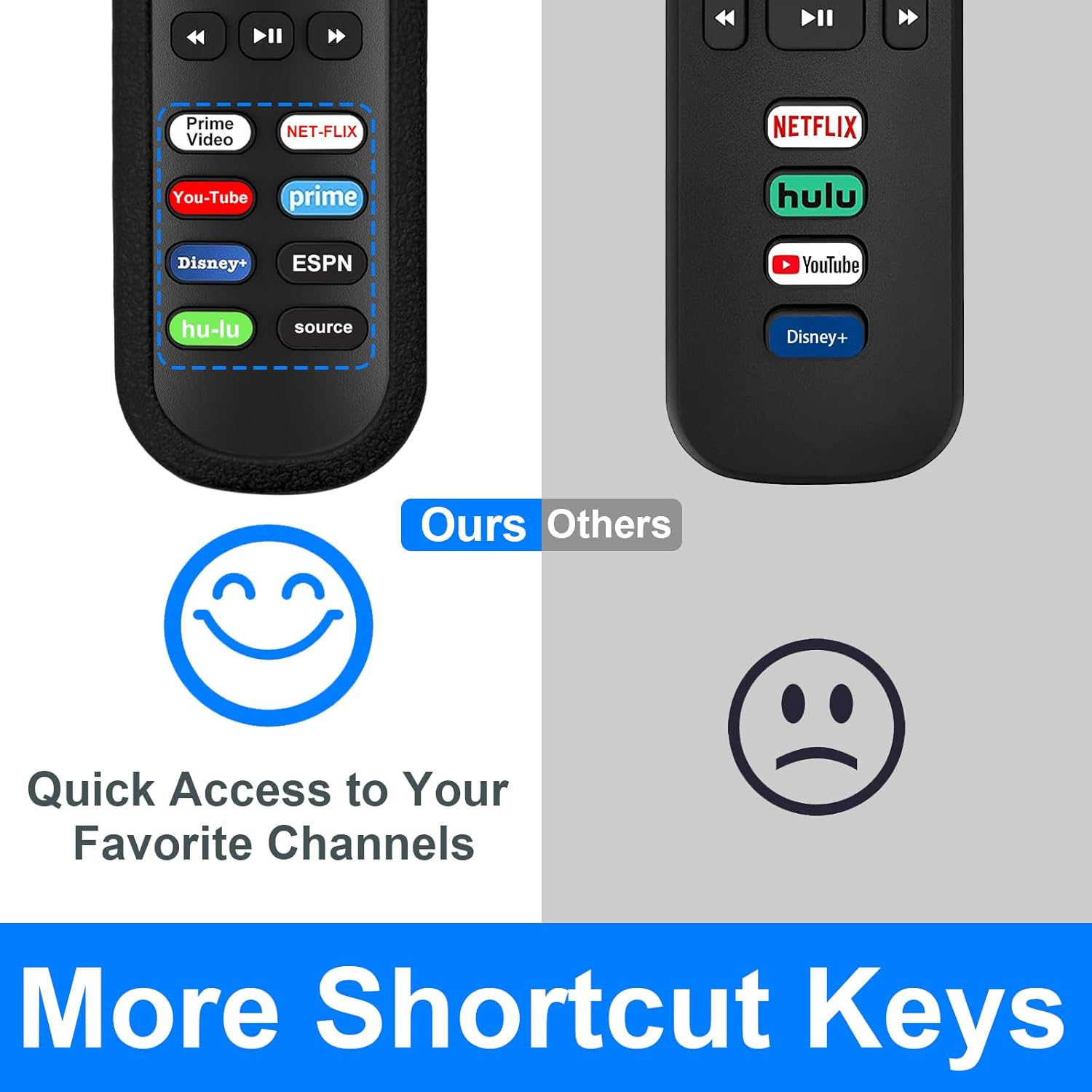
Figure 3: Dedicated shortcut buttons for popular streaming services, allowing for quick app launch.
5. Maintenance and Care
To ensure the longevity and optimal performance of your Yimaut Replacement Remote Control, follow these maintenance guidelines:
5.1. Silicone Protective Cover
The included silicone covers provide protection against drops and impacts. The blue cover features a glow-in-the-dark property, making it easier to locate the remote in low-light conditions.
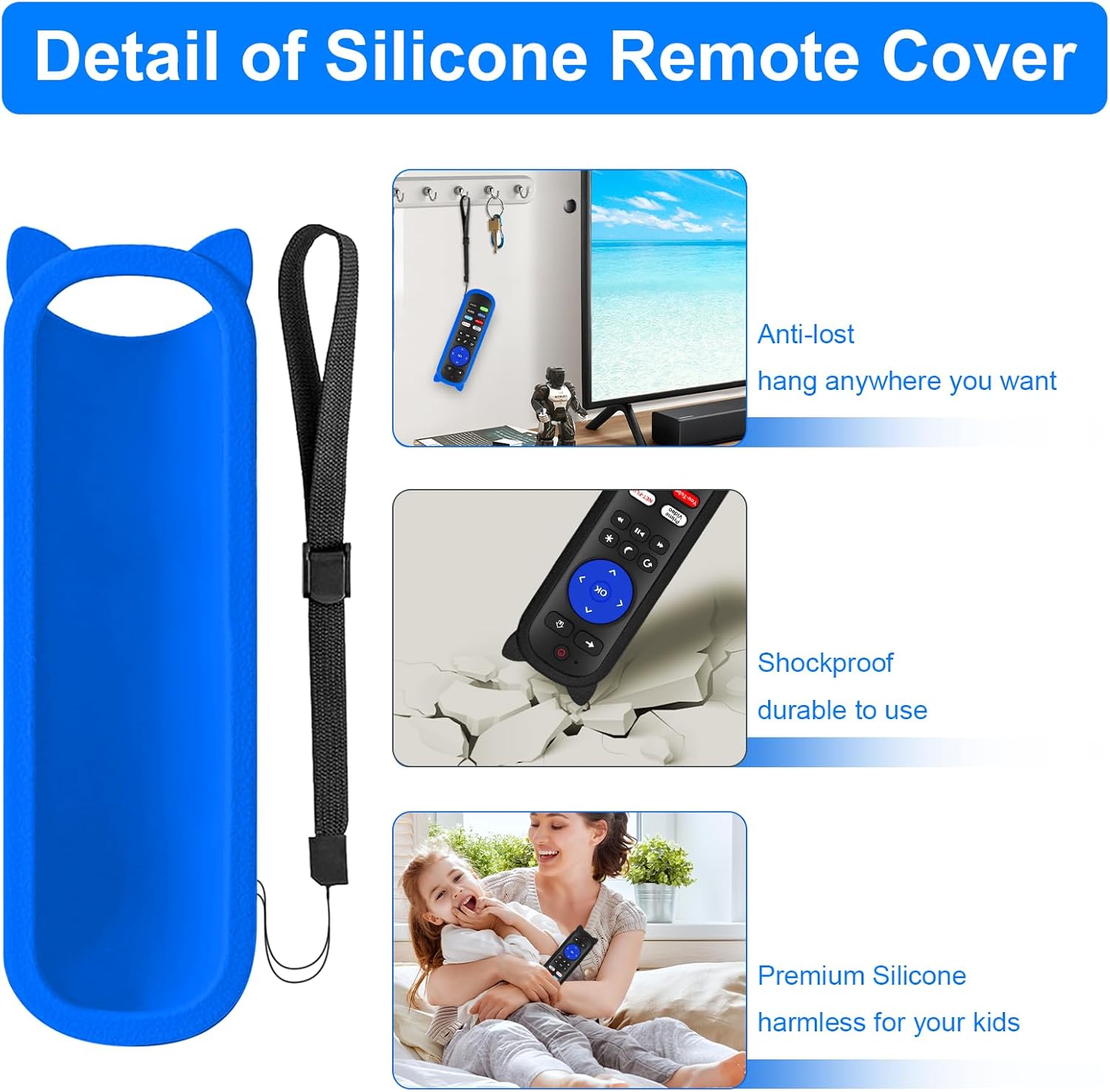
Figure 4: Features of the silicone protective cover, including the anti-lost wrist strap and shockproof design.
- Cleaning: The silicone cover can be removed and washed with mild soap and water if it becomes dirty. Ensure it is completely dry before placing it back on the remote.
- Glow Feature: For the blue cover to glow effectively, expose it to light (natural or artificial) for a period to "charge" its luminescence.
- Wrist Strap: Utilize the included wrist strap to prevent accidental drops or misplacement.
5.2. General Care
- Avoid exposing the remote to extreme temperatures, direct sunlight, or high humidity.
- Do not drop the remote or subject it to strong impacts, even with the cover on.
- Clean the remote's surface with a soft, dry cloth. Do not use abrasive cleaners or solvents.
- Remove batteries if the remote will not be used for an extended period to prevent battery leakage.
6. Troubleshooting
If you encounter issues with your Yimaut Replacement Remote Control, try the following troubleshooting steps:
| Problem | Possible Solution |
|---|---|
| Remote is not responding. |
|
| Power, Volume, or Mute buttons are not working on my Roku TV. |
|
| Remote works with Roku TV but not with my Roku Stick. |
|
| Buttons feel sticky or unresponsive. |
|
7. Specifications
| Feature | Detail |
|---|---|
| Model Name | Universal Remote (HU-RCRUS-20) |
| Item Model Number | 6462717679735 |
| Connectivity Technology | Infrared (IR) |
| Controller Type | Button Control |
| Maximum Range | Up to 40 Feet (12 Meters) |
| Power Source | 2 x AAA Batteries (not included) |
| Product Dimensions (approx.) | 5 x 2 x 1 cm |
| Product Weight (approx.) | 159 g (with cover) |
| Special Features | Ergonomic design, Glow-in-dark silicone cover (blue), Anti-lost wrist strap, Dedicated shortcut keys |

Figure 5: The remote offers a reliable transmitting distance of up to 40 feet (12 meters).
8. Warranty and Support
For warranty information or technical support regarding your Yimaut Replacement Remote Control, please contact the seller or manufacturer directly through your purchase platform. Keep your purchase receipt or order number handy for faster service.
Manufacturer: YJY SHOP