
1. Introduction
This manual provides detailed instructions for the operation and maintenance of your SKMEI Digital Sports Watch Model 1299. This watch features a digital display, 50M water resistance, dual time functionality, a chronograph, countdown timer, alarm, and EL backlight. Please read this manual carefully to ensure proper use and to maximize the lifespan of your watch.

Figure 1: Front view of the SKMEI Digital Sports Watch Model 1299.
2. Product Overview
The SKMEI Digital Sports Watch Model 1299 is designed for durability and functionality, suitable for various activities. Key features include:
- Digital Display: Clear and easy-to-read time display.
- 50M Water Resistance: Suitable for splashes, sweating, handwashing, and cold showering. Not for diving or prolonged underwater activities.
- Dual Time: Track two different time zones simultaneously.
- Chronograph: Stopwatch function for measuring elapsed time.
- Countdown Timer: Set a timer for specific durations.
- Alarm: Daily alarm function.
- EL Backlight: Illuminates the display for visibility in low-light conditions.
- 12/24 Hour Clock: Select preferred time format.
- Date and Week Display: Shows current date and day of the week.

Figure 2: Overview of watch functions.
3. Setup
3.1 Button Identification
Familiarize yourself with the four buttons on your watch:
- LIGHT (Top Left): Activates the EL backlight.
- MODE (Bottom Left): Cycles through different modes (Time, Alarm, Chronograph, Countdown, Dual Time).
- START (Top Right): Used to start/stop functions in Chronograph and Countdown modes, and to adjust settings.
- RESET (Bottom Right): Used to reset functions in Chronograph and Countdown modes, and to select settings.
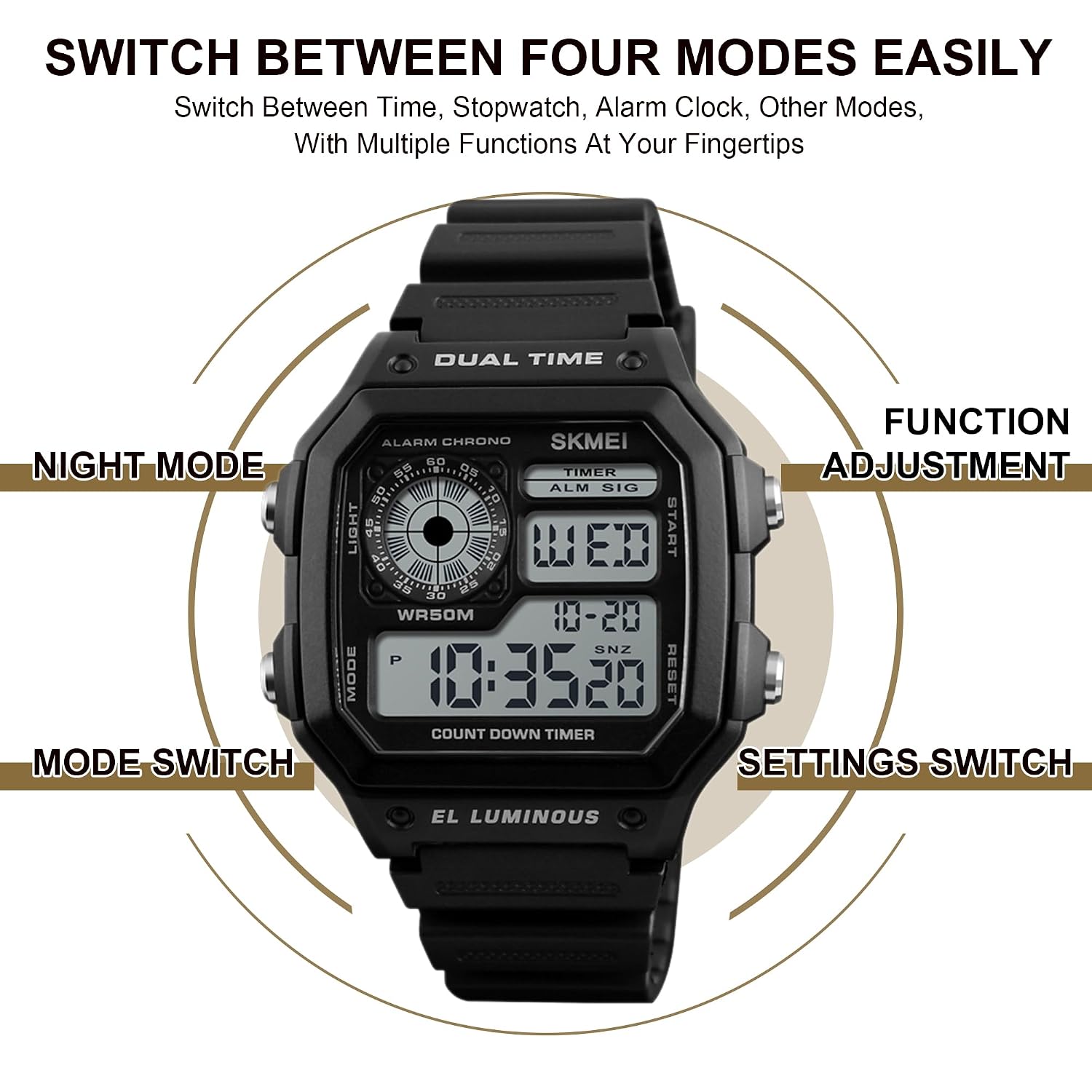
Figure 3: Watch button layout and functions.
3.2 Setting Time and Date
- In Timekeeping Mode, press the MODE button repeatedly until the seconds begin to flash. This indicates you are in setting mode.
- Press the RESET button to cycle through the settings: seconds, hours, minutes, year, month, day, 12/24 hour format.
- Use the START button to adjust the flashing value.
- Once all settings are correct, press the MODE button to exit the setting mode.
4. Operating Instructions
4.1 Mode Switching
Press the MODE button to cycle through the following modes:
- Timekeeping Mode (displays current time, date, day)
- Chronograph Mode (stopwatch)
- Alarm Mode
- Countdown Timer Mode
- Dual Time Mode
4.2 Using the EL Backlight
Press the LIGHT button (top left) to illuminate the watch display for a few seconds. This is useful in dark environments.
4.3 Chronograph (Stopwatch) Mode
- Press MODE until you reach Chronograph Mode (indicated by 'CHRONO' or similar on the display).
- Press START to begin timing.
- Press START again to pause timing.
- Press RESET to clear the stopwatch to zero.
- To resume timing after pausing, press START.
4.4 Alarm Mode
- Press MODE until you reach Alarm Mode (indicated by 'ALARM' or 'ALM').
- Press RESET to select the hour or minute setting. The selected value will flash.
- Use the START button to adjust the flashing hour or minute.
- Press MODE to exit alarm setting.
- To turn the alarm ON/OFF, in Alarm Mode, press START. An alarm icon will appear/disappear.
4.5 Countdown Timer Mode
- Press MODE until you reach Countdown Timer Mode (indicated by 'TIMER' or 'COUNT DOWN').
- Press RESET to select the hour, minute, or second setting. The selected value will flash.
- Use the START button to adjust the flashing value.
- Press MODE to exit timer setting.
- Press START to begin the countdown.
- Press START again to pause the countdown.
- Press RESET to reset the timer to its initial set value.
4.6 Dual Time Mode
- Press MODE until you reach Dual Time Mode (indicated by 'DUAL TIME' or 'T2').
- Press RESET to select the hour or minute setting. The selected value will flash.
- Use the START button to adjust the flashing hour or minute.
- Press MODE to exit dual time setting.
5. Maintenance
5.1 Water Resistance
Your SKMEI 1299 watch is water-resistant up to 50 meters (5 ATM). This means it can withstand splashes, sweating, handwashing, and cold showering. However, it is not suitable for diving, snorkeling, or prolonged underwater activities. Important: Do not press any buttons while the watch is submerged in water or wet, as this can compromise the water resistance.

Figure 4: Watch features including water resistance and material.
5.2 Cleaning
To clean your watch, wipe it with a soft, dry cloth. For stubborn dirt, a slightly damp cloth can be used, followed by drying. Avoid using chemical cleaners, as they may damage the watch's finish or seals.
5.3 Battery Replacement
The watch is powered by one C battery (included). When the display becomes dim or functions become erratic, it may be time to replace the battery. It is recommended to have the battery replaced by a qualified watch technician to ensure the water resistance seal is properly maintained.
6. Troubleshooting
- Display is blank: Check if the battery needs replacement.
- Buttons are unresponsive: Ensure the watch is not in a locked mode (if applicable, though not a feature of this model) or that no buttons are stuck. If the issue persists, a battery replacement might be needed.
- Time is inaccurate: Re-set the time following the instructions in Section 3.2. If inaccuracy persists, the battery may be low or the watch may require servicing.
- Water inside the watch: If water condensation appears inside the watch, stop using it immediately and seek professional servicing to prevent further damage.
7. Specifications
| Feature | Detail |
|---|---|
| Brand | SKMEI |
| Model Number | SKMEI-1299 |
| Movement Type | Quartz (Digital) |
| Case Material | Acrylonitrile Butadiene Styrene (ABS) |
| Band Material | Polyurethane (PU) |
| Crystal Material | Resin |
| Water Resistance Depth | 50 Metres (5 ATM) |
| Case Diameter | 43 Millimetres |
| Case Thickness | 13 Millimetres (approx. 0.11 mm is likely a typo in source data) |
| Band Width | 18 Millimetres (approx. 40 mm is likely a typo in source data) |
| Band Length | 26.5 Centimetres |
| Item Weight | 40 Grams |
| Included Components | Watch, SKMEI Original Box, User Manual |

Figure 5: Detailed product specifications.
8. Warranty and Support
8.1 Warranty Information
Your SKMEI Digital Sports Watch Model 1299 comes with a 9-month Manufacturer Warranty from the date of purchase. This warranty covers manufacturing defects under normal use.
8.2 Customer Support
For any service-related inquiries or feedback, please contact the Skmei India Helpline:
- Helpline Number: 1800-889-6251
- Operating Hours: Monday to Saturday, 9:00 AM to 6:00 PM (IST)


