
1. Introduction
Thank you for choosing the JBL T280 TWS True Wireless Bluetooth 5.0 Headphones. These in-ear earbuds are designed to provide a high-quality audio experience with the freedom of true wireless connectivity. Featuring IPX5 waterproofing, they are suitable for sports and outdoor activities. This manual provides essential information on how to set up, operate, and maintain your headphones.

Image: The JBL T280 TWS True Wireless Bluetooth 5.0 Headphones in blue, alongside their matching charging case.
2. Package Contents
Please check that all items are present in your package:
- JBL T280 TWS True Wireless Earbuds (Left and Right)
- Charging Case
- USB Charging Cable
- Multiple Sizes of Ear Tips (S, M, L)
- User Manual (this document)
3. Product Overview
Earbud Components
- Touch Control Area: For managing music playback, calls, and voice assistant.
- LED Indicator: Shows pairing status, battery level, and charging status.
- Microphone: For hands-free calls.
- Ear Tip: Replaceable for optimal fit and sound isolation.
- Charging Contacts: For charging inside the case.

Image: An illustration highlighting the touch control area on the JBL T280 TWS earbud, indicating intuitive control for music and calls.
Charging Case Components
- Earbud Charging Slots: Securely holds and charges the earbuds.
- Battery Indicator LEDs: Shows the charging case's battery level.
- USB Charging Port: For charging the case.
4. Getting Started
4.1 Charging the Earbuds and Case
Before first use, fully charge the earbuds and the charging case. Place the earbuds into the charging case. Connect the USB charging cable to the charging port on the case and to a power source. The LED indicators on the case will show the charging status. A full charge provides up to 16 hours of mixed battery life, with 4 hours from the earbuds and an additional 12 hours from the charging case.

Image: The JBL T280 TWS charging case open, showing earbuds inside and a graphic indicating up to 16 hours of total battery life.
4.2 Wearing the Earbuds
Select the ear tips that provide the most comfortable and secure fit for optimal sound quality and stability, especially during physical activity. Insert the earbuds into your ears and gently twist them to ensure a snug fit.

Image: A close-up of a JBL T280 TWS earbud comfortably fitted in an ear, emphasizing its light 5.2g weight and stable design.
4.3 Bluetooth Pairing
- Ensure the earbuds are charged.
- Open the charging case. The earbuds will automatically enter pairing mode, and their LED indicators will flash.
- On your Bluetooth-enabled device (smartphone, tablet, etc.), go to the Bluetooth settings.
- Search for available devices and select "JBL T280 TWS" from the list.
- Once connected, the earbud LEDs will stop flashing and remain solid blue or turn off, depending on the model.
- If prompted, confirm the pairing.
The earbuds utilize Bluetooth 5.0 technology for a strong and stable connection.

Image: A detailed view of a JBL T280 TWS earbud, illustrating the internal Bluetooth 5.0 chip for strong and stable signal reception.
5. Operating Instructions
5.1 Power On/Off
- Power On: Open the charging case, or press and hold the touch control area on both earbuds for approximately 2-3 seconds.
- Power Off: Place the earbuds back into the charging case and close the lid, or press and hold the touch control area on both earbuds for approximately 5 seconds.
5.2 Music Playback
- Play/Pause: Tap the touch control area on either earbud once.
- Next Track: Double-tap the touch control area on the right earbud.
- Previous Track: Double-tap the touch control area on the left earbud.
5.3 Call Management
- Answer/End Call: Tap the touch control area on either earbud once.
- Reject Call: Press and hold the touch control area on either earbud for 2 seconds.
5.4 Voice Assistant
- Activate Voice Assistant: Triple-tap the touch control area on either earbud.
6. Maintenance
6.1 Cleaning
Regularly clean your earbuds and charging case to ensure optimal performance and hygiene.
- Use a soft, dry, lint-free cloth to wipe the earbuds and charging case.
- For ear tips, remove them from the earbuds and clean with a mild soap solution if necessary, then rinse thoroughly and dry completely before reattaching.
- Gently clean the charging contacts on both the earbuds and the case with a dry cotton swab to remove any dust or debris.
6.2 Storage
When not in use, store the earbuds in their charging case to protect them from dust, damage, and to keep them charged.
6.3 Water Resistance (IPX5)
The JBL T280 TWS earbuds are IPX5 water-resistant, meaning they can withstand a sustained, low-pressure water jet spray. This makes them suitable for workouts and light rain. However, they are not designed for submersion in water. Do not expose them to swimming, showering, or heavy rain.

Image: Two JBL T280 TWS earbuds with water droplets on their surface, demonstrating their IPX5 anti-sweat and rain resistance.
7. Troubleshooting
If you encounter issues with your JBL T280 TWS headphones, refer to the following common solutions:
| Problem | Possible Solution |
|---|---|
| Earbuds not pairing with device |
|
| Only one earbud playing sound |
|
| Earbuds not charging |
|
| Low volume or poor sound quality |
|
8. Technical Specifications
- Model Name: T280
- Brand: JBL
- Connectivity: Bluetooth 5.0
- Form Factor: In Ear
- Ear Placement: In Ear
- Color: Blue (other colors may be available)
- Water Resistance: IPX5 (Sweat and splash proof)
- Driver Unit: 6mm (for pure low frequency sound)
- Earbud Weight: Approximately 5.2g per earbud
- Battery Life: Up to 4 hours (earbuds), up to 12 hours (with charging case), total 16 hours mixed use.
- Package Dimensions: 17.4 x 9.6 x 4.9 cm
- Package Weight: 240 g
- Manufacturer: JBL
- ASIN: B07WMQSN8X
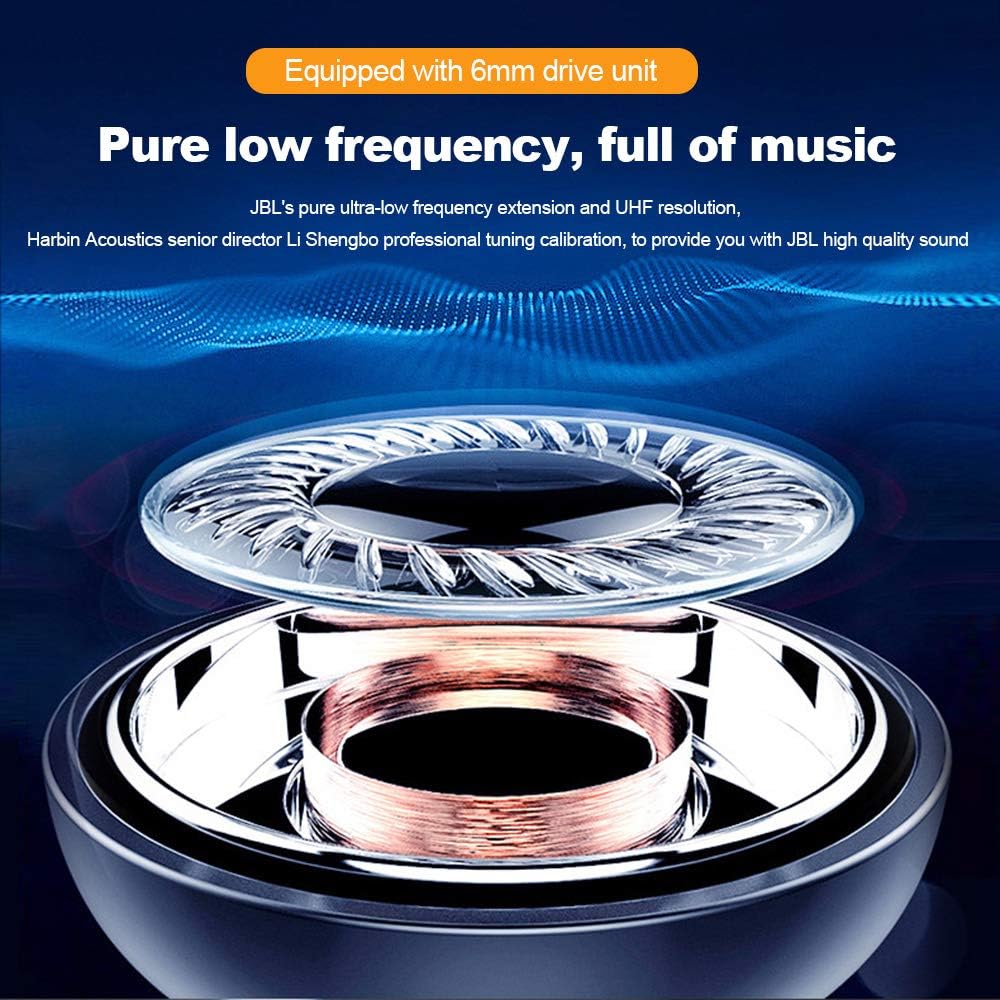
Image: An exploded view of a JBL T280 TWS earbud, highlighting the 6mm drive unit responsible for pure low-frequency sound.
9. Safety Information
Please read and follow these safety guidelines to prevent damage to your device or injury to yourself:
- Do not disassemble or modify the earbuds or charging case.
- Keep the device away from extreme temperatures, direct sunlight, and open flames.
- Avoid exposing the device to excessive moisture or corrosive liquids.
- Do not use the earbuds at high volume for extended periods to prevent hearing damage.
- Keep out of reach of children and pets.
- Dispose of the device and its battery responsibly according to local regulations.
10. Customer Support
For further assistance, warranty information, or to report issues not covered in this manual, please contact JBL customer support or visit the official JBL website. You can find contact details on the JBL website or your product packaging.
JBL Store Link: Visit the JBL Store on Amazon


