
1. Introduction
Thank you for purchasing the LG 55-inch 4K Ultra HD Smart OLED TV, model OLED55C9PTA. This manual provides essential information for setting up, operating, and maintaining your new television. Please read it thoroughly before use and retain it for future reference.

Figure 1: Front view of the LG OLED55C9PTA TV.
2. What's in the Box
Carefully unpack your TV and ensure all items are present. If any items are missing or damaged, contact your retailer.
- 1 LG 55-inch OLED TV
- 1 Table Top Stand
- 1 Magic Remote Control
- 2 AA Batteries (for remote control)
- 1 Power Cable / Power Supply Adapter
- User Manual (this document)
3. Initial Setup
3.1 Attaching the Stand or Wall Mounting
Before connecting cables, decide whether to use the included table-top stand or a compatible wall mount (sold separately). Follow the instructions provided with the stand or wall mount for secure installation.
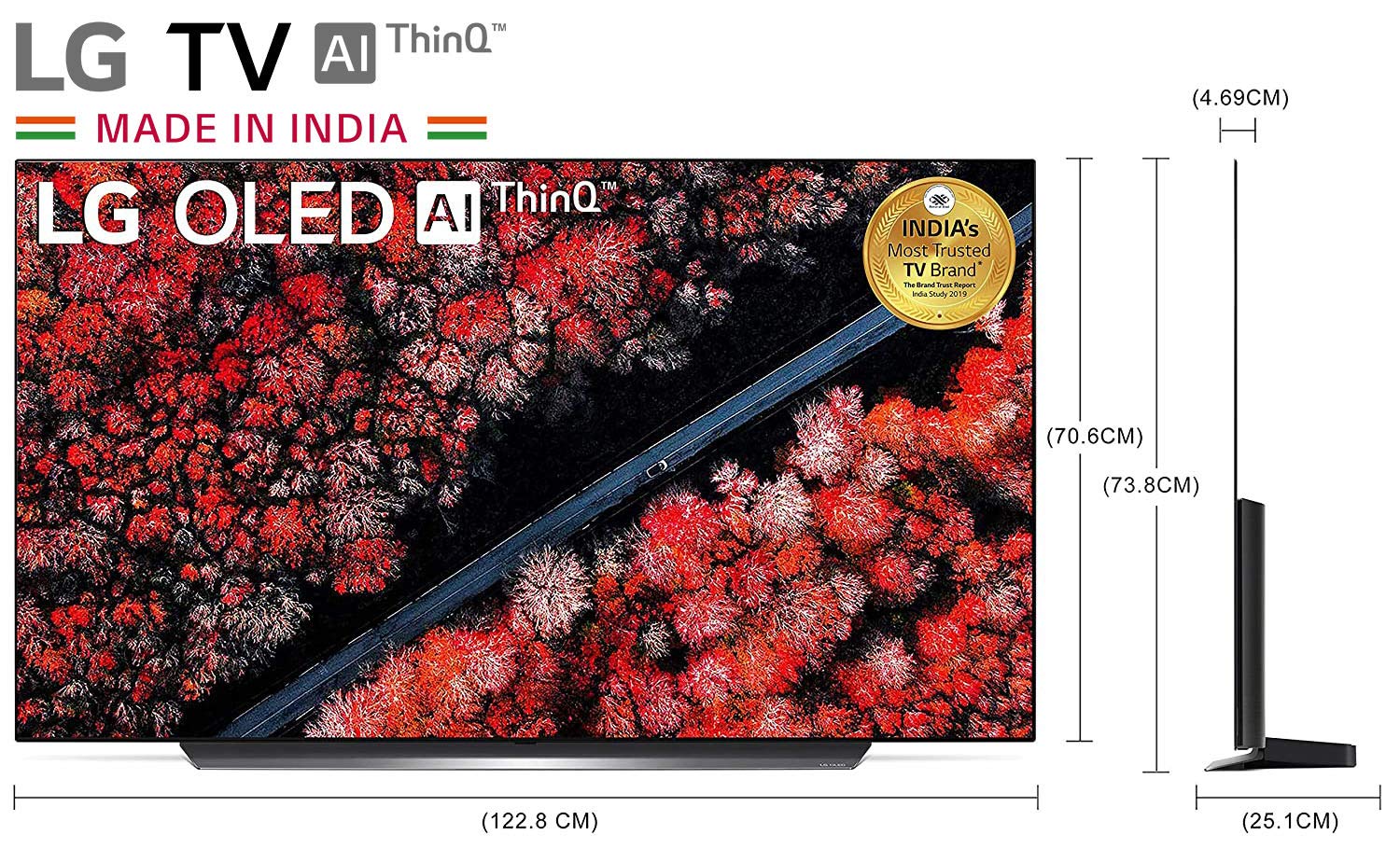
Figure 2: TV dimensions with stand for placement planning.
3.2 Connecting External Devices
Connect your external devices (e.g., set-top box, Blu-ray player, gaming console) to the TV's input ports. The TV features 4 HDMI ports and 3 USB ports, along with LAN and optical digital audio out.

Figure 3: Rear input ports including HDMI, USB, LAN, and Optical Audio Out.

Figure 4: Side input ports for convenient access.
3.3 Power Connection
Connect the power cable to the TV and then to a wall outlet. Ensure the voltage matches the TV's requirements (220 VAC 50 Hz).
3.4 Remote Control Setup
Insert the two AA batteries into the Magic Remote Control, observing the correct polarity (+/-). The remote will automatically pair with the TV upon first use.
4. Operating Instructions
4.1 Power On/Off
Press the Power button on the remote control or the TV to turn the TV on or off.
4.2 Basic Navigation
Use the directional buttons and the scroll wheel on the Magic Remote to navigate menus and select options. Point the remote at the screen to use the on-screen pointer.
4.3 Input Selection
Press the 'Input' button on the remote to switch between connected devices (HDMI 1, HDMI 2, USB, etc.).
4.4 Volume and Channel Control
Use the Volume Up/Down buttons to adjust the sound level. Use the Channel Up/Down buttons to change channels.
5. Smart Features
Your LG OLED TV is equipped with WebOS, AI ThinQ, and integrated voice assistants for an enhanced viewing experience.

Figure 5: Overview of integrated smart features and streaming services.
5.1 WebOS Smart Platform
Access a wide range of apps, streaming services (Netflix, Prime Video, YouTube, Hotstar, Zee5, Eros Now, AltBalaji), and content through the intuitive WebOS interface. Use the Home button on your Magic Remote to open the launcher bar.
5.2 AI ThinQ
LG AI ThinQ allows you to control your TV and connected smart home devices using natural voice commands. The α9 Gen 2 Intelligent Processor enhances picture and sound quality through AI Picture and AI Sound features.
5.3 Voice Assistants (Alexa, Google Assistant)
Your TV supports both Amazon Alexa and Google Assistant. To set up Alexa, press and hold the Prime Video button on your Magic Remote for two seconds. This will direct you to the LG Content Store to download and register the Alexa app.
Video 1: Quick guide on setting up Alexa on your LG AI ThinQ TV. This video demonstrates how to access the Alexa app via the Prime Video button on the Magic Remote.
5.4 Apple AirPlay 2 & HomeKit
Seamlessly stream content from your Apple devices to your LG TV using AirPlay 2. Control your TV using the Home app on your iOS device with HomeKit integration.
6. Connectivity
The LG OLED55C9PTA offers various connectivity options:
- HDMI: 4 ports for high-definition audio and video input.
- USB: 3 ports for connecting USB storage devices to play media or for service.
- Wi-Fi: Built-in Wi-Fi for wireless internet connection.
- LAN: Ethernet port for a wired internet connection.
- Optical Digital Audio Out: For connecting to external sound systems.
- Bluetooth: For connecting wireless headphones or soundbars.
7. Maintenance
7.1 Cleaning the Screen
Gently wipe the screen with a soft, dry, lint-free cloth. For stubborn marks, slightly dampen the cloth with water or a specialized screen cleaner. Avoid harsh chemicals or abrasive materials.
7.2 Cleaning the Cabinet
Wipe the TV cabinet with a soft, dry cloth. Do not use liquid cleaners directly on the cabinet.
7.3 Ventilation
Ensure adequate ventilation around the TV to prevent overheating. Do not block ventilation openings.
8. Troubleshooting
If you encounter issues with your TV, refer to the following common solutions:
- No Power: Check if the power cable is securely connected to both the TV and the wall outlet. Ensure the outlet is functional.
- No Picture/Sound: Verify that the correct input source is selected. Check all cable connections (HDMI, AV). Try restarting the TV.
- Remote Control Not Working: Ensure batteries are correctly inserted and not depleted. Point the remote directly at the TV. Re-pair the Magic Remote if necessary by holding the Home and Back buttons simultaneously for 5 seconds.
- Network Connection Issues: Check your Wi-Fi router or LAN cable connection. Try restarting your router. Ensure TV software is up to date.
- Picture Quality Issues: Adjust picture settings (brightness, contrast, sharpness). Ensure the content source is high quality.
For more complex issues, consult the LG support website or contact customer service.
9. Specifications
| Feature | Specification |
|---|---|
| Screen Size | 55 Inches (139 cms) |
| Display Technology | OLED |
| Resolution | 4K Ultra HD (3840 x 2160) |
| Refresh Rate | 60 Hz |
| Processor | α9 Gen 2 Intelligent Processor |
| Operating System | WebOS |
| Connectivity Technology | HDMI, USB, Wi-Fi, Bluetooth, LAN |
| HDMI Ports | 4 |
| USB Ports | 3 |
| Audio Output | 40 Watts, AI Sound Engine, Dolby Audio |
| Supported Internet Services | Netflix, Prime Video, YouTube, Hotstar, Zee5, Google Play, Eros Now, AltBalaji |
| Voice Assistants | Alexa, Google Assistant |
| Power Consumption | 357 Watts |
| Line Voltage | 220 VAC 50 Hz |
| Item Weight | 26.2 kg (26200 Grams) |
| Model Year | 2019 |
10. Warranty and Support
10.1 Warranty Information
This product comes with a 1 Year LG India Comprehensive Warranty and an additional 1 year Warranty on the panel/module from the date of purchase. To avail warranty service, please provide the product's model name and seller's details as mentioned on your invoice.
10.2 Customer Support
For assistance, contact LG customer service:
- Toll Free: 1800-315-9999 or 1800-180-9999
- WhatsApp: 9711709999
- Email: serviceindia@lge.com
- Manufacturer Address: LG Electronics India Pvt. Ltd. | Plot No. A5, MIDC Ranjangaon, Tal. Shirur, Pune - 412220
The service center will allot a convenient slot for your service request.


