
1. Introduction
The Shinco 30 Pints Energy Star Dehumidifier is designed to efficiently remove excess moisture from the air in your home, creating a more comfortable and healthy environment. This appliance is suitable for various medium to large rooms, including basements, bathrooms, living rooms, cellars, garages, bedrooms, and laundry areas. It features advanced functionalities such as adjustable humidity settings, multiple drainage options, and a programmable timer for convenient operation.

Figure 1.1: Front view of the Shinco 30 Pints Energy Star Dehumidifier. This unit is designed to remove up to 30 pints of moisture per day, making it ideal for spaces up to 5,000 square feet.
2. Safety Information
Please read all safety instructions carefully before operating the dehumidifier. Failure to follow these instructions may result in electric shock, fire, or personal injury.
- Always plug the dehumidifier into a grounded electrical outlet.
- Do not operate the unit with a damaged power cord or plug.
- Do not place the dehumidifier near heat sources or in direct sunlight.
- Ensure adequate clearance around the unit for proper airflow (at least 8 inches from walls or furniture).
- Do not immerse the unit, power cord, or plug in water or other liquids.
- Unplug the dehumidifier before cleaning or performing any maintenance.
- Keep children and pets away from the unit during operation.
- Do not block the air inlet or outlet.
- This appliance is for indoor use only.
3. Product Components and Features
Familiarize yourself with the main components and features of your Shinco dehumidifier.

Figure 3.1: Key components of the dehumidifier, including the firm handle for portability, 360° casters for easy movement, the LED display for settings, and the washable filter for air purification.
- Control Panel: Located on the top, with touch buttons and an LED display for settings and status.
- Air Inlet/Outlet: For drawing in and expelling air.
- Water Tank: Removable bucket for collecting condensed moisture. Capacity of 4 liters (1.06 gallons).
- Continuous Drain Outlet: Port for attaching a hose for continuous drainage.
- Washable Filter: Located at the back, designed to capture dust and particles.
- Casters: 360-degree rotating wheels for easy mobility.
- Handle: Integrated handle for convenient lifting and transport.
4. Setup and Installation
Follow these steps to set up your dehumidifier for first use.
- Unpacking: Carefully remove the dehumidifier from its packaging. Retain the packaging materials for future storage or transport.
- Placement: Place the unit on a flat, stable surface in the desired location. Ensure there is at least 8 inches (20 cm) of space around all sides of the dehumidifier for proper air circulation. Avoid placing it in direct sunlight or near heat-generating appliances.
- Power Connection: Plug the power cord into a grounded electrical outlet. The unit will beep once, and the display will light up briefly.
- Initial Operation: For optimal performance, allow the unit to stand upright for at least 24 hours before plugging it in if it has been stored or transported horizontally.
5. Operating Instructions
Your Shinco dehumidifier offers various modes and settings for effective moisture control.

Figure 5.1: Overview of the digital control panel with buttons for Timer, Inside Drying, Fan Speed, Humidity Setting, Mode, and Power.
5.1. Control Panel Functions
- Power Button (⑂): Press to turn the unit ON or OFF.
- Mode Button (M): Cycles through operating modes: Auto Dehumidify, Continuous Dry. Press and hold for 3 seconds to activate/deactivate Child Lock.
- Humidity Setting Button (%): Adjusts the desired humidity level from 30% to 80% in 5% increments.
- Fan Speed Button (☼): Selects fan speed: High or Low.
- Timer Button (⏱): Sets the auto-on or auto-off timer from 1 to 24 hours.
- Inside Drying Button (☼): Activates the internal drying function to prevent mold growth inside the unit.
5.2. Operating Modes

Figure 5.2: Visual representation of the Auto Dehumidify Mode, Continuous Dry Mode, and Child Lock feature.
- Auto Dehumidify Mode: The unit will automatically adjust its operation to maintain the set humidity level. The fan speed can also be set in this mode.
- Continuous Dry Mode: The dehumidifier will run continuously regardless of the humidity level, ideal for drying clothes or in extremely damp conditions.
5.3. Drainage Options
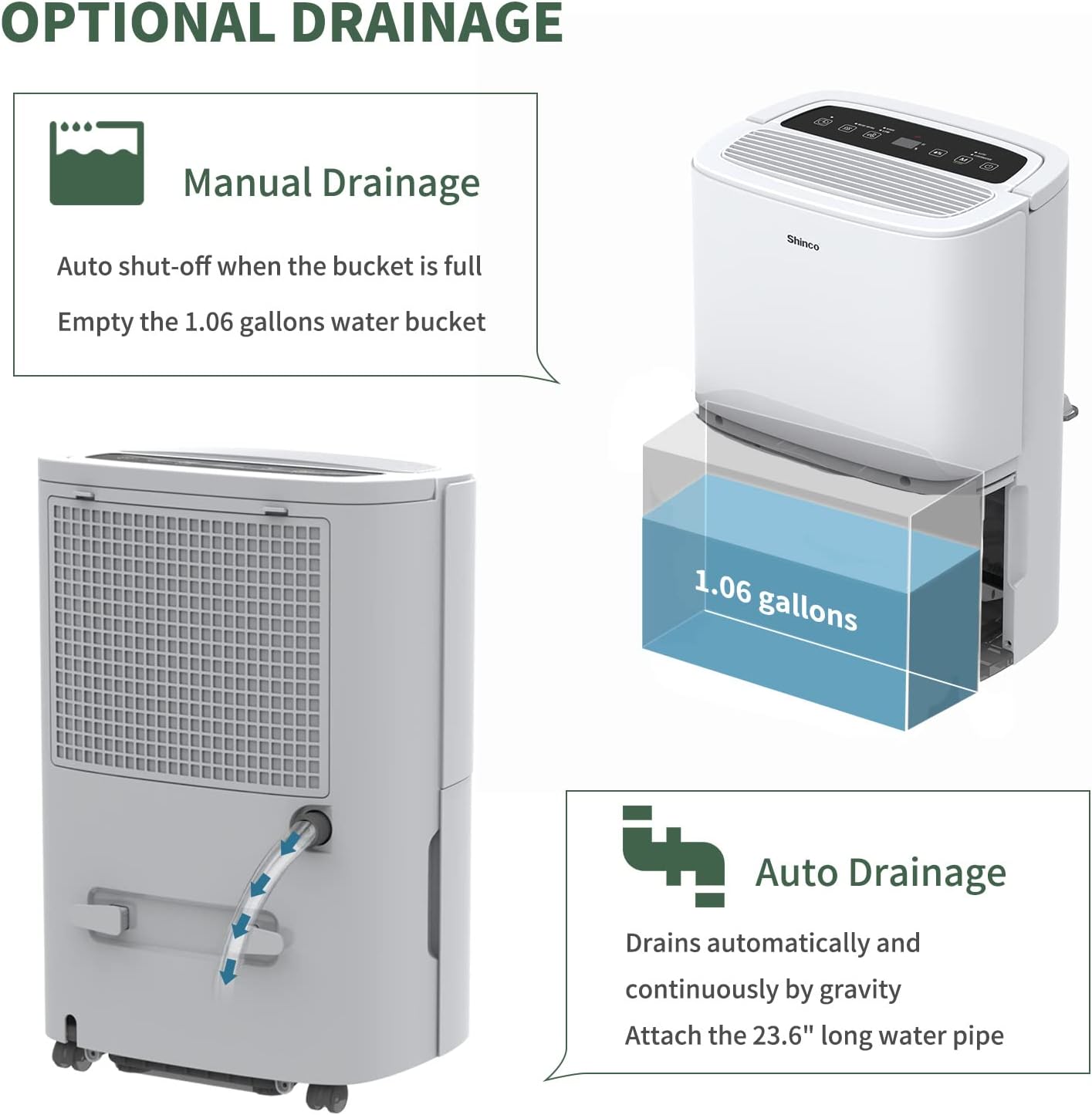
Figure 5.3: Illustration of both manual drainage by emptying the water bucket and continuous drainage using a hose.
- Manual Drainage: When the water tank is full (4L/1.06Gal), the "Water full" indicator will light up, the display will show "FL" code, and the dehumidifier will automatically shut off. Carefully remove the bucket and empty the collected water. Reinsert the bucket firmly to resume operation.
- Continuous Drainage: For continuous operation without manual emptying, attach the provided 23.6-inch drain hose to the continuous drain outlet at the back of the unit. Ensure the hose is sloped downwards to allow water to drain by gravity into a suitable floor drain or container. (Note: A water container for continuous drainage is not provided).
6. Maintenance
Regular maintenance ensures optimal performance and extends the lifespan of your dehumidifier.
6.1. Cleaning the Air Filter
The air filter should be cleaned every two weeks or more frequently depending on usage and air quality.
- Turn off the dehumidifier and unplug it from the power outlet.
- Locate the air filter cover at the back of the unit.
- Remove the filter by gently pulling it out.
- Wash the filter with warm, soapy water. Rinse thoroughly and allow it to air dry completely before reinserting. Alternatively, use a vacuum cleaner to remove dust from the filter.
- Once dry, reinsert the filter into its slot.
6.2. Cleaning the Water Tank
Clean the water tank regularly to prevent mold and mildew growth.
- Remove the water tank from the unit.
- Wash the tank with warm water and a mild detergent.
- Rinse thoroughly and dry before placing it back into the dehumidifier.
6.3. Inside Drying Function
To prevent internal mold and odor, use the "Inside Drying" function. Press the "Inside Drying" button on the control panel. The unit will run its fan for a period to dry internal components.
7. Troubleshooting
Refer to this section for common issues and their solutions. If the problem persists, contact customer support.
| Problem | Possible Cause | Solution |
|---|---|---|
| Dehumidifier does not turn on. | No power, power cord loose, water tank full or not properly inserted. | Check power connection. Empty and reinsert water tank firmly. |
| Unit displays "FL" code. | Water tank is full. | Empty the water tank and reinsert it. |
| No water collected or low dehumidifying effect. | Air filter clogged, room temperature too low, humidity setting too high, unit size too small for area. | Clean the air filter. Ensure room temperature is above 41°F (5°C). Lower the humidity setting. Consider a larger capacity unit if needed. |
| Unit is noisy. | Unit not on a level surface, air filter clogged. | Place unit on a flat, stable surface. Clean the air filter. |
8. Specifications
Technical specifications for the Shinco SDZ1-30P Dehumidifier.

Figure 8.1: Dimensions of the Shinco 30 Pints Dehumidifier: 9.45"D x 13.5"W x 20.1"H.
| Specification | Value |
|---|---|
| Brand | Shinco |
| Model Name | SDZ1-30P |
| Dehumidification Capacity | 30 Pints per Day (2012 DOE Standard) |
| Coverage Area | Up to 5,000 Sq.Ft (Max under 95°F, 90%RH) |
| Water Tank Volume | 4 Liters (1.06 Gallons) |
| Product Dimensions (D x W x H) | 9.45"D x 13.5"W x 20.1"H |
| Item Weight | 28.7 Pounds |
| Wattage | 320 watts |
| Operation Mode | Continuous |
| Noise Level | ≤ 42 dB |
| UPC | 850003522340 |
9. Warranty and Support
For warranty information and customer support, please refer to the warranty card included with your product or visit the official Shinco website.
If you encounter any issues or have questions regarding your Shinco dehumidifier, please contact Shinco customer service for assistance.
- Online Support: Visit the Shinco official website for FAQs, troubleshooting guides, and contact information.
- Email Support: Refer to your product documentation for the customer service email address.


