
Introduction
Welcome to the user manual for your new vivo T3 5G smartphone. This guide provides essential information on setting up, operating, maintaining, and troubleshooting your device. The vivo T3 5G is designed for speed and innovation, featuring a MediaTek Dimensity 7200 chip, a Sony IMX882 OIS sensor for clear photography, a 16.94 cm (6.67 inch) 120 Hz Ultra Vision AMOLED display, dual stereo speakers, and a 5000 mAh battery with 44 W FlashCharge. It supports ultra-stable 4K video and offers seamless multitasking with 8 GB RAM.
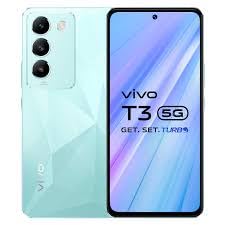
Image: The vivo T3 5G smartphone, showcasing its front display and the unique Crystal Flake design on the rear panel, along with the triple camera module.
What's in the Box
Upon unboxing your vivo T3 5G, please ensure all the following items are present:
- vivo T3 5G Smartphone
- Adapter (Charger)
- USB Cable (Type-C)
- SIM Tray Ejector
- Phone Case
- Screen Protector (pre-applied or in box)
Setup
1. SIM Card Installation
- Locate the SIM card tray on the side of your phone.
- Insert the provided SIM tray ejector tool into the small hole next to the tray. Press gently until the tray pops out.
- Place your Nano SIM cards (up to two) into the designated slots on the tray, ensuring the gold contacts face downwards and the cut corner aligns correctly.
- Carefully push the SIM tray back into the phone until it is flush with the device's side.
2. Initial Power On and Setup
- Press and hold the Power button (usually on the right side) until the vivo logo appears on the screen.
- Follow the on-screen prompts to select your language, region, and connect to a Wi-Fi network.
- Sign in with your Google account or create a new one to access Google services and the Play Store.
- Set up your preferred screen lock method (PIN, pattern, password, fingerprint, or face unlock).
- Review and accept the terms and conditions to complete the initial setup.
Operating Instructions
1. Basic Navigation
- Touchscreen Gestures: Swipe up from the bottom to go to the home screen, swipe up and hold for recent apps, swipe from the left or right edge to go back.
- Home Screen: Customize with widgets and app shortcuts. Long-press an empty area to access customization options.
- Notification Panel: Swipe down from the top of the screen to view notifications and quick settings.
2. Camera Usage
The vivo T3 5G features a 50MP main camera with OIS and a 16MP front camera. To use the camera:
- Open the Camera app from your home screen or app drawer.
- Select your desired mode (Photo, Portrait, Video, Night, etc.) by swiping left or right.
- Tap the screen to focus on a subject.
- Press the Shutter button to capture a photo or start/stop video recording.
- Utilize features like Super Night Portrait mode for enhanced low-light photography and ultra-stable 4K video recording.
3. Battery Management
Your device is equipped with a 5000 mAh battery and supports 44 W FlashCharge for rapid charging.
- Charging: Use the provided adapter and USB cable for optimal charging speed.
- Battery Saver: Enable Battery Saver mode in Settings to extend battery life when needed.
- Optimization: Regularly check battery usage in Settings to identify and manage power-consuming apps.
Maintenance
1. Cleaning Your Device
- Use a soft, lint-free cloth to gently wipe the screen and body of the phone.
- Avoid using harsh chemicals, abrasive materials, or aerosol sprays.
- For stubborn smudges, slightly dampen the cloth with water or a screen cleaner specifically designed for electronics.
2. Software Updates
Keeping your software up to date ensures optimal performance, security, and access to new features.
- Go to Settings > System update.
- The phone will check for available updates.
- If an update is available, follow the on-screen instructions to download and install it. Ensure your phone has sufficient battery and a stable internet connection.
Troubleshooting
This section addresses common issues you might encounter with your vivo T3 5G.
- Phone Not Responding: Press and hold the Power button for about 10-15 seconds to force a restart.
- Apps Crashing/Freezing: Try clearing the app's cache (Settings > Apps > [App Name] > Storage > Clear cache) or reinstalling the app.
- Battery Draining Quickly: Check battery usage in Settings to identify problematic apps. Reduce screen brightness, disable unnecessary features (GPS, Bluetooth, Wi-Fi when not in use).
- Network Connectivity Issues: Toggle Airplane mode on and off. Restart your phone. Check SIM card insertion.
- Fingerprint Sensor Not Working: Ensure your finger is clean and dry. Re-register your fingerprints in Settings > Security.
If issues persist, consider performing a factory reset (back up your data first) or contacting customer support.
Specifications
| Feature | Detail |
|---|---|
| Brand | vivo |
| Model Name | T3 5G |
| Operating System | Android 14 |
| RAM Memory | 8 GB |
| Storage Capacity | 128 GB |
| Processor | MediaTek Dimensity 7200 (2.8 GHz) |
| Display Size | 16.94 cm (6.67 inches) |
| Display Type | AMOLED, 120 Hz Refresh Rate |
| Resolution | 2408 x 1080 Pixels (Full HD+) |
| Rear Camera | 50MP (OIS) + 2MP |
| Front Camera | 16MP |
| Video Capture Resolution | 3840 x 2160 (4K) |
| Battery Capacity | 5000 mAh |
| Charging | 44 W FlashCharge |
| SIM Card Slot | Dual SIM (Nano) |
| Connector Type | USB Type C |
| Biometric Security | Fingerprint Recognition |
| Dimensions | 16.6 x 7.6 x 0.8 Centimeters |
| Weight | 186 Grams |
| Water Resistance Level | Water Resistant |
Warranty Information
Your vivo T3 5G smartphone comes with a manufacturer's warranty:
- Device Warranty: 1 Year Manufacturer Warranty.
- Inbox Accessories Warranty: 6 Months Manufacturer Warranty.
Please retain your proof of purchase for warranty claims. The warranty covers manufacturing defects and does not cover damage caused by misuse, accidents, or unauthorized repairs.
Support
For further assistance, technical support, or warranty claims, please contact vivo customer service.
- Manufacturer: Vivo, vivo Mobile India Private Limited
- Address: TEC-1 and TEC-2 World Trade Centre Plot No TZ-13A Techzone IT Park Noida-201308
- Refer to the official vivo website or your regional support contact information for phone numbers or email support.


