
QSC KS118
QSC KS118 Active 18" Subwoofer Instruction Manual
Model: KS118
Introduction
The QSC KS118 is a very high output active subwoofer designed to produce impressive low frequencies for a wide range of professional audio applications, including mobile entertainment, AV production, clubs, and performance venues. It features an 18-inch direct radiating driver powered by a robust 3600-watt Class D amplifier, ensuring high sound pressure levels with dynamic and musical reproduction of very low frequencies.
Equipped with on-board Digital Signal Processing (DSP), the KS118 optimizes and protects system performance. This advanced DSP also offers capabilities such as the ability to array two units in a cardioid arrangement for directional bass control. The rugged enclosure is highly transportable, featuring comfortable handles and four low-noise casters for easy movement. Additionally, an M20 threaded pole receptacle allows for easy vertical deployment with full-range loudspeakers.
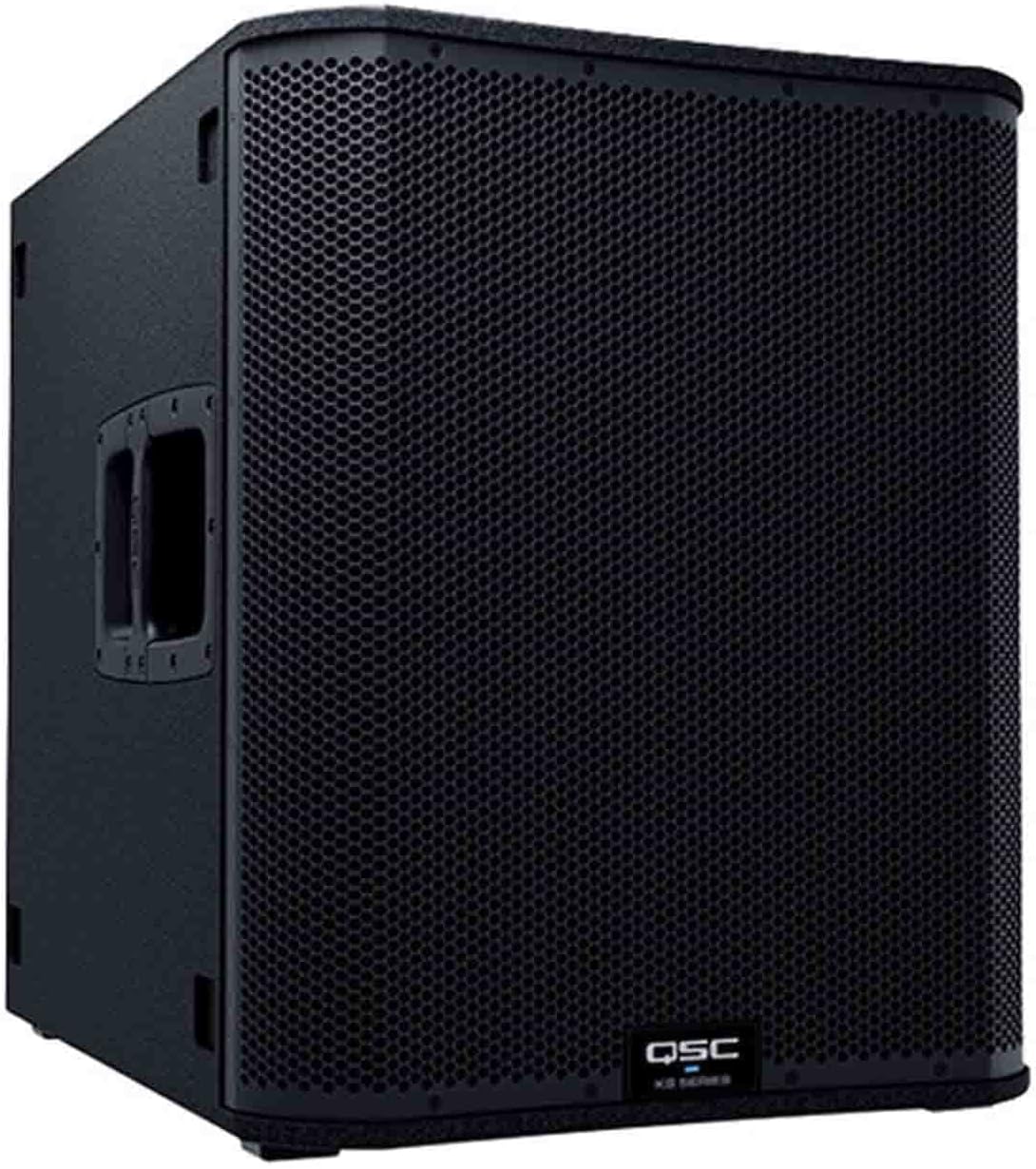
Image: Angled front view of the QSC KS118 Active 18" Subwoofer, showcasing its robust grille and integrated handles.
Setup
1. Unpacking and Inspection
Carefully remove the KS118 subwoofer from its packaging. Inspect the unit for any signs of damage that may have occurred during shipping. Retain all packaging materials for future transport or in case the unit needs to be returned for service.
2. Placement
Position the subwoofer on a stable, flat surface. The integrated casters facilitate easy movement. For optimal bass response, consider placing the subwoofer on the floor or a sturdy stage. The KS118 features an M20 threaded pole receptacle on its top surface, allowing for the mounting of a full-range loudspeaker using a compatible pole (sold separately).

Image: Front view of the QSC KS118 Subwoofer, highlighting its protective grille.

Image: Bottom view of the QSC KS118 Subwoofer, clearly showing the four integrated casters for mobility.
3. Power Connection
Connect the supplied AC power cable to the AC INLET on the rear panel of the subwoofer and then to a grounded electrical outlet. Ensure the power switch is in the OFF position before connecting to power.
4. Audio Connections
The KS118 offers versatile input and output options:
- MIC/LINE IN A & B: These inputs accept XLR and 1/4-inch TRS connectors. Use these to connect audio sources such as mixers, instruments, or microphones. Ensure the MIC/LINE switch is set appropriately for your source (MIC for microphones, LINE for line-level signals).
- RCA Inputs: For consumer-level audio devices, use the RCA inputs.
- LINE OUT (POST GAIN - MIX): These XLR outputs provide a mixed signal of inputs A and B, post-gain. Use these to daisy-chain multiple subwoofers or send the signal to other full-range loudspeakers.

Image: Rear panel of the QSC KS118 Subwoofer, showing the various input/output connections and control switches.
Operating Instructions
1. Powering On/Off
Locate the POWER switch on the rear panel. Flip the switch to the ON position to power on the subwoofer. The PWR LED on the front panel will illuminate. To power off, flip the switch back to the OFF position.
2. Gain Control
Adjust the GAIN A and GAIN B knobs to control the input level for each channel. Start with the gain set to minimum and slowly increase it until the desired volume is achieved without distortion. The SIGNAL LEDs will illuminate when an audio signal is present.
3. DSP Settings (LF/HF Switches)
The KS118 features on-board DSP with selectable modes:
- EXT SUB / NORM / DEEP: This switch adjusts the low-frequency extension.
- EXT SUB: For use with external subwoofers.
- NORM: Standard low-frequency response.
- DEEP: Provides extended low-frequency response for enhanced bass.
- VOCAL BOOST / FLAT: This switch adjusts the high-frequency response.
- VOCAL BOOST: Enhances vocal clarity, typically used when the subwoofer is paired with full-range speakers handling vocals.
- FLAT: Provides a neutral high-frequency response.
4. Front LED Indicators
- PWR: Indicates the unit is powered on.
- STBY: Indicates standby mode.
- LIMIT: Illuminates when the internal limiter is active, protecting the speaker from excessive signal levels. If this LED flashes frequently, reduce the input gain.
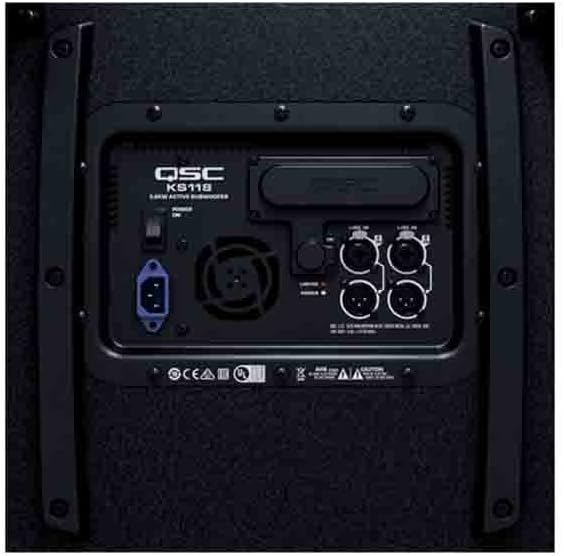
Image: Close-up view of the QSC KS118 Subwoofer's rear panel, detailing the various control knobs and switches for audio adjustment.
Maintenance
1. Cleaning
Clean the exterior of the subwoofer with a soft, dry cloth. Do not use abrasive cleaners, waxes, or solvents. Ensure no liquids enter the enclosure.
2. Storage
When not in use, store the subwoofer in a dry, cool environment, away from direct sunlight and extreme temperatures. Using an optional protective cover (e.g., KS-LOC security cover) is recommended to prevent dust accumulation and physical damage.
3. Safety Precautions
- Do not expose the unit to rain or moisture.
- Ensure proper ventilation; do not block cooling vents.
- Avoid placing the unit near heat sources.
- Always disconnect power before performing any maintenance or moving the unit.
Troubleshooting
If you encounter issues with your QSC KS118 Subwoofer, refer to the following common troubleshooting steps:
- No Power:
- Check if the power cable is securely connected to both the subwoofer and the electrical outlet.
- Verify that the electrical outlet is active by plugging in another device.
- Ensure the POWER switch on the rear panel is in the ON position.
- No Sound:
- Confirm that the audio source (mixer, instrument, etc.) is sending a signal and its volume is turned up.
- Check all audio cables for secure connections and ensure they are not damaged.
- Adjust the GAIN A and GAIN B knobs on the subwoofer to an audible level.
- Ensure the correct input (MIC or LINE) is selected via the switch.
- Distorted Sound:
- Reduce the input gain from your audio source or the GAIN A/B knobs on the subwoofer. The LIMIT LED should not be constantly illuminated.
- Check if the audio cables are properly connected and not damaged.
- Ensure the subwoofer is not being overdriven by the source.
- Overheating:
- Ensure the cooling vents on the rear panel are not obstructed.
- Operate the subwoofer in a well-ventilated area.
- If the unit frequently overheats, reduce the operating volume or consider a different setup.
If the issue persists after following these steps, please contact QSC customer support for further assistance.
Specifications
| Feature | Detail |
|---|---|
| Model Name | KS118 Active 18" |
| Speaker Type | Subwoofer |
| Subwoofer Diameter | 18 Inches |
| Speaker Maximum Output Power | 3600 Watts |
| Power Source | Corded Electric |
| Connectivity Technology | RCA, XLR, Wired (Subwoofer) |
| Connectivity Protocol | Bluetooth (for control/streaming, if applicable, otherwise wired is primary) |
| Audio Driver Type | Dynamic Driver |
| Audio Output Mode | Omnidirectional |
| Mounting Type | Pole Mount (M20 Threaded) |
| Product Dimensions (D x W x H) | 36"D x 30"W x 23"H |
| Item Weight | 104 Pounds |
| Included Components | Subwoofer |
| Manufacturer | QSC |
| Model Number | KS118 |
| UPC | 684284076199 |
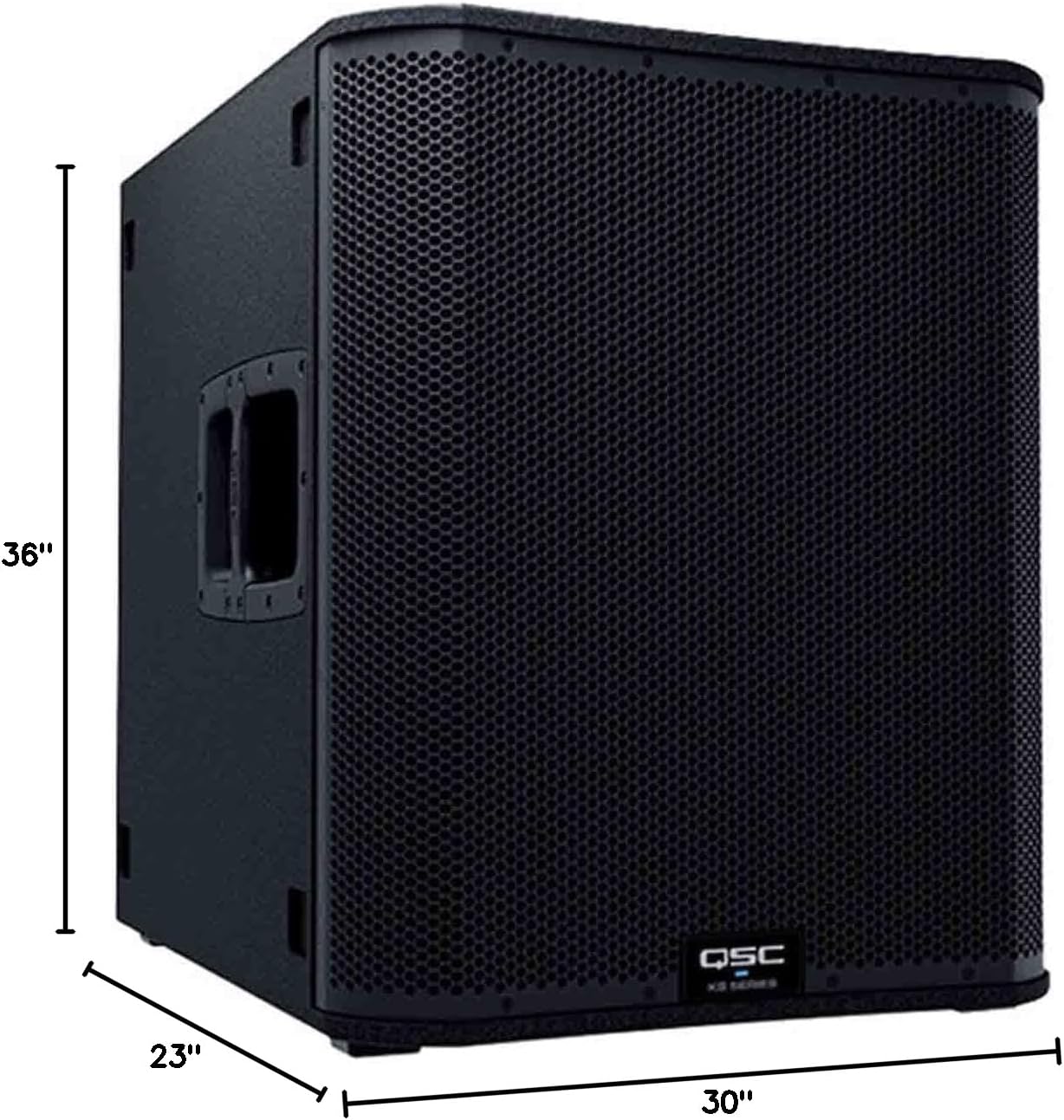
Image: Diagram illustrating the dimensions of the QSC KS118 Subwoofer (36"D x 30"W x 23"H).
Warranty and Support
The QSC KS118 Active 18" Subwoofer comes with a Limited Warranty. For specific details regarding the warranty period, coverage, and terms, please refer to the warranty card included with your product or visit the official QSC website.
For technical support, service, or any inquiries not covered in this manual, please contact QSC customer support. You can find contact information and additional resources on the QSC Store on Amazon or the official QSC website.
Related documentsKS118


Ask a question about this manual
Ask about setup, troubleshooting, compatibility, parts, safety, or missing instructions. Manuals+ will review the question and use this page’s manual context to help answer it.