
GoolRC CSJ S167
GoolRC CSJ S167 GPS Drone User Manual
Model: CSJ S167 | Brand: GoolRC
Introduction
This manual provides essential information for the safe and effective operation of your GoolRC CSJ S167 GPS Drone. Please read this manual thoroughly before operating the drone to ensure proper usage and to maximize your flying experience. The GoolRC CSJ S167 GPS Drone features a 4K HD camera, GPS positioning, gesture control for photos and videos, auto return home, altitude hold, and follow me mode.
What's in the Box
Verify that all components listed below are included in your package:
- GoolRC CSJ S167 GPS Drone
- Remote Control (Transmitter)
- 3 x Drone Batteries
- Handbag
- Camera (integrated)
- Propellers (spare set)
- Charger
- Screwdriver
- User Manual (this document)
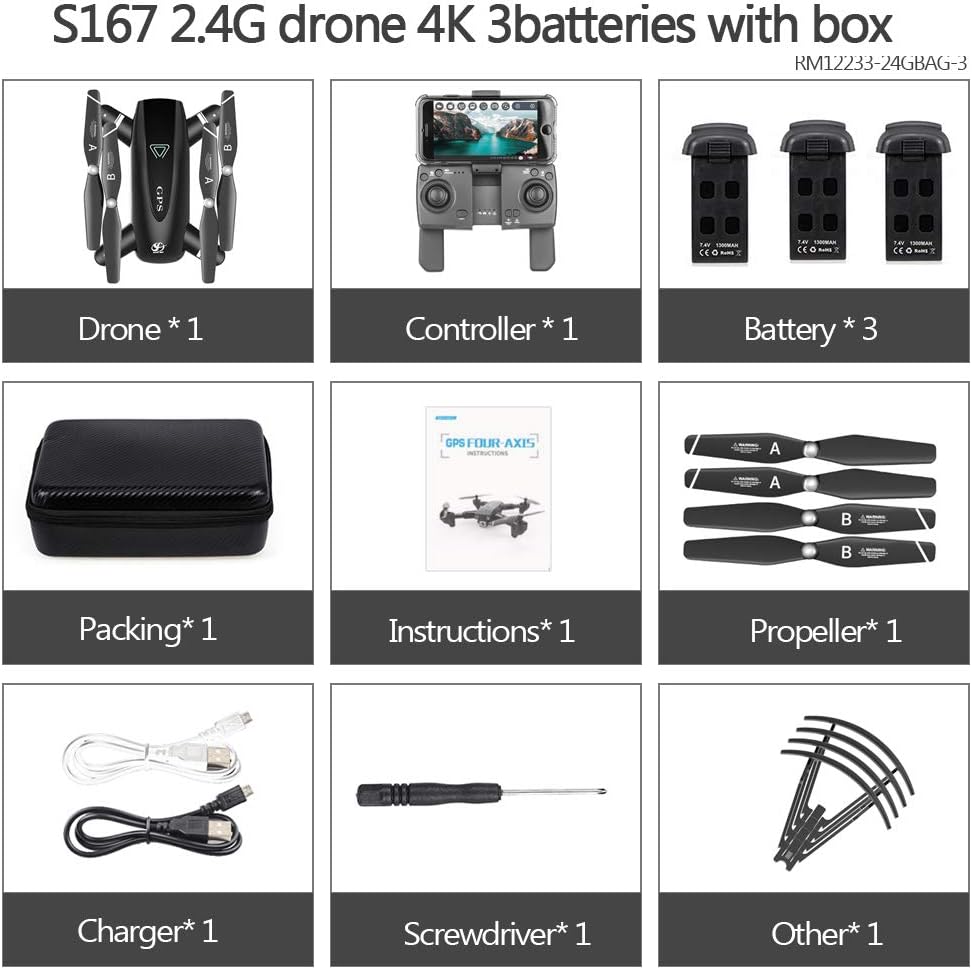
Image: All components included in the GoolRC CSJ S167 GPS Drone package.
Setup
1. Charging the Batteries
Before first use, fully charge all drone batteries and the remote control battery. Use the provided charger and connect it to a suitable power source. The charging indicator will show the charging status.
2. Installing Batteries
Insert the charged battery into the drone's battery compartment. Ensure it clicks securely into place. For the remote control, open the battery cover and insert the required batteries (refer to the remote control's specific instructions if different from drone batteries).
3. Propeller Installation (if required)
If propellers are not pre-installed, attach them according to the markings (A and B) on the propellers and motor arms. Ensure they are firmly secured to prevent detachment during flight.
4. Unfolding the Drone
The GoolRC CSJ S167 features a foldable design for portability. Gently unfold the drone arms until they lock into position. Ensure all arms are fully extended before flight.

Image: The GoolRC CSJ S167 GPS Drone ready for flight, alongside its remote control and batteries.
Operating the Drone
1. Power On and Pairing
Power on the drone first, then the remote control. Wait for the drone and remote to pair automatically. Indicators on both devices will confirm successful pairing.
2. GPS Positioning and Calibration
For optimal performance and safety features like Auto Return Home, ensure the drone acquires a strong GPS signal before takeoff. Perform compass calibration as instructed by the drone's app or manual to ensure accurate positioning.

Image: Visual representation of the drone's GPS capabilities, including various return-to-home functions and fixed hovering.
3. Takeoff and Landing
The drone supports one-key steady takeoff and landing via the remote control or the dedicated mobile application. Ensure a clear area for takeoff and landing.
Video: Demonstrates the GoolRC CSJ S167 GPS Drone in flight, showcasing its stable flight capabilities and various features like one-key takeoff, GPS tracking, and gesture control.
4. Flight Modes and Features
- 2.4G WiFi FPV: Experience First Person View directly on your mobile device via the dedicated app.
- Follow Me Mode: The drone intelligently follows your steps under GPS positioning, capturing your movements.
- Altitude Hold: Maintains a stable altitude for easier control and clearer aerial shots.
- Headless Mode: Simplifies control by eliminating the need to adjust the drone's orientation relative to the pilot.
- 360° Surround Photography: Utilize GPS Surround Mode to capture a full 360-degree view of your surroundings.

Image: The drone executing a surround flight, capturing a panoramic view.

Image: Explanation of Headless Mode, allowing flight without concern for the drone's front orientation.
5. Camera and Media
The drone is equipped with a 4K HD camera with a 120° wide-angle lens for high-quality aerial photography and video recording. It supports external SD cards for increased storage.
- Gesture Photo/Video: Easily capture images or start video recording using specific hand gestures.
- APP Control: View live video feed and control camera functions in real-time via the CSJ-GPS App on your mobile device.

Image: Detailed view of the drone's 4K/1080P 120° FOV Wi-Fi camera.

Image: Demonstrates the drone's gesture recognition feature for capturing photos.

Image: The mobile control interface for the drone, showing live feed and control options.
Maintenance
- Cleaning: Regularly clean the drone body, propellers, and camera lens with a soft, dry cloth. Avoid using harsh chemicals.
- Propeller Inspection: Before each flight, inspect propellers for any cracks, bends, or damage. Replace damaged propellers immediately using the provided spares.
- Battery Care: Store batteries in a cool, dry place. Do not overcharge or over-discharge. If storing for extended periods, charge them to about 50% capacity.
- Storage: When not in use, store the drone in its original handbag or a protective case to prevent damage from dust and impacts.
Troubleshooting
| Problem | Possible Cause | Solution |
|---|---|---|
| Drone does not power on | Low battery; Battery not properly inserted | Charge battery fully; Reinsert battery securely |
| Drone cannot pair with remote | Incorrect pairing sequence; Interference | Ensure drone is powered on first, then remote; Move to an open area away from interference |
| Unstable flight / Drifting | Improper calibration; Damaged propellers | Perform compass calibration; Check and replace damaged propellers |
| No FPV feed on app | Wi-Fi not connected; App not running correctly | Connect phone to drone's Wi-Fi network; Restart app and drone |
| GPS features not working | Weak GPS signal; No GPS lock | Fly in an open outdoor area with clear sky; Wait for GPS lock (indicated by app) |
Specifications
- Brand: GoolRC
- Model Name: CSJ S167
- Product Dimensions: 8.66"L x 8.66"W x 1.77"H
- Item Weight: 1.74 pounds
- Video Capture Format: 4K (as advertised in title/features, though some specs mention 1080p)
- Video Capture Resolution: 1080p (from specifications, likely for live feed or lower resolution recording)
- Camera: 4K HD with 120° Wide Angle Lens
- Connectivity Technology: Wi-Fi, USB
- Wireless Communication Technology: Wi-Fi
- Control Type: Remote Control, APP Control
- Battery Capacity: 1300 Milliamp Hours (per battery)
- Battery Type: Lithium Polymer
- Maximum Range: 500 Meters
- Media Type: SD, Micro SD (supports external SD card)
- Age Range (Description): Adult
Warranty and Support
For warranty information, technical support, or service inquiries, please refer to the official GoolRC website or contact their customer service directly. Keep your purchase receipt as proof of purchase for warranty claims.
You can also download the operation video and user manual from the CSJ-GPS App, which can assist you further.
Note: Product specifications and features are subject to change without prior notice.
Ask a question about this manual
Ask about setup, troubleshooting, compatibility, parts, safety, or missing instructions. Manuals+ will review the question and use this page’s manual context to help answer it.