
ANCEL VD700
ANCEL VD700 OBD2 Diagnostic Code Reader Scan Tool User Manual
Model: VD700 | Brand: ANCEL
1. Product Overview
The ANCEL VD700 is an advanced diagnostic scan tool designed primarily for Volkswagen Group vehicles (VW, Audi, Skoda, Seat). It offers comprehensive full-system diagnostics and professional maintenance functions, serving as an upgraded version of the ANCEL VD500. Beyond VAG vehicles, it also supports standard OBD2 functions for most vehicles manufactured after 1996.
Key features include:
- Full-System Diagnostics for VAG Vehicles (ABS, SAS, SRS, ESP, TPMS, Transmission, Engine, Immobilizer, Battery systems).
- Professional Maintenance Functions: Throttle position adaptation, brake pad reset, TPMS reset, steering angle learning, oil service reset, injector learning, and battery registration.
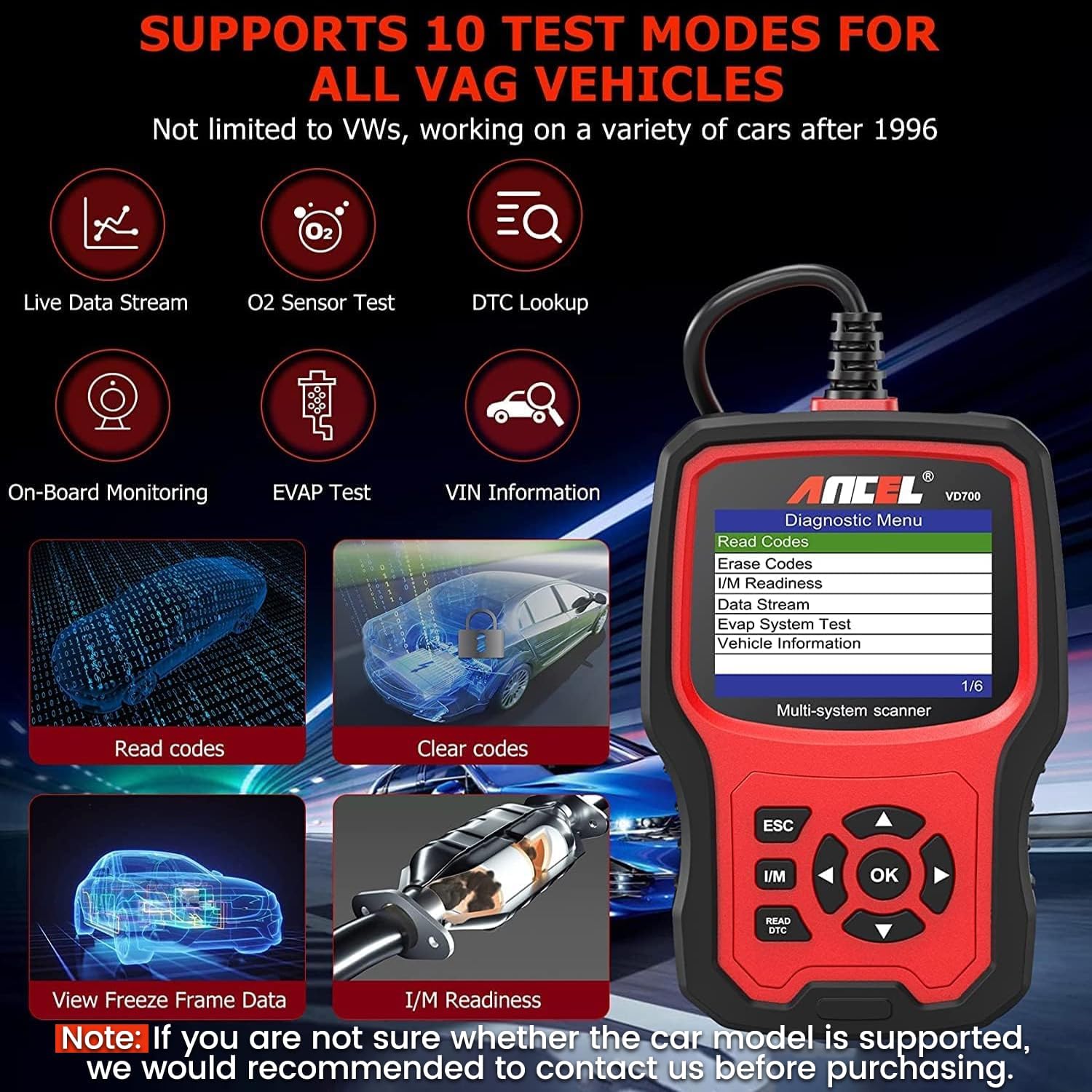
- OBD 6 Modes for Most Vehicles: Read/clear codes, display fault code definitions, turn off Check Engine Light (CEL), read data stream, test EVAP system, read I/M readiness, and retrieve VIN information.
- Real-time Battery Voltage Monitoring.
- Lifetime Free Software Updates.
- No Hidden Costs for features.

2. What's in the Box
- 1 x ANCEL VD700 OBD2 Scanner
- 1 x Dust-proof Bag
- 1 x USB Cable (for software updates)
- 1 x User Manual
3. Setup and Initial Use
3.1 Connecting to Vehicle
To begin diagnostics, simply plug the VD700 scanner into your vehicle's OBD2 port. The device is powered directly by the vehicle's OBD2 port, requiring no external batteries or charging. Ensure the vehicle's ignition is turned to the "ON" position (engine off) for proper communication.
3.2 Software Update
The ANCEL VD700 offers lifetime free software updates to ensure compatibility with the latest vehicle models and to fix any bugs. Updates are performed via a Windows PC (Windows 7/8/10/11 supported; Mac is not supported).
- Download the update software from the official ANCEL website.
- Unzip the downloaded file.
- Connect the VD700 to your computer using the supplied USB cable.
- Follow the on-screen instructions provided by the update software to complete the process.

4. Operating the Device
4.1 General OBD2 Functions (for most vehicles)
The VD700 supports standard OBD2 functions for 16-pin Non-VAG vehicles sold in the US after 1996. These functions include:
- Read Codes: Retrieves Diagnostic Trouble Codes (DTCs) from the vehicle's computer.
- Erase Codes: Clears DTCs from the vehicle's computer and turns off the Check Engine Light (CEL).
- I/M Readiness: Checks the readiness of the emission monitoring systems.
- Data Stream: Displays real-time data parameters from the vehicle's sensors.
- EVAP System Test: Initiates a test of the Evaporative Emission Control System.
- Vehicle Information: Retrieves Vehicle Identification Number (VIN) and other calibration information.
4.2 VAG-Specific Functions (for VW, Audi, Skoda, Seat)
The VD700 excels in diagnosing and performing special functions on Volkswagen Group vehicles. It supports full-system diagnostics and various maintenance resets.
- Full-System Diagnostics: Accesses all available control modules such as ABS, Transmission, SAS, SRS, ESP, TPMS, Engine, Immobilizer, and Battery systems to read and clear fault codes.
- Throttle Position Adaptation: Resets the throttle body position after cleaning or replacement.
- Brake Pad Reset (EPB): Retracts the electronic parking brake caliper for pad replacement and resets the EPB light.
- TPMS Reset: Resets the Tire Pressure Monitoring System after tire rotation or replacement.
- Steering Angle Learning: Calibrates the steering angle sensor.
- Oil Service Reset: Resets the oil service light after an oil change.
- Injector Learning: Codes new injector values into the ECU.
- Battery Registration: Registers a new battery with the vehicle's Battery Management System (BMS).


4.3 Battery Check
The VD700 can perform a real-time battery voltage check. This function helps you monitor the health of your vehicle's battery.

5. Maintenance and Care
To ensure the longevity and optimal performance of your ANCEL VD700, follow these maintenance guidelines:
- Keep the device clean and free from dust and moisture. Use a soft, dry cloth for cleaning.
- Store the device in its supplied dust-proof bag when not in use to protect it from physical damage and environmental elements.
- Avoid exposing the device to extreme temperatures or direct sunlight for prolonged periods.
- Handle the USB cable with care to prevent damage to the connectors.
- Regularly check for and install software updates as described in Section 3.2 to maintain compatibility and functionality.
6. Troubleshooting
If you encounter issues with your ANCEL VD700, refer to the following common troubleshooting tips:
6.1 Why can't I clear the fault codes?
Clearing fault codes requires specific conditions to be met:
- Requirement: The vehicle must be in ignition-on mode (engine off).
- Hard Faults: Ensure all underlying hard faults are repaired first. The scanner can only clear codes if the fault is no longer present.
- Permanent DTCs: Some Diagnostic Trouble Codes (DTCs) are permanent and cannot be cleared until the vehicle completes several drive cycles without the fault recurring.
For more detailed troubleshooting steps and specific error codes, please consult the comprehensive User Manual (PDF) provided with your product or available for download on the ANCEL website.
7. Product Specifications
| Specification | Detail |
|---|---|
| Brand | ANCEL |
| Model Number | VD700 |
| Item Weight | 1.06 pounds |
| Product Dimensions | 10.43 x 7.68 x 1.77 inches |
| Country of Origin | China |
| Voltage | 12 Volts |
| Display | 2.8 inch screen, 2 colors UI theme |
| Display Languages | 11 languages |
| Software Updates | Lifetime Free |
| Supported OS for Updates | Windows 7/8/10/11 (Mac not supported) |
8. Warranty and Support
The ANCEL VD700 comes with a commitment to customer satisfaction, including lifetime free software updates. This ensures your device remains up-to-date with the latest vehicle data and diagnostic capabilities.
For technical support, troubleshooting assistance, or to access the latest software updates and user manuals, please visit the official ANCEL website: www.anceltech.com. You can also utilize the special feedback function on the device to report issues or suggest new parameters.
Please note the legal disclaimer: The automobile logos and vehicle brand names mentioned are for compatibility description only and do not indicate that ANCEL sells products manufactured or sold by VW Group, Audi, Skoda, Seat, or any other vehicle brand.
Related documentsVD700


Ask a question about this manual
Ask about setup, troubleshooting, compatibility, parts, safety, or missing instructions. Manuals+ will review the question and use this page’s manual context to help answer it.