
Introduction
Thank you for choosing the NightSearcher NSSOLARSENTRY1100RC Solar Floodlight. This manual provides essential information for the safe and efficient operation, installation, and maintenance of your floodlight. Please read these instructions carefully before use and retain them for future reference.

Image: The NightSearcher NSSOLARSENTRY1100RC Solar Floodlight, a black rectangular unit with an LED panel, motion sensor, and a yellow indicator light. A black remote control with purple buttons is shown next to it.
Product Features
- Integrated solar panel for energy efficiency.
- Motion sensor for automatic light activation.
- Remote control for convenient operation and mode selection.
- Durable, waterproof design suitable for outdoor use.
- High luminous flux of 1100 lumens for bright illumination.
- Long-lasting LED bulb type.
Setup and Installation
1. Unpacking and Initial Charge
Carefully remove all components from the packaging. Before first use, ensure the solar panel is exposed to direct sunlight for at least 8-10 hours to fully charge the internal battery. This initial charge is crucial for optimal performance.
2. Choosing an Installation Location
Select a location that receives ample direct sunlight throughout the day to maximize charging efficiency. Avoid areas shaded by trees, buildings, or other obstructions. The floodlight is designed for outdoor use and is waterproof.

Image: A top-down view of the NightSearcher solar floodlight, highlighting the integrated solar panel on its upper surface, essential for charging.
3. Mounting the Floodlight
The floodlight can be mounted on a wall, pole, or other suitable outdoor structure. Use the provided mounting hardware (e.g., straps or screws, if included) to secure the unit firmly. Ensure the motion sensor and LED panel face the desired detection and illumination area.
- Wall Mounting: Mark drill points, drill holes, insert wall plugs, and secure the floodlight with screws.
- Pole Mounting: Utilize the metal straps provided to fasten the floodlight securely around a pole.

Image: The rear view of the NightSearcher solar floodlight, showing the mounting brackets and metal straps used for securing the unit to a pole or similar structure.

Image: The NightSearcher solar floodlight is shown mounted horizontally on a metal pole, demonstrating a typical installation scenario.
Operating Instructions
1. Remote Control Functions
The floodlight is operated using the included remote control. Ensure the remote has working batteries (if applicable) and is pointed towards the floodlight during operation.

Image: A close-up of the black remote control for the floodlight, featuring purple buttons for ON, OFF, and five distinct operating modes (MODE1 to MODE5).
- ON/OFF: Press the ON button to activate the light or OFF to deactivate it.
- MODE1 - MODE5: These buttons select different operating modes, typically combining motion sensing with varying brightness levels or durations. Refer to the specific mode descriptions below for details.
2. Operating Modes (Example)
While specific mode functionalities may vary, common settings for solar motion sensor floodlights include:
- Mode 1: Motion sensor activated. Light turns on at full brightness when motion is detected and turns off after a set period (e.g., 15-30 seconds) when no motion is detected.
- Mode 2: Dim light + Motion sensor activated. Light stays on at a low brightness from dusk till dawn, then switches to full brightness when motion is detected, returning to dim after motion ceases.
- Mode 3: Constant light. Light stays on at a medium brightness from dusk till dawn, without motion sensor activation.
- Mode 4 & 5: May offer variations of the above, such as different brightness levels, longer illumination times, or specific timing functions. Experiment with these modes to find the best setting for your needs.

Image: The NightSearcher solar floodlight casting a bright, wide beam of light onto a wooden bench and surrounding area at night, demonstrating its illumination capability.
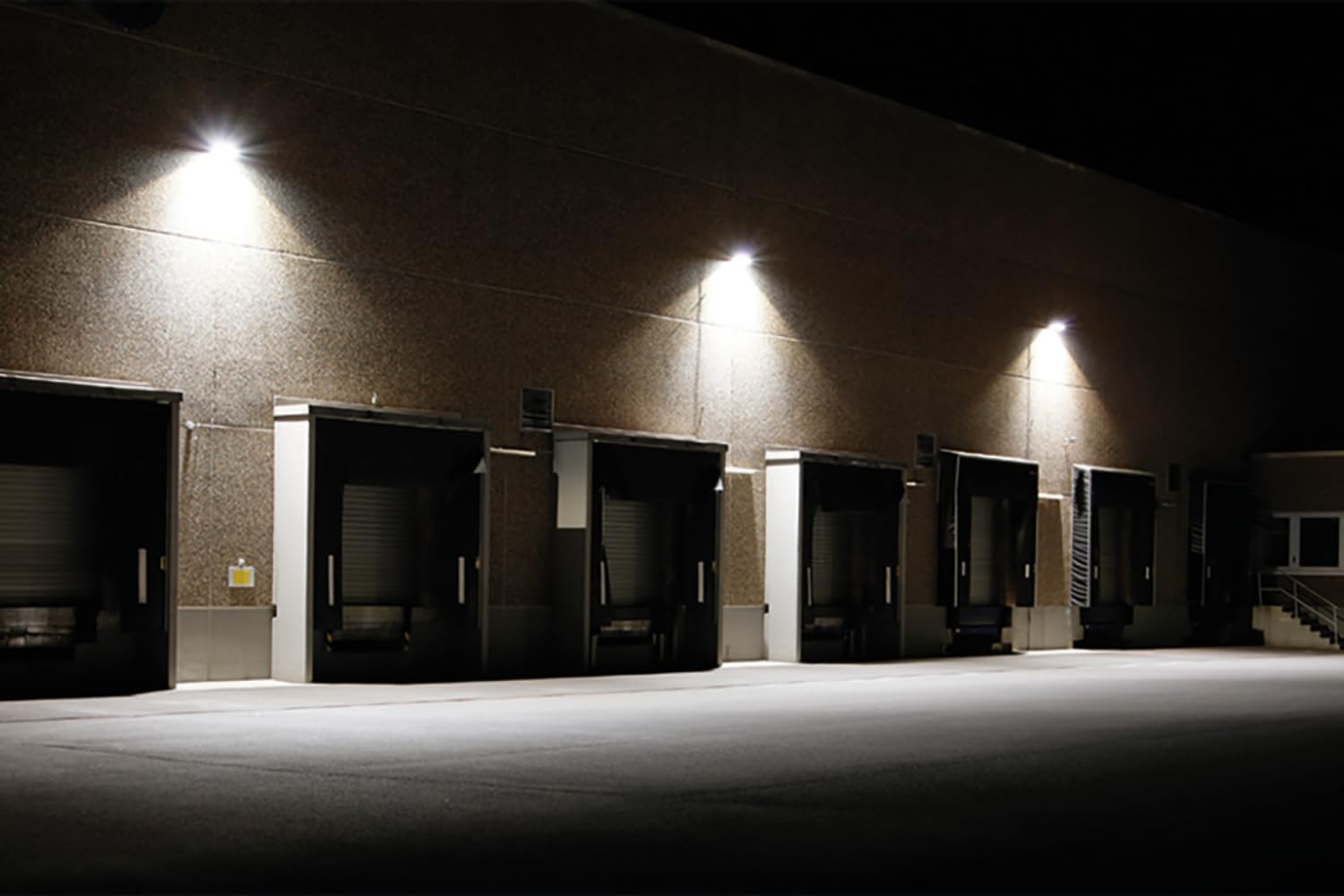
Image: Several NightSearcher floodlights are installed along the exterior of a building, effectively illuminating a loading dock area at night, showcasing their use in commercial or industrial settings.
Maintenance
1. Cleaning
To ensure optimal charging and light output, regularly clean the solar panel and the LED light surface. Use a soft, damp cloth to wipe away dust, dirt, and debris. Avoid abrasive cleaners or harsh chemicals that could damage the surfaces.
2. Battery Care
The floodlight contains a built-in Lithium Ion battery. For best performance, ensure the unit receives adequate sunlight daily. If the light is stored for an extended period, fully charge it before storage and recharge every few months to maintain battery health.
3. Recycling and Disposal
This product contains a Lithium Ion battery and electronic components. Do not dispose of it with general household waste. Please follow local regulations for the recycling of electronic waste and batteries. For information on recycling light bulbs, consult local guidelines or visit relevant recycling resources.
In case of light bulb breakage or damage, handle with care. Collect all broken pieces using appropriate safety measures and dispose of them according to local hazardous waste guidelines.
Troubleshooting
- Light does not turn on at night:
- Ensure the floodlight is switched ON via the remote control.
- Verify the solar panel is receiving sufficient direct sunlight during the day. Relocate if necessary.
- Check if the battery has had enough time to charge (allow 8-10 hours of direct sunlight).
- Ensure the motion sensor is not obstructed and is set to an appropriate mode.
- Light stays dim or only works for a short period:
- The battery may not be fully charged. Ensure adequate sunlight exposure.
- Clean the solar panel to remove any dirt or debris that might be hindering charging.
- Extreme cold weather can affect battery performance.
- Motion sensor is not detecting movement:
- Ensure the sensor is not obstructed.
- Verify the floodlight is set to a motion-sensing mode (e.g., Mode 1 or 2).
- Adjust the angle of the floodlight to optimize sensor coverage.
- Remote control is not working:
- Check and replace the remote control batteries if necessary.
- Ensure there are no obstructions between the remote and the floodlight.
- Point the remote directly at the floodlight's sensor.
Specifications
| Brand | NightSearcher |
| Model Number | NSSOLARSENTRY1100RC |
| Product Dimensions | 21 x 10.8 x 14 cm |
| Item Weight | 800 g |
| Colour | Black |
| Batteries | 1 Lithium Ion battery (included) |
| Type of Bulb | LED |
| Luminous Flux | 1100 Lumen |
| Special Features | Motion Sensor, Waterproof |
| EU Energy Efficiency Label | A+ |
Warranty and Support
For warranty information, please refer to the documentation provided at the time of purchase or contact your retailer. NightSearcher products are designed for reliability and performance.
If you encounter any issues not covered in this manual, or require further assistance, please contact NightSearcher customer support or your product supplier. Contact details can typically be found on the manufacturer's official website or your purchase receipt.


