
1. Important Safety Instructions
Please read all instructions carefully before using the BLACK+DECKER FX2200 Steam Iron. Keep this manual for future reference.
- Always ensure the iron is connected to a grounded electrical outlet of the correct voltage (220V for this model).
- Do not leave the iron unattended while it is switched on or connected to the power supply.
- Keep the iron and its cord out of reach of children and pets when it is switched on or cooling down.
- Never immerse the iron, power cord, or plug in water or other liquids.
- Do not operate the iron with a damaged cord or plug, or if the iron has been dropped or damaged. Contact authorized service personnel for repair.
- Use the iron only for its intended purpose: ironing clothes.
- Always unplug the iron before filling or emptying the water tank, and when not in use.
- Exercise caution when handling hot surfaces and steam.
2. Product Overview
The BLACK+DECKER FX2200 is a versatile steam iron designed for efficient garment care. Familiarize yourself with its components and features.
2.1 Components
- Soleplate: Non-stick surface for smooth gliding.
- Water Tank: For steam generation.
- Spray Nozzle: Releases a fine mist to dampen fabrics.
- Steam Control Dial: Adjusts steam output.
- Temperature Control Dial: Selects appropriate heat for different fabrics.
- Power Indicator Light: Illuminates when the iron is heating.
- Self-Cleaning Button: Activates the self-cleaning function.
- Power Cord: Connects the iron to the electrical outlet.
2.2 Key Features
- Non-Stick Soleplate: Ensures smooth gliding over various fabrics without sticking.
- Front Spray Function: Helps to moisten and remove stubborn wrinkles.
- Button-Saver Technology: Designed to prevent damage to buttons during ironing.
- Self-Cleaning System: Maintains the iron's performance by removing mineral deposits.
- Vertical Steam: Allows for steaming garments directly on the hanger.
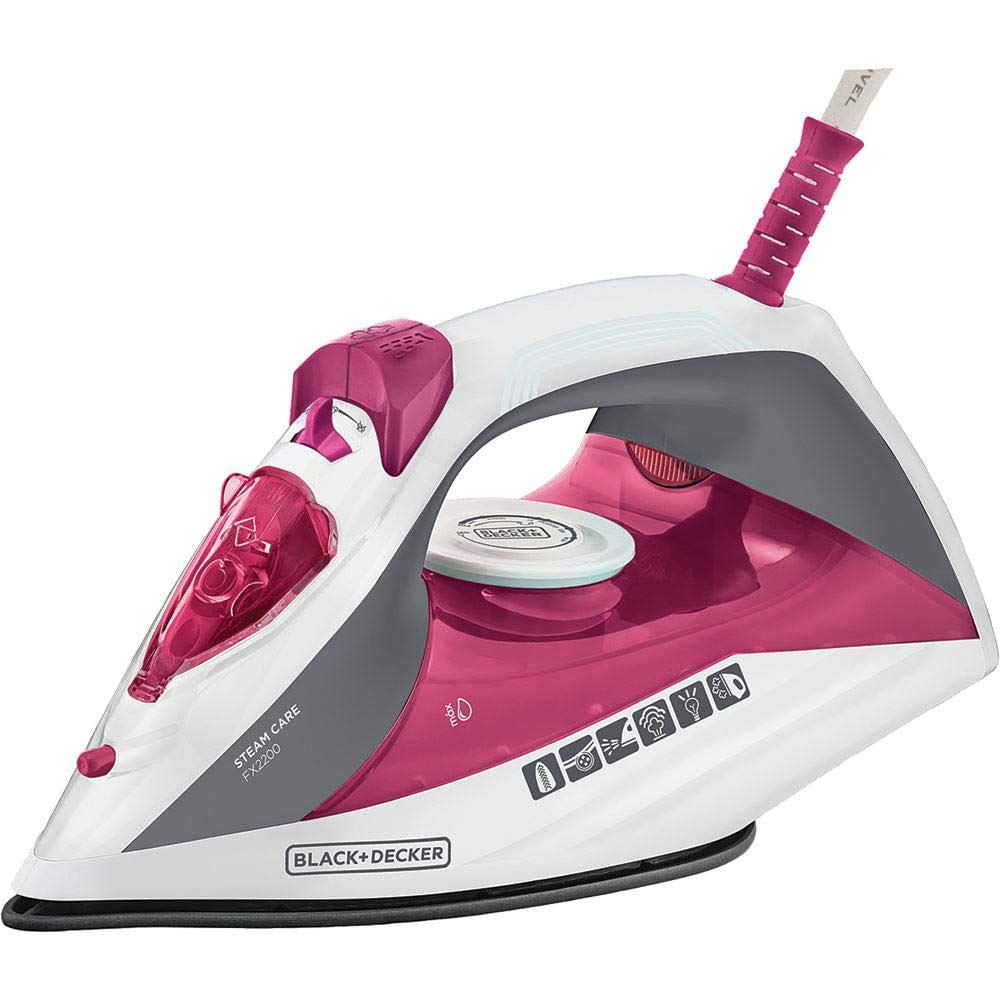
The BLACK+DECKER FX2200 Steam Iron, showcasing its modern design and color scheme.

Close-up view of the non-stick soleplate of the BLACK+DECKER FX2200 iron, designed for effortless gliding.
This video demonstrates the key features of the BLACK+DECKER FX2200 Steam Iron, including its front spray, non-stick soleplate, and vertical steam function.
3. Setup and First Use
3.1 Before First Use
- Remove any labels or protective film from the soleplate.
- It is recommended to iron an old piece of fabric first to ensure no residue is transferred to your garments.
3.2 Filling the Water Tank
- Ensure the iron is unplugged from the power outlet.
- Set the steam control to the 'Dry Ironing' or 'No Steam' position.
- Open the water tank filler cap.
- Fill the water tank with clean tap water up to the 'MAX' fill line. Do not overfill.
- Close the filler cap securely.
3.3 Connecting to Power
- Plug the iron's power cord into a suitable 220V grounded electrical outlet.
- The power indicator light will illuminate, indicating the iron is heating up.
4. Operating Instructions
Follow these steps for effective ironing with your BLACK+DECKER FX2200 Steam Iron.
4.1 Temperature Settings
- Sort clothes according to fabric type (e.g., linen, cotton, wool, silk, synthetics).
- Consult the fabric care label on your garment for recommended ironing temperature.
- Turn the temperature control dial to the desired setting. The power indicator light will turn off when the set temperature is reached.
- Always start with lower temperatures for delicate fabrics and gradually increase for heavier materials.
4.2 Dry Ironing
- Ensure the water tank is empty or the steam control is set to 'Dry Ironing'.
- Select the appropriate temperature for your fabric.
- Once the iron reaches the desired temperature, begin ironing.
4.3 Steam Ironing
- Fill the water tank as described in Section 3.2.
- Set the temperature control dial to a steam-suitable setting (usually indicated on the dial, typically for cotton or linen). Steam will not be generated at low temperatures.
- Once the iron reaches the set temperature, adjust the steam control dial to the desired steam output.
- Begin ironing, moving the iron smoothly over the fabric.
4.4 Using the Spray Function
- Press the spray button to release a fine mist onto the fabric. This is useful for dampening stubborn wrinkles before ironing.
4.5 Vertical Steam
- Ensure the water tank is filled and the iron is heated to a high temperature setting.
- Hold the iron vertically, a few centimeters away from the garment (e.g., hanging curtains or clothes on a hanger).
- Press the steam button repeatedly to release bursts of steam, helping to remove creases.

The BLACK+DECKER FX2200 Steam Iron positioned next to a stack of ironed shirts, demonstrating its effectiveness.

The BLACK+DECKER FX2200 Steam Iron resting on an ironing board, ready for use.
5. Care and Maintenance
Proper care ensures the longevity and optimal performance of your iron.
5.1 Cleaning the Soleplate
- Always ensure the iron is unplugged and completely cool before cleaning.
- Wipe the soleplate with a damp cloth and a non-abrasive cleaner if necessary.
- Do not use abrasive scouring pads or metal objects, as these can scratch the non-stick coating.
5.2 Self-Cleaning Function
- Fill the water tank to the 'MAX' line.
- Plug in the iron and set the temperature to maximum.
- Once the iron reaches maximum temperature, unplug it.
- Hold the iron horizontally over a sink and press the self-cleaning button. Hot water and steam will flush out mineral deposits.
- Release the button when the water tank is empty.
- Repeat if necessary.
5.3 Storage
- Ensure the iron is unplugged and completely cool.
- Empty any remaining water from the tank.
- Store the iron upright in a safe, dry place.
6. Troubleshooting
Refer to this section for solutions to common issues.
| Problem | Possible Cause | Solution |
|---|---|---|
| Iron does not heat up. | Not plugged in; power outlet fault; temperature dial set to 'OFF' or too low. | Check power connection; test outlet with another appliance; adjust temperature dial. |
| No steam or insufficient steam. | Water tank empty; temperature too low for steam; steam control set to 'Dry Ironing'; mineral deposits. | Fill water tank; increase temperature setting; adjust steam control; perform self-cleaning. |
| Water leakage from soleplate. | Temperature too low for steam; water tank overfilled; iron left horizontal when hot. | Increase temperature; do not overfill; store iron upright when hot. |
| Soleplate is dirty or sticky. | Residue from fabrics; starch buildup. | Clean soleplate as per Section 5.1. |
7. Technical Specifications
Detailed specifications for the BLACK+DECKER FX2200 Steam Iron.
| Specification | Detail |
|---|---|
| Brand | Black+Decker |
| Model Number | FX2200 |
| Voltage | 220 Volts |
| Frequency | 50 Hz |
| Product Dimensions (L x W) | 26.5 cm x 14.5 cm |
| Product Weight | 950 Grams |
| Soleplate Material | Heat-resistant Plastic or Ceramic (Non-stick) |
| Included Components | 1 Steam Iron, 1 User Manual |
| Manufacturer | STANLEY BLACK & DECKER |
8. Warranty and Support
8.1 Warranty Information
This BLACK+DECKER FX2200 Steam Iron comes with a 1-year manufacturer's warranty from the date of purchase. Please retain your proof of purchase for warranty claims. The warranty covers manufacturing defects under normal use conditions.
8.2 Customer Support
For technical assistance, spare parts, or warranty inquiries, please contact BLACK+DECKER customer support or visit the official brand store:


