
Introduction
This manual provides comprehensive instructions for the Zerone RM-YD038 Universal Remote Control. This remote is designed as a replacement for various models, including RM-YD033, RM-ED040, RM-YD034, and RM-YD035, and is compatible with specific TV models such as KDL32EX500, KDL55HX729, and KDL40EX723. Please read this manual carefully to ensure proper setup and operation of your new remote control.
1. Setup
1.1 Battery Installation
The Zerone RM-YD038 remote control requires two (2) AAA batteries (sold separately) for operation. Follow these steps to install the batteries:
- Locate the battery compartment on the back of the remote control.
- Press down on the tab and slide the battery cover downwards to open it.
- Insert two AAA batteries, ensuring the positive (+) and negative (-) terminals align correctly with the markings inside the compartment.
- Slide the battery cover back into place until it clicks securely.

Figure 1: Battery compartment with cover removed, ready for AAA battery insertion.
1.2 Initial Use
No programming or setup is required for this universal remote control. Once the batteries are correctly installed, the remote is ready for immediate use with compatible devices.
2. Operating Instructions
The Zerone RM-YD038 remote control features a standard layout for easy navigation and control of your television. Below is an overview of key functions:
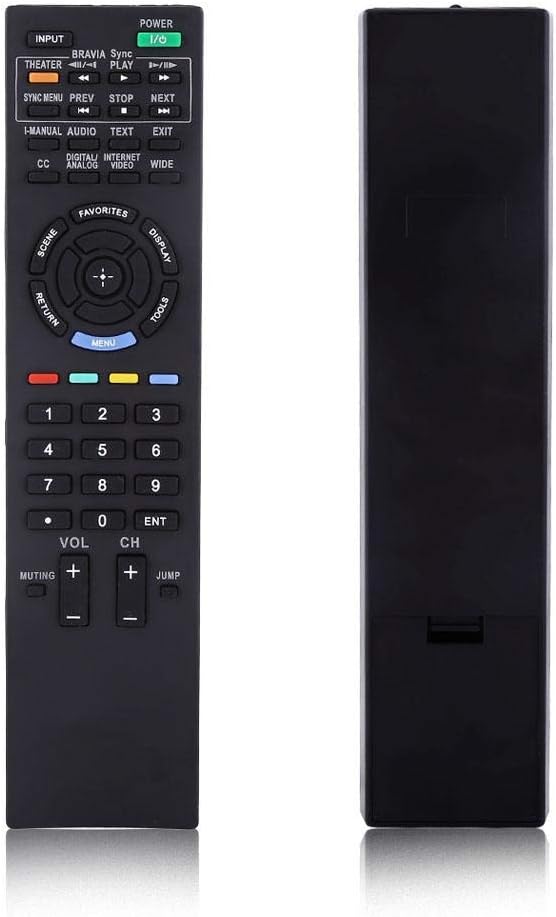
Figure 2: Front view of the Zerone RM-YD038 Remote Control.
- Power Button (Green, top right): Turns the television on or off.
- Input Button (Top left): Cycles through available input sources (HDMI, AV, etc.).
- Navigation Key (Circular pad in the middle): Used for menu navigation. The central button typically acts as "Enter" or "OK". This dedicated menu navigation key allows direct access to digital TV functions.
- Volume Up/Down (VOL +/-): Adjusts the audio volume.
- Channel Up/Down (CH +/-): Changes television channels.
- Muting Button (Muting): Mutes or unmutes the television audio.
- Number Pad (0-9): Directly enters channel numbers.
- Menu Button (Blue, below navigation pad): Accesses the television's main menu.
- Return Button (Left of navigation pad): Returns to the previous screen or menu.
- Playback Controls (Play, Stop, Pause, Rewind, Fast Forward): Controls media playback if your TV supports it.

Figure 3: The remote control held in hand, showing button layout.

Figure 4: Detailed view of the remote's buttons.
3. Maintenance
3.1 Cleaning
To maintain the remote control's functionality and appearance, clean it regularly:
- Use a soft, dry cloth to wipe the surface of the remote.
- For stubborn dirt, slightly dampen the cloth with water or a mild, non-abrasive cleaner. Avoid excessive moisture.
- Do not use harsh chemicals, solvents, or abrasive cleaning pads, as these can damage the remote's finish or internal components.
3.2 Battery Replacement
Replace batteries when the remote's response becomes sluggish or it stops functioning. Refer to Section 1.1 for battery installation instructions. Always replace both batteries at the same time with new AAA batteries.
3.3 Storage
When not in use for extended periods, it is recommended to remove the batteries to prevent leakage and potential damage to the remote control.
4. Troubleshooting
If you experience issues with your Zerone RM-YD038 remote control, please refer to the following common troubleshooting steps:
- Remote Not Responding:
- Ensure batteries are correctly installed with proper polarity (+/-).
- Replace old batteries with new ones. Weak batteries are a common cause of unresponsiveness.
- Check for any obstructions between the remote and the TV's infrared receiver.
- Ensure you are within the effective range and pointing the remote directly at the TV.
- Buttons Require Excessive Pressure:
- This can sometimes occur with new remotes or after extended use. Ensure you are pressing the buttons firmly and directly.
- If the issue persists, ensure the remote is clean and free of debris around the buttons.
- Limited Range or Poor Signal:
- Replace batteries, as low battery power can reduce signal strength.
- Ensure there are no strong light sources (like direct sunlight or certain types of lighting) interfering with the IR signal.
- Remote Makes Unusual Sounds:
- If the remote produces unusual sounds, particularly after a fall, it may indicate internal damage. Consider replacing the unit.
If these steps do not resolve the issue, please contact customer support for further assistance.
5. Specifications
| Feature | Detail |
|---|---|
| Brand | Zerone |
| Model Number | RM-YD038 (Internal Model: Zer oneuhiskbndp2) |
| Compatible Remote Models | RM-YD033, RM-ED040, RM-YD034, RM-YD035 |
| Compatible TV Models | KDL32EX500, KDL55HX729, KDL40EX723 |
| Power Source | 2 x AAA Batteries (not included) |
| Item Weight | 2.39 ounces (approximately 67.7 grams) |
| Special Feature | Universal Replacement |
| Max Number of Supported Devices | 1 (Television) |
| ASIN | B07WCN3S2V |
| Date First Available | August 12, 2019 |

Figure 5: Dimensions of the Zerone RM-YD038 Remote Control.
6. Warranty and Support
6.1 Warranty Information
Specific warranty details for the Zerone RM-YD038 remote control are not provided in this manual. Please refer to the product packaging or the retailer's website for any applicable warranty terms and conditions.
6.2 Customer Support
For further assistance, technical support, or inquiries regarding your Zerone RM-YD038 remote control, please contact the retailer or manufacturer directly. Contact information can typically be found on the product packaging or the official Zerone website.