
Introduction
This manual provides essential information for setting up, operating, maintaining, and troubleshooting your VAIO SX12 laptop. Please read this manual thoroughly to ensure proper use and to maximize the performance and longevity of your device.

Figure 1: Front view of the VAIO SX12 laptop with the screen open.
Setup
1. Unpacking and Initial Inspection
Carefully remove all components from the packaging. Verify that all items listed in the 'What's in the Box' section are present and undamaged. If any items are missing or damaged, contact customer support.
- VAIO SX12 Laptop
- AC Adapter
- Cleaning Cloth
2. Connecting the AC Adapter
Connect the AC adapter to the power input port on the laptop and then plug the adapter into a wall outlet. The battery will begin charging automatically.
3. Initial Power On
Press the power button located on the top right of the keyboard. The laptop will boot up and guide you through the initial Windows 10 Pro setup process.
Operating
1. Keyboard and Touchpad
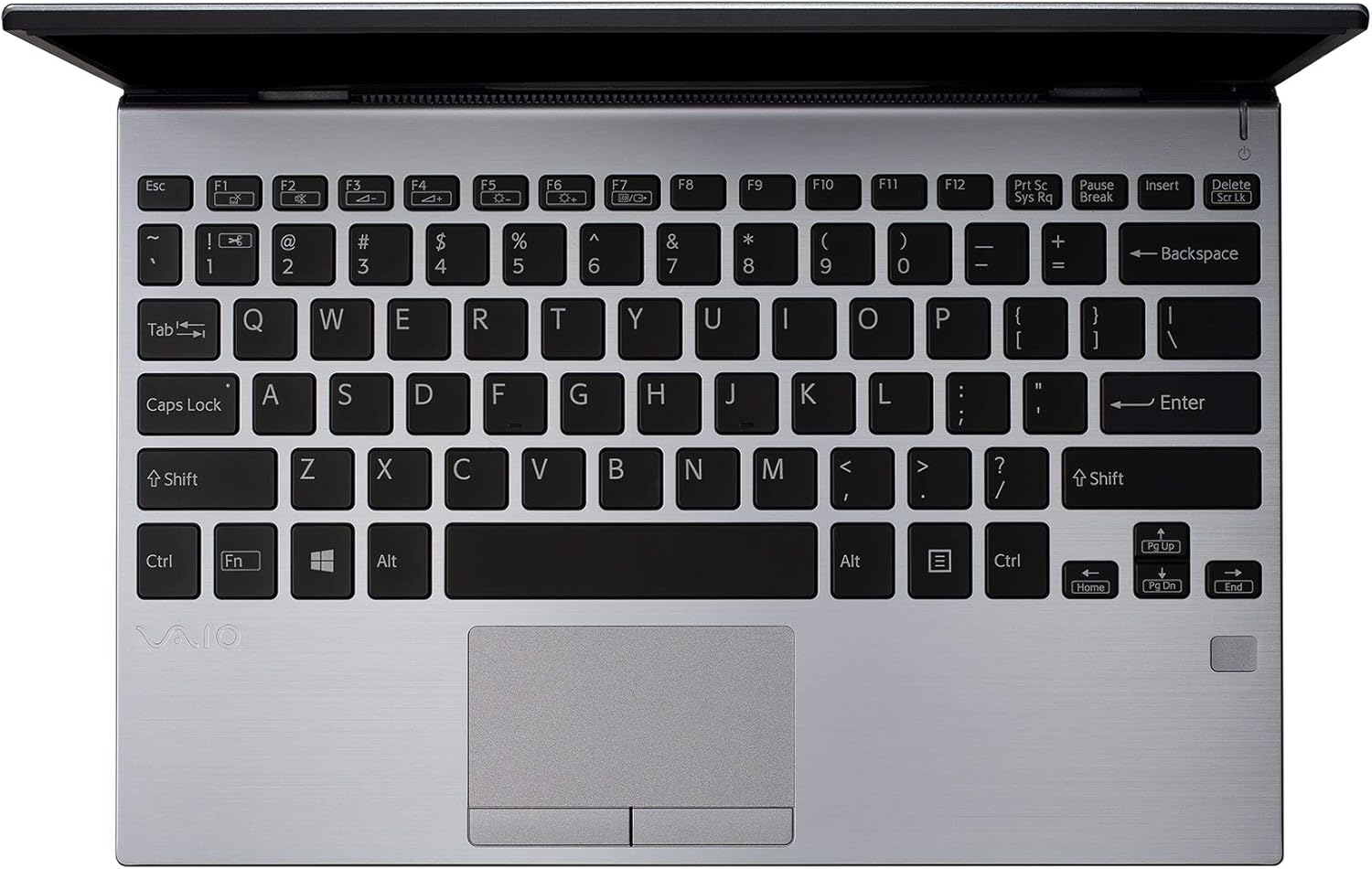
Figure 2: Top-down view of the VAIO SX12 keyboard and touchpad.
The VAIO SX12 features a full-sized keyboard and a precision touchpad. Familiarize yourself with the function keys (F1-F12) which control various system settings such as screen brightness, volume, and wireless connectivity.
- Function Keys: Use the 'Fn' key in combination with F1-F12 for secondary functions.
- Touchpad: Supports multi-touch gestures for scrolling, zooming, and navigating.
2. Connecting Peripherals
The VAIO SX12 offers a variety of ports for connecting external devices.

Figure 3: Left side view of the VAIO SX12, showing the power input, USB ports, HDMI, Ethernet, and VGA ports.

Figure 4: Right side view of the VAIO SX12, showing the SD card slot, USB ports, and audio jack.
- USB Ports: Connect USB devices such as external drives, keyboards, or mice.
- HDMI Port: Connect to an external display or projector.
- VGA Port: Connect to older external displays or projectors.
- Ethernet Port: Connect to a wired network.
- SD Card Slot: Insert an SD card for data transfer.
- Audio Jack: Connect headphones or external speakers.
Maintenance
1. Cleaning the Laptop
- Use the provided cleaning cloth or a soft, lint-free cloth to wipe the screen and exterior surfaces.
- Do not use harsh chemicals, abrasive cleaners, or solvents.
- Ensure the laptop is powered off and unplugged before cleaning.
2. Battery Care
- To prolong battery life, avoid fully discharging the battery frequently.
- Store the laptop in a cool, dry place if not used for extended periods.
- The battery is internal and not user-replaceable. Contact authorized service for battery replacement.
3. Software Updates
Regularly check for and install operating system and driver updates to ensure optimal performance and security.
Troubleshooting
1. Laptop Does Not Power On
- Ensure the AC adapter is securely connected to both the laptop and a working power outlet.
- Verify the power outlet is functional by plugging in another device.
- If the battery is completely drained, allow it to charge for at least 30 minutes before attempting to power on.
2. Display Issues
- If the screen is blank, try adjusting the brightness using the function keys.
- If an external monitor is connected, ensure the display output is correctly configured (e.g., duplicate, extend).
- Restart the laptop.
3. Peripheral Not Recognized
- Ensure the peripheral is properly connected to the correct port.
- Try connecting the peripheral to a different port or another computer to rule out device malfunction.
- Check the device manager in Windows for driver issues.
Specifications
| Feature | Specification |
|---|---|
| Model Name | VAIO SX12 |
| Item Model Number | VJS121C11L |
| Processor | Intel Core i5-8265U (3.9 GHz max) |
| RAM | 8 GB LPDDR3 |
| Hard Drive | 512 GB PCIe SSD |
| Operating System | Windows 10 Pro |
| Screen Size | 12.5 Inches |
| Screen Resolution | 1920 x 1080 pixels (Full HD) |
| Graphics Card | Integrated Intel Graphics |
| Wireless Connectivity | 802.11a/b/g/n/ac, Bluetooth |
| USB 3.0 Ports | 4 |
| Item Weight | 1.97 pounds |
| Product Dimensions | 11.3 x 8 x 0.62 inches |
| Color | Silver |
| Batteries | 1 Lithium Ion battery (included) |
Warranty and Support
For warranty information and technical support, please refer to the documentation included with your product or visit the official VAIO support website. Keep your purchase receipt as proof of purchase for warranty claims.