1. Introduction
This manual provides instructions for the AULCMEET RC-SA01 replacement remote control, designed for use with various Seiki Smart TV models. This remote control requires no programming and is ready for use after battery installation.
2. Setup: Battery Installation
Follow these steps to install batteries into your remote control:
- Open the Battery Cover: Locate the battery compartment on the back of the remote control and slide the cover downwards or press the latch to open it.
- Install Batteries: Insert two new AAA alkaline batteries (not included), ensuring the positive (+) and negative (-) terminals align correctly with the markings inside the compartment.
- Close the Battery Cover: Slide the battery cover back into place until it clicks securely.

3. Operating Instructions
After installing the batteries, the remote control is ready for immediate use. Point the remote control directly towards the infrared (IR) sensor on your Seiki Smart TV. Ensure there are no obstructions between the remote and the TV sensor.
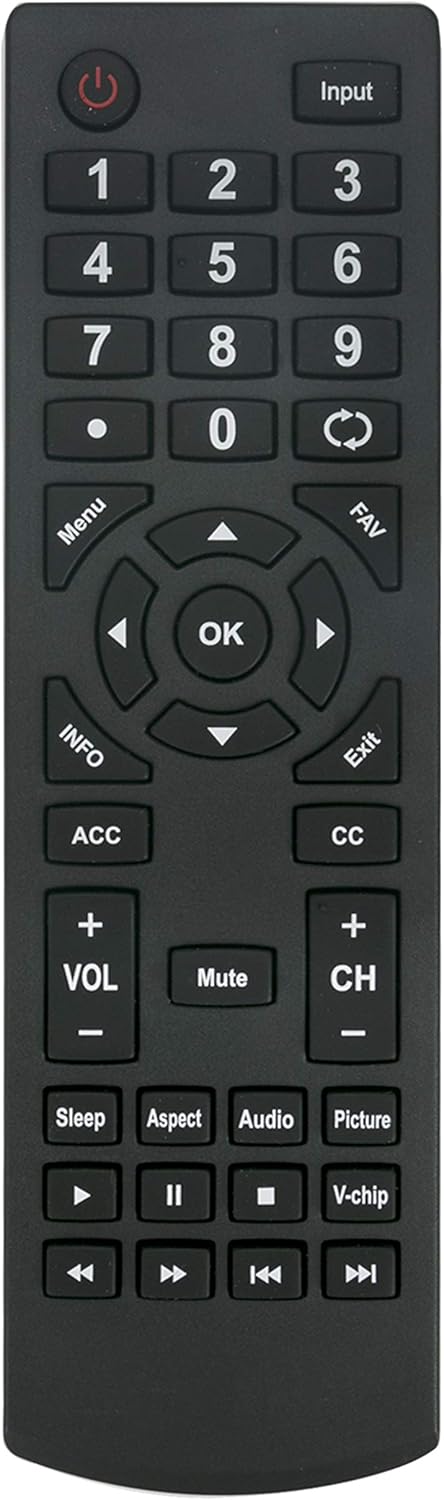
Key Functions:
- Power (⏻): Turns the TV on or off.
- Input: Selects video input sources (HDMI, AV, etc.).
- Number Pad (0-9): Direct channel selection.
- Menu: Accesses the TV's main menu.
- Navigation (Up, Down, Left, Right, OK): Navigates through menus and confirms selections.
- VOL (+/-): Adjusts volume level.
- CH (+/-): Changes TV channels.
- Mute: Mutes or unmutes the TV audio.
- Exit: Exits current menu or on-screen display.
- Media Controls (Play, Pause, Stop, Rewind, Fast Forward): Controls playback of media content.
- Aspect: Adjusts screen aspect ratio.
- Audio: Selects audio tracks or modes.
- Picture: Adjusts picture settings.
- Sleep: Sets a sleep timer for the TV.
- V-chip: Accesses parental control settings.
4. Compatible Seiki Smart TV Models
This AULCMEET RC-SA01 replacement remote control is compatible with the following Seiki Smart TV models:
- SC-32HS703N
- SC-32HS880N
- SC-32HS950N
- SC32HS703N
- SC32HS880N
- SC32HS950N
- SC40-FS703N
- SC40FS703N
- SC-32HK860N
- SC-32HS970N
- SC-39HS950N
- SC-40FS703N
No programming is required for these models; simply insert batteries and begin use.
5. Specifications
| Feature | Detail |
|---|---|
| Brand | AULCMEET |
| Model | RC-SA01 (Replacement) |
| Compatible Devices | Seiki Smart Televisions |
| Power Source | 2 x AAA Batteries (not included) |
| Connectivity Technology | Infrared (IR) |
| Color | Black |
| Product Dimensions | 7.2 x 1.8 x 0.65 inches |
| Item Weight | 1.58 ounces |
6. Troubleshooting
- Remote Not Responding:
- Ensure batteries are installed correctly with proper polarity.
- Replace old batteries with new AAA alkaline batteries.
- Check for any obstructions between the remote control and the TV's IR sensor.
- Verify that the remote is pointed directly at the TV's IR sensor.
- Confirm your TV model is listed in the compatible models section.
- Specific Buttons Not Working:
- This remote is a direct replacement and should not require programming. If specific buttons do not function, double-check compatibility with your exact TV model.
- Ensure the remote is clean and free from debris that might obstruct button presses.
7. Maintenance
To ensure the longevity and proper functioning of your remote control:
- Keep the remote control dry and away from moisture.
- Avoid dropping the remote or subjecting it to strong impacts.
- Clean the remote with a soft, dry cloth. Do not use liquid cleaners or abrasive materials.
- Remove batteries if the remote control will not be used for an extended period to prevent battery leakage.
8. Support
If you encounter any issues not covered in this manual or require further assistance, please contact the product seller or manufacturer for support. Refer to your purchase documentation for contact information.


